> ## Documentation Index
> Fetch the complete documentation index at: https://docs.fintoc.com/llms.txt
> Use this file to discover all available pages before exploring further.
# Accept a payment
> Accept one-time payments in CLP or MXN through a Fintoc-hosted checkout page
Build a payment flow that collects one-time payments in CLP or MXN through a Fintoc-hosted checkout page.
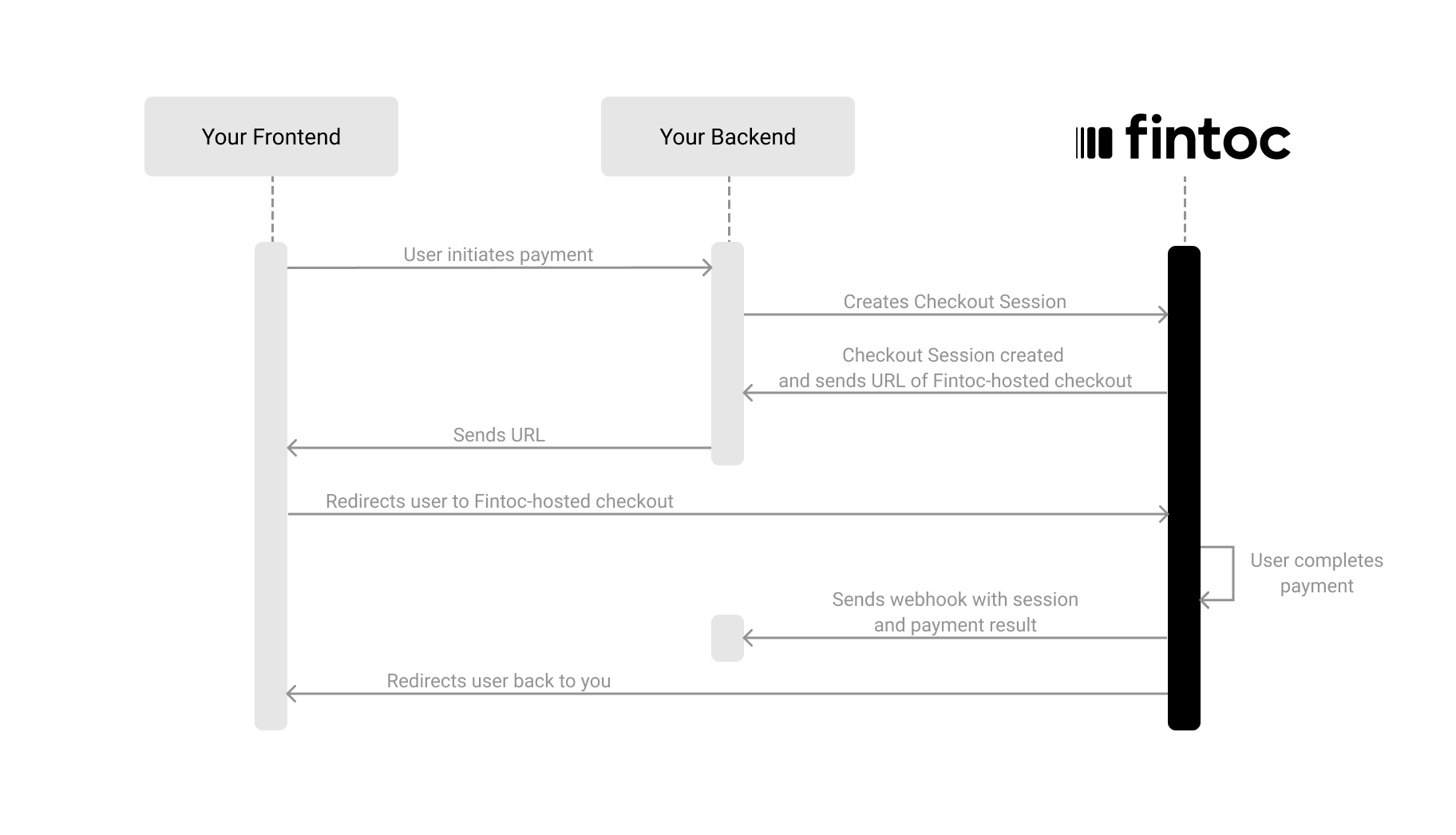
To accept payments with Fintoc, you complete three steps:
1. On your backend, create a `Checkout Session` using your [Secret Key](/docs/home/api-keys)
2. Redirect your customer to complete the payment on the Fintoc-hosted checkout page
3. Handle post-payment events
The following diagram shows how Fintoc interacts with both your backend and your frontend:
 ## Optional: install the backend SDK
If you’re using Python, you can install our [Python SDK](https://github.com/fintoc-com/fintoc-python) to make it easier to interact with our API. The SDK automatically handles pagination, lets you easily verify Fintoc's webhooks, and offers many other helpful features.
```
pip install fintoc
```
If you’re using Node, you can install our [Node SDK](https://github.com/fintoc-com/fintoc-node) to make it easier to interact with our API. The SDK automatically handles pagination, lets you easily verify Fintoc's webhooks, and offers many other helpful features.
```
npm install fintoc
```
## Create a session
The [Checkout Session](/reference/payments-api/checkout-sessions/checkout-session-object) object represents your intent to collect a payment from a customer and tracks state changes throughout the payment process.
Using your [Secret Key](/docs/home/api-keys), create a `Checkout Session` from your backend with the required parameters: `amount`, `currency`, `success_url`, and `cancel_url`, like the example below:
**Server**
```curl theme={null}
curl --request POST "https://api.fintoc.com/v2/checkout_sessions" \
--header "Authorization: YOUR_TEST_SECRET_API_KEY" \
--header "Content-Type: application/json" \
--data-raw '{
"amount": 350000,
"currency": "CLP",
"success_url": "https://merchant.com/success",
"cancel_url": "https://merchant.com/cancel",
"customer_data": {
"tax_id": {
"type": "cl_rut",
"value": "11.111.111-1"
},
"name": "Felipe Castro",
"email": "jon@snow.com",
"metadata": {}
},
"metadata": {
"order": "987654321"
}
}'
```
```javascript Node theme={null}
const { Fintoc } = require('fintoc');
const fintoc = new Fintoc('YOUR_TEST_SECRET_API_KEY');
const checkoutSession = await fintoc.checkoutSessions.create({
amount: 350000,
currency: 'CLP',
success_url: 'https://merchant.com/success',
cancel_url: 'https://merchant.com/cancel',
customer_data: {
tax_id: {
type: 'cl_rut',
value: '11.111.111-1'
},
name: 'Felipe Castro',
email: 'jon@snow.com',
metadata: {}
},
metadata: {
order: '987654321'
}
});
```
```python theme={null}
from fintoc import Fintoc
client = Fintoc('YOUR_TEST_SECRET_API_KEY')
checkout_session = client.checkout_sessions.create(
amount=350000,
currency='CLP',
success_url='https://merchant.com/success',
cancel_url='https://merchant.com/cancel',
customer_data={
'tax_id': {
'type': 'cl_rut',
'value': '11.111.111-1'
},
'name': 'Felipe Castro',
'email': 'jon@snow.com',
'metadata': {}
},
metadata={
'order': '987654321'
}
)
```
Fintoc responds with the created `Checkout Session` object, including the `redirect_url` you use to send the customer to the payment:
```json theme={null}
{
"id": "cs_li5531onlFDi235",
"object": "checkout_session",
"mode": "test",
"status": "created",
"amount": 350000,
"currency": "CLP",
"created_at": "2024-06-04T15:32:46.721Z",
"updated_at": "2024-06-04T15:32:46.721Z",
"success_url": "https://merchant.com/success",
"cancel_url": "https://merchant.com/cancel",
"redirect_url": "https://pay.fintoc.com/checkout/cs_li5531onlFDi235",
"metadata": {
"order": "987654321"
},
"customer": {
"id": "cus_3B2bODrQFje7ZVkT69xyaTSDwXQ",
"object": "customer",
"name": "Felipe Castro",
"email": "jon@snow.com",
"metadata": {},
"tax_id": {
"type": "cl_rut",
"value": "11.111.111-1"
}
}
}
```
| Parameter | Example | Description |
| ------------- | ------------------------------ | -------------------------------------------------------------------------------------------------------------------------------------------------------------------------------------------------------------------------------------------------------------- |
| `amount` | 350000 | **Required.** A positive integer representing the amount to charge, in the smallest currency unit. CLP has no minor unit, so `350000` means CLP 350000. MXN uses centavos, so `350000` means MXN 3500.00. [Read more about currencies](/docs/home/currencies). |
| `currency` | CLP or MXN | **Required.** Three-letter ISO 4217 currency code. Fintoc supports `CLP` and `MXN`; see the [supported currencies](/docs/home/currencies) for the full list. |
| `success_url` | `https://merchant.com/success` | **Required.** URL Fintoc redirects the customer to after a successful payment. |
| `cancel_url` | `https://merchant.com/cancel` | **Required.** URL Fintoc redirects the customer to if they cancel the payment and return to your website. |
| `metadata` | `{"order": "987654321"}` | Set of key-value pairs you can attach to an object, useful for storing additional information in a structured format. |
### Business profile (optional)
**Send the Business Profile object if you are processing payments for a submerchant**
You can also add the `business_profile` object when creating a session to customize the name displayed as the "Recipient" on the payment flow.
[Read here to learn more](/reference/payments-api/checkout-sessions/checkout-sessions-create).
### Include customer data (optional)
When creating a `Checkout Session`, you can include customer information by sending a `customer_data` object (or `customer` with the `id` of an existing `Customer`). This information allows Fintoc to display only the payment methods available for that specific customer. For example, Fintoc hides a bank when the amount exceeds its [transaction limit](/docs/payments/overview-payment-initiation/transaction-limits).
| Attribute | Type | Description |
| ---------- | -------- | --------------------------------------------------------------------------------------------------------------------------------------------------------------------------------------------------------------------------------------------------------------------------------------------------------------------------------------------------------------------------------------------------------------------------------------------------------------------------------------------------------------------------------------------------------------- |
| `tax_id` | `object` | **Required if no `email`.** Object that identifies the customer at a fiscal or regulatory level.
## Optional: install the backend SDK
If you’re using Python, you can install our [Python SDK](https://github.com/fintoc-com/fintoc-python) to make it easier to interact with our API. The SDK automatically handles pagination, lets you easily verify Fintoc's webhooks, and offers many other helpful features.
```
pip install fintoc
```
If you’re using Node, you can install our [Node SDK](https://github.com/fintoc-com/fintoc-node) to make it easier to interact with our API. The SDK automatically handles pagination, lets you easily verify Fintoc's webhooks, and offers many other helpful features.
```
npm install fintoc
```
## Create a session
The [Checkout Session](/reference/payments-api/checkout-sessions/checkout-session-object) object represents your intent to collect a payment from a customer and tracks state changes throughout the payment process.
Using your [Secret Key](/docs/home/api-keys), create a `Checkout Session` from your backend with the required parameters: `amount`, `currency`, `success_url`, and `cancel_url`, like the example below:
**Server**
```curl theme={null}
curl --request POST "https://api.fintoc.com/v2/checkout_sessions" \
--header "Authorization: YOUR_TEST_SECRET_API_KEY" \
--header "Content-Type: application/json" \
--data-raw '{
"amount": 350000,
"currency": "CLP",
"success_url": "https://merchant.com/success",
"cancel_url": "https://merchant.com/cancel",
"customer_data": {
"tax_id": {
"type": "cl_rut",
"value": "11.111.111-1"
},
"name": "Felipe Castro",
"email": "jon@snow.com",
"metadata": {}
},
"metadata": {
"order": "987654321"
}
}'
```
```javascript Node theme={null}
const { Fintoc } = require('fintoc');
const fintoc = new Fintoc('YOUR_TEST_SECRET_API_KEY');
const checkoutSession = await fintoc.checkoutSessions.create({
amount: 350000,
currency: 'CLP',
success_url: 'https://merchant.com/success',
cancel_url: 'https://merchant.com/cancel',
customer_data: {
tax_id: {
type: 'cl_rut',
value: '11.111.111-1'
},
name: 'Felipe Castro',
email: 'jon@snow.com',
metadata: {}
},
metadata: {
order: '987654321'
}
});
```
```python theme={null}
from fintoc import Fintoc
client = Fintoc('YOUR_TEST_SECRET_API_KEY')
checkout_session = client.checkout_sessions.create(
amount=350000,
currency='CLP',
success_url='https://merchant.com/success',
cancel_url='https://merchant.com/cancel',
customer_data={
'tax_id': {
'type': 'cl_rut',
'value': '11.111.111-1'
},
'name': 'Felipe Castro',
'email': 'jon@snow.com',
'metadata': {}
},
metadata={
'order': '987654321'
}
)
```
Fintoc responds with the created `Checkout Session` object, including the `redirect_url` you use to send the customer to the payment:
```json theme={null}
{
"id": "cs_li5531onlFDi235",
"object": "checkout_session",
"mode": "test",
"status": "created",
"amount": 350000,
"currency": "CLP",
"created_at": "2024-06-04T15:32:46.721Z",
"updated_at": "2024-06-04T15:32:46.721Z",
"success_url": "https://merchant.com/success",
"cancel_url": "https://merchant.com/cancel",
"redirect_url": "https://pay.fintoc.com/checkout/cs_li5531onlFDi235",
"metadata": {
"order": "987654321"
},
"customer": {
"id": "cus_3B2bODrQFje7ZVkT69xyaTSDwXQ",
"object": "customer",
"name": "Felipe Castro",
"email": "jon@snow.com",
"metadata": {},
"tax_id": {
"type": "cl_rut",
"value": "11.111.111-1"
}
}
}
```
| Parameter | Example | Description |
| ------------- | ------------------------------ | -------------------------------------------------------------------------------------------------------------------------------------------------------------------------------------------------------------------------------------------------------------- |
| `amount` | 350000 | **Required.** A positive integer representing the amount to charge, in the smallest currency unit. CLP has no minor unit, so `350000` means CLP 350000. MXN uses centavos, so `350000` means MXN 3500.00. [Read more about currencies](/docs/home/currencies). |
| `currency` | CLP or MXN | **Required.** Three-letter ISO 4217 currency code. Fintoc supports `CLP` and `MXN`; see the [supported currencies](/docs/home/currencies) for the full list. |
| `success_url` | `https://merchant.com/success` | **Required.** URL Fintoc redirects the customer to after a successful payment. |
| `cancel_url` | `https://merchant.com/cancel` | **Required.** URL Fintoc redirects the customer to if they cancel the payment and return to your website. |
| `metadata` | `{"order": "987654321"}` | Set of key-value pairs you can attach to an object, useful for storing additional information in a structured format. |
### Business profile (optional)
**Send the Business Profile object if you are processing payments for a submerchant**
You can also add the `business_profile` object when creating a session to customize the name displayed as the "Recipient" on the payment flow.
[Read here to learn more](/reference/payments-api/checkout-sessions/checkout-sessions-create).
### Include customer data (optional)
When creating a `Checkout Session`, you can include customer information by sending a `customer_data` object (or `customer` with the `id` of an existing `Customer`). This information allows Fintoc to display only the payment methods available for that specific customer. For example, Fintoc hides a bank when the amount exceeds its [transaction limit](/docs/payments/overview-payment-initiation/transaction-limits).
| Attribute | Type | Description |
| ---------- | -------- | --------------------------------------------------------------------------------------------------------------------------------------------------------------------------------------------------------------------------------------------------------------------------------------------------------------------------------------------------------------------------------------------------------------------------------------------------------------------------------------------------------------------------------------------------------------- |
| `tax_id` | `object` | **Required if no `email`.** Object that identifies the customer at a fiscal or regulatory level.
It includes a `type` field indicating the format or country-specific identifier, for example, `cl_rut` for a Chilean tax ID (RUT) or `mx_rfc` for a Mexican tax ID (RFC). It also includes a `value` field that contains the tax identifier as a string.
If a `Customer` with the same `tax_id` already exists, the request returns a `409 Conflict` error. To reuse an existing `Customer`, send its `id` in `customer` instead of `customer_data`. |
| `name` | `string` | Full name of the customer. |
| `email` | `string` | **Required if no `tax_id`.** Email address of the customer. |
| `metadata` | `object` | Custom data that stores additional information about the customer, such as internal IDs, CRM references, or tags. |
**Bank specific payment flows for business accounts and high amounts**
In Chile, some `bank_transfer` payments require banks with special payment flows: Banco Estado, Banco de Chile, and Banco Santander. Fintoc limits the session to these banks when the payment exceeds the [transaction limits](/docs/payments/overview-payment-initiation/transaction-limits) or the `customer` has a `tax_id.value` of a business instead of a natural person. You can test this flow with [these credentials](/docs/payments/payment-initiation-test-your-integration#testing-with-banco-estados-compraqui-payment-flow).
### Include a list of items (optional)
When creating a `Checkout Session`, you can also send the `line_items`, including information about the items of the session. This enables Fintoc to display this information on the checkout page and show only the payment methods available for specific products.
Each item should have:
| Attribute | Type | Description |
| :----------- | :-------- | :----------------------------------------------------------------------- |
| `quantity` | `integer` | **Required.** Number of units of this item being purchased. |
| `price_data` | `object` | **Required.** Object with the price of the item and its product details. |
#### The `price_data` object
| Attribute | Type | Description |
| :------------- | :-------- | :---------------------------------------------------------------------------------------------------------------------------- |
| `product_data` | `object` | **Required.** Object with information about the product, such as its name and image. |
| `currency` | `string` | **Required.** Three-letter ISO 4217 currency code (for example, `CLP`, `MXN`). |
| `unit_amount` | `integer` | **Required.** Price per unit of the item, in the smallest currency unit. CLP has no minor unit, so `350000` means CLP 350000. |
#### The `product_data` object
The `price_data` object contains a `product_data` object with product information:
| Attribute | Type | Description |
| :---------- | :------- | :------------------------------------------------------------------------------ |
| `name` | `string` | **Required.** Name of the product or service being purchased. |
| `image_url` | `string` | Image URL for the product. Must be an HTTPS URL. Recommended aspect ratio: 9:4. |
The example below creates a `Checkout Session` with a single line item:
**Server**
```curl theme={null}
curl --request POST "https://api.fintoc.com/v2/checkout_sessions" \
--header "Authorization: YOUR_TEST_SECRET_API_KEY" \
--header "Content-Type: application/json" \
--data-raw '{
"amount": 350000,
"currency": "CLP",
"success_url": "https://merchant.com/success",
"cancel_url": "https://merchant.com/cancel",
"line_items": [
{
"quantity": 1,
"price_data": {
"currency": "CLP",
"unit_amount": 350000,
"product_data": {
"name": "Annual subscription",
"image_url": "https://merchant.com/images/annual-subscription.png"
}
}
}
]
}'
```
```javascript Node theme={null}
const { Fintoc } = require('fintoc');
const fintoc = new Fintoc('YOUR_TEST_SECRET_API_KEY');
const checkoutSession = await fintoc.checkoutSessions.create({
amount: 350000,
currency: 'CLP',
success_url: 'https://merchant.com/success',
cancel_url: 'https://merchant.com/cancel',
line_items: [
{
quantity: 1,
price_data: {
currency: 'CLP',
unit_amount: 350000,
product_data: {
name: 'Annual subscription',
image_url: 'https://merchant.com/images/annual-subscription.png'
}
}
}
]
});
```
```python theme={null}
from fintoc import Fintoc
client = Fintoc('YOUR_TEST_SECRET_API_KEY')
checkout_session = client.checkout_sessions.create(
amount=350000,
currency='CLP',
success_url='https://merchant.com/success',
cancel_url='https://merchant.com/cancel',
line_items=[
{
'quantity': 1,
'price_data': {
'currency': 'CLP',
'unit_amount': 350000,
'product_data': {
'name': 'Annual subscription',
'image_url': 'https://merchant.com/images/annual-subscription.png'
}
}
}
]
)
```
Fintoc responds with the created `Checkout Session` object, echoing the `line_items` you sent:
```json theme={null}
{
"id": "cs_li5531onlFDi235",
"object": "checkout_session",
"mode": "test",
"status": "created",
"amount": 350000,
"currency": "CLP",
"created_at": "2024-06-04T15:32:46.721Z",
"updated_at": "2024-06-04T15:32:46.721Z",
"success_url": "https://merchant.com/success",
"cancel_url": "https://merchant.com/cancel",
"redirect_url": "https://pay.fintoc.com/checkout/cs_li5531onlFDi235",
"metadata": {},
"line_items": [
{
"quantity": 1,
"price_data": {
"currency": "CLP",
"unit_amount": 350000,
"product_data": {
"name": "Annual subscription",
"image_url": "https://merchant.com/images/annual-subscription.png"
}
}
}
]
}
```
### Pre-select a payment method (optional)
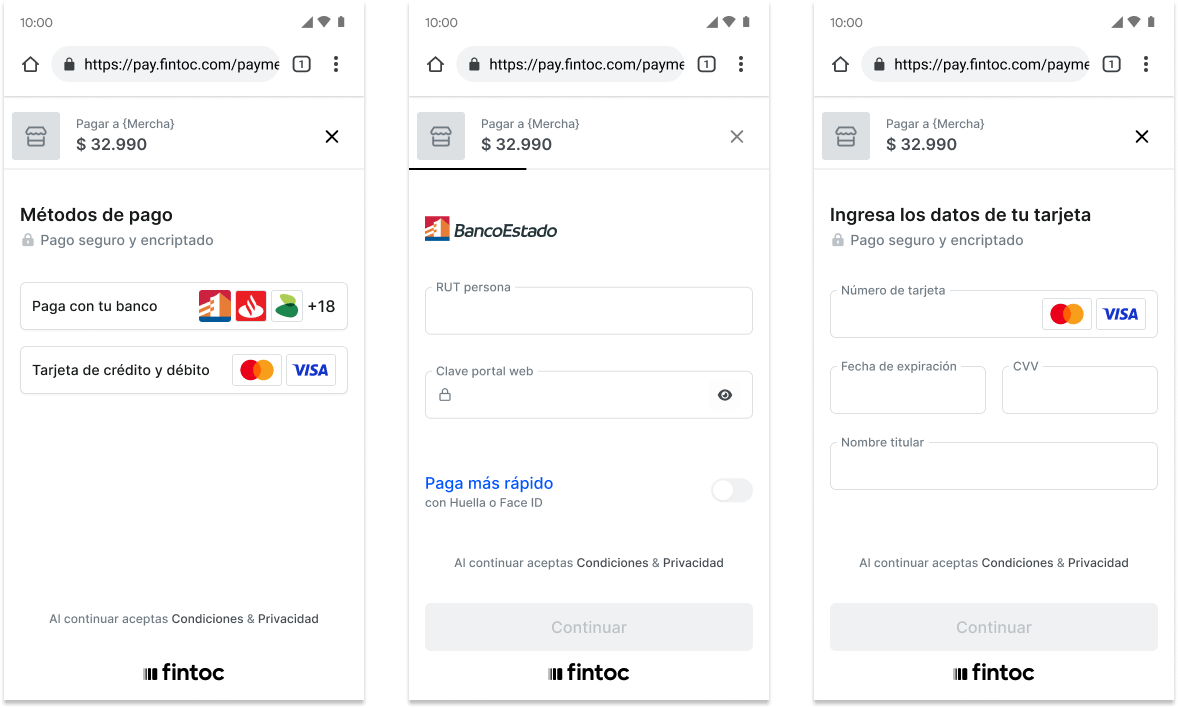
You can create a `Checkout Session` without specifying payment methods. In this case, customers can select from all available options on the Fintoc-hosted checkout page, based on the session parameters (`amount`, `customer`, `currency`) and the payment methods you have enabled in Fintoc.
Alternatively, you can explicitly define the payment method type(s) for the session. For example, the request below sets the `bank_transfer` method and uses `payment_method_options` to pre-select the institution `cl_banco_estado` for the customer. In this scenario, the payment flow presented to the customer is limited to this specific method and bank.
**Server**
```curl theme={null}
curl --request POST "https://api.fintoc.com/v2/checkout_sessions" \
--header "Authorization: YOUR_TEST_SECRET_API_KEY" \
--header "Content-Type: application/json" \
--data-raw '{
"amount": 350000,
"currency": "CLP",
"success_url": "https://merchant.com/success",
"cancel_url": "https://merchant.com/cancel",
"payment_method_types": ["bank_transfer"],
"payment_method_options": {
"bank_transfer": {
"sender_account": {
"institution_id": {
"value": "cl_banco_estado"
}
}
}
},
"customer_data": {
"tax_id": {
"type": "cl_rut",
"value": "11.111.111-1"
},
"name": "Felipe Castro",
"email": "jon@snow.com",
"metadata": {}
}
}'
```
```javascript Node theme={null}
const { Fintoc } = require('fintoc');
const fintoc = new Fintoc('YOUR_TEST_SECRET_API_KEY');
const checkoutSession = await fintoc.checkoutSessions.create({
amount: 350000,
currency: 'CLP',
success_url: 'https://merchant.com/success',
cancel_url: 'https://merchant.com/cancel',
payment_method_types: ['bank_transfer'],
payment_method_options: {
bank_transfer: {
sender_account: {
institution_id: {
value: 'cl_banco_estado'
}
}
}
},
customer_data: {
tax_id: {
type: 'cl_rut',
value: '11.111.111-1'
},
name: 'Felipe Castro',
email: 'jon@snow.com',
metadata: {}
}
});
```
```python theme={null}
from fintoc import Fintoc
client = Fintoc('YOUR_TEST_SECRET_API_KEY')
checkout_session = client.checkout_sessions.create(
amount=350000,
currency='CLP',
success_url='https://merchant.com/success',
cancel_url='https://merchant.com/cancel',
payment_method_types=['bank_transfer'],
payment_method_options={
'bank_transfer': {
'sender_account': {
'institution_id': {
'value': 'cl_banco_estado'
}
}
}
},
customer_data={
'tax_id': {
'type': 'cl_rut',
'value': '11.111.111-1'
},
'name': 'Felipe Castro',
'email': 'jon@snow.com',
'metadata': {}
}
)
```
| Attribute | Type | Description |
| :----------------------- | :----------------- | :---------------------------------------------------------------------------------------------- |
| `payment_method_types` | `array of strings` | List of payment method types available for the session. One or more of `bank_transfer`, `card`. |
| `payment_method_options` | `object` | Set of settings for each available payment method. |
Fintoc responds with the created `Checkout Session` object, echoing the pre-selected method and institution:
```json theme={null}
{
"id": "cs_li5531onlFDi235",
"object": "checkout_session",
"mode": "test",
"status": "created",
"amount": 350000,
"currency": "CLP",
"created_at": "2024-06-04T15:32:46.721Z",
"updated_at": "2024-06-04T15:32:46.721Z",
"success_url": "https://merchant.com/success",
"cancel_url": "https://merchant.com/cancel",
"redirect_url": "https://pay.fintoc.com/checkout/cs_li5531onlFDi235",
"metadata": {},
"payment_method_types": [
"bank_transfer"
],
"payment_method_options": {
"bank_transfer": {
"sender_account": {
"institution_id": {
"value": "cl_banco_estado"
}
}
}
},
"customer": {
"id": "cus_3B2bODrQFje7ZVkT69xyaTSDwXQ",
"object": "customer",
"name": "Felipe Castro",
"email": "jon@snow.com",
"metadata": {},
"tax_id": {
"type": "cl_rut",
"value": "11.111.111-1"
}
}
}
```
 **Using your own Checkout Page**
When you have your own checkout page, you should set the `payment_method_types` to redirect customers to the Fintoc-hosted checkout after they've already selected their preferred payment method.
This skips Fintoc's payment method selection screen and directs customers straight to the specific payment flow, instead of letting Fintoc manage the full checkout experience.
### Response when creating a Checkout Session
After you make the request to create the [Checkout Session](/reference/payments-api/checkout-sessions/checkout-session-object), Fintoc responds with the session object:
```json theme={null}
{
"id": "cs_li5531onlFDi235",
"object": "checkout_session",
"mode": "test",
"status": "created",
"amount": 350000,
"currency": "CLP",
"created_at": "2024-06-04T15:32:46.721Z",
"updated_at": "2024-06-04T15:32:46.721Z",
"success_url": "https://merchant.com/success",
"cancel_url": "https://merchant.com/cancel",
"redirect_url": "https://pay.fintoc.com/checkout/cs_li5531onlFDi235",
"metadata": {},
"customer": {
"id": "cus_3B2bODrQFje7ZVkT69xyaTSDwXQ",
"object": "customer",
"name": "Felipe Castro",
"email": "jon@snow.com",
"metadata": {},
"tax_id": {
"type": "cl_rut",
"value": "11.111.111-1"
}
}
}
```
The response includes the `redirect_url` attribute. In the following step, you'll use this attribute to redirect the customer to complete the payment.
## Redirect the customer to complete the payment
Next, redirect customers to the Fintoc-hosted checkout page. After they complete the payment, Fintoc automatically redirects them back to your site: to the `success_url` after a successful payment, or to the `cancel_url` if they cancel.
**Client**
```javascript theme={null}
window.location.assign(REDIRECT_URL_FROM_YOUR_BACKEND);
```
## Handle post-payment events
Once a `Checkout Session` finishes, you handle the payment result in your frontend and complete the payment in your backend. On your backend, use the events that Fintoc sends through webhooks.
### Complete the payment on your backend
Fintoc sends a `checkout_session.finished` and a `payment_intent.succeeded` event when the session completes and the payment is successful. Follow the [webhook guide](/docs/resources/webhooks-walkthrough) to receive these events and run actions, such as sending an order confirmation email to your customer, logging the sale in a database, or starting a shipping workflow.
The `checkout_session.finished` event includes information about the session and the `payment_intent`:
```json theme={null}
{
"id": "evt_a4xK32BanKWYn",
"object": "event",
"type": "checkout_session.finished",
"data": {
"id": "cs_li5531onlFDi235",
"mode": "test",
"amount": 350000,
"object": "checkout_session",
"status": "finished",
"flow": "payment",
"currency": "CLP",
"metadata": {},
"cancel_url": "https://merchant.com/cancel",
"created_at": "2026-01-13T18:48:25Z",
"expires_at": "2026-01-14T18:48:25Z",
"success_url": "https://merchant.com/success",
"redirect_url": "https://pay.fintoc.com/checkout/cs_li5531onlFDi235",
"session_token": null,
"customer_email": null,
"customer": {
"id": "cus_3B2bODrQFje7ZVkT69xyaTSDwXQ",
"object": "customer",
"name": "Felipe Castro",
"email": "jon@snow.com",
"metadata": {},
"tax_id": {
"type": "cl_rut",
"value": "11.111.111-1"
}
},
"payment_method_types": [
"bank_transfer"
],
"business_profile": {},
"payment_resource": {
"payment_intent": {
"id": "pi_38DNJo3rbvGUzKFvCGZ6dxR1Kxx",
"mode": "test",
"amount": 350000,
"object": "payment_intent",
"status": "succeeded",
"currency": "CLP",
"metadata": {},
"created_at": "2026-01-13T18:48:31Z",
"expires_at": "2026-01-14T18:48:25Z",
"error_reason": null,
"payment_type": "bank_transfer",
"reference_id": null,
"widget_token": null,
"customer_email": null,
"sender_account": {
"type": "checking_account",
"number": "813990168",
"holder_id": "11.111.111-1",
"institution_id": "cl_banco_falabella"
},
"business_profile": {},
"transaction_date": null,
"recipient_account": null,
"payment_type_options": {}
}
},
"payment_method_options": {}
}
}
```
Fintoc emits these events across the payment lifecycle, including the failure and pending paths. Handle each one:
| Event | Description | Action |
| -------------------------------- | -------------------------------------------------------------------------------------------------------------------------------------------------------------------------------------------------------------------------------- | ------------------------------------------------------------------------------------------------------------------------ |
| `checkout_session.finished` | Sent when a `Checkout Session` reaches a final state. The associated payment may still be pending, for example `requires_action`. | Complete the order based on the payment's status. |
| `checkout_session.expired` | Sent when a `Checkout Session` expires. | Offer the customer another attempt to pay. |
| `payment_intent.succeeded` | Sent when the payment related to a `Checkout Session` succeeds. | Confirm the customer's order. |
| `payment_intent.failed` | Sent when the payment related to a `Checkout Session` fails. | Offer the customer another attempt to pay. |
| `payment_intent.requires_action` | Sent when the payment related to a `Checkout Session` needs an action from the customer.
**Using your own Checkout Page**
When you have your own checkout page, you should set the `payment_method_types` to redirect customers to the Fintoc-hosted checkout after they've already selected their preferred payment method.
This skips Fintoc's payment method selection screen and directs customers straight to the specific payment flow, instead of letting Fintoc manage the full checkout experience.
### Response when creating a Checkout Session
After you make the request to create the [Checkout Session](/reference/payments-api/checkout-sessions/checkout-session-object), Fintoc responds with the session object:
```json theme={null}
{
"id": "cs_li5531onlFDi235",
"object": "checkout_session",
"mode": "test",
"status": "created",
"amount": 350000,
"currency": "CLP",
"created_at": "2024-06-04T15:32:46.721Z",
"updated_at": "2024-06-04T15:32:46.721Z",
"success_url": "https://merchant.com/success",
"cancel_url": "https://merchant.com/cancel",
"redirect_url": "https://pay.fintoc.com/checkout/cs_li5531onlFDi235",
"metadata": {},
"customer": {
"id": "cus_3B2bODrQFje7ZVkT69xyaTSDwXQ",
"object": "customer",
"name": "Felipe Castro",
"email": "jon@snow.com",
"metadata": {},
"tax_id": {
"type": "cl_rut",
"value": "11.111.111-1"
}
}
}
```
The response includes the `redirect_url` attribute. In the following step, you'll use this attribute to redirect the customer to complete the payment.
## Redirect the customer to complete the payment
Next, redirect customers to the Fintoc-hosted checkout page. After they complete the payment, Fintoc automatically redirects them back to your site: to the `success_url` after a successful payment, or to the `cancel_url` if they cancel.
**Client**
```javascript theme={null}
window.location.assign(REDIRECT_URL_FROM_YOUR_BACKEND);
```
## Handle post-payment events
Once a `Checkout Session` finishes, you handle the payment result in your frontend and complete the payment in your backend. On your backend, use the events that Fintoc sends through webhooks.
### Complete the payment on your backend
Fintoc sends a `checkout_session.finished` and a `payment_intent.succeeded` event when the session completes and the payment is successful. Follow the [webhook guide](/docs/resources/webhooks-walkthrough) to receive these events and run actions, such as sending an order confirmation email to your customer, logging the sale in a database, or starting a shipping workflow.
The `checkout_session.finished` event includes information about the session and the `payment_intent`:
```json theme={null}
{
"id": "evt_a4xK32BanKWYn",
"object": "event",
"type": "checkout_session.finished",
"data": {
"id": "cs_li5531onlFDi235",
"mode": "test",
"amount": 350000,
"object": "checkout_session",
"status": "finished",
"flow": "payment",
"currency": "CLP",
"metadata": {},
"cancel_url": "https://merchant.com/cancel",
"created_at": "2026-01-13T18:48:25Z",
"expires_at": "2026-01-14T18:48:25Z",
"success_url": "https://merchant.com/success",
"redirect_url": "https://pay.fintoc.com/checkout/cs_li5531onlFDi235",
"session_token": null,
"customer_email": null,
"customer": {
"id": "cus_3B2bODrQFje7ZVkT69xyaTSDwXQ",
"object": "customer",
"name": "Felipe Castro",
"email": "jon@snow.com",
"metadata": {},
"tax_id": {
"type": "cl_rut",
"value": "11.111.111-1"
}
},
"payment_method_types": [
"bank_transfer"
],
"business_profile": {},
"payment_resource": {
"payment_intent": {
"id": "pi_38DNJo3rbvGUzKFvCGZ6dxR1Kxx",
"mode": "test",
"amount": 350000,
"object": "payment_intent",
"status": "succeeded",
"currency": "CLP",
"metadata": {},
"created_at": "2026-01-13T18:48:31Z",
"expires_at": "2026-01-14T18:48:25Z",
"error_reason": null,
"payment_type": "bank_transfer",
"reference_id": null,
"widget_token": null,
"customer_email": null,
"sender_account": {
"type": "checking_account",
"number": "813990168",
"holder_id": "11.111.111-1",
"institution_id": "cl_banco_falabella"
},
"business_profile": {},
"transaction_date": null,
"recipient_account": null,
"payment_type_options": {}
}
},
"payment_method_options": {}
}
}
```
Fintoc emits these events across the payment lifecycle, including the failure and pending paths. Handle each one:
| Event | Description | Action |
| -------------------------------- | -------------------------------------------------------------------------------------------------------------------------------------------------------------------------------------------------------------------------------- | ------------------------------------------------------------------------------------------------------------------------ |
| `checkout_session.finished` | Sent when a `Checkout Session` reaches a final state. The associated payment may still be pending, for example `requires_action`. | Complete the order based on the payment's status. |
| `checkout_session.expired` | Sent when a `Checkout Session` expires. | Offer the customer another attempt to pay. |
| `payment_intent.succeeded` | Sent when the payment related to a `Checkout Session` succeeds. | Confirm the customer's order. |
| `payment_intent.failed` | Sent when the payment related to a `Checkout Session` fails. | Offer the customer another attempt to pay. |
| `payment_intent.requires_action` | Sent when the payment related to a `Checkout Session` needs an action from the customer.
You receive this event when a `bank_transfer` payment from a business account requires approval from more than one representative. | Inform your customer of the action needed to approve the payment, based on the `next_action` field in the webhook event. |
**Handling async payments after the `Checkout Session` ends**
In some cases, the `Checkout Session` may finish with a payment that does not yet have a final status, such as `requires_action`. This can happen, for example, when a bank transfer from a business account requires approval from more than one representative.
In these cases, when you receive the `payment_intent.requires_action` event, inform the customer that the payment is pending approval. Once you receive either the `payment_intent.succeeded` or `payment_intent.failed` event, you should notify the customer of the final payment status as soon as it is confirmed.
## Test your integration
Using your [test mode API Secret Key](/docs/resources/test-mode), you can create payments that simulate successful and failed outcomes without moving any money.
This lets you validate your full payment flow end-to-end:
* Your backend API requests (creating sessions and handling responses)
* The redirect flow from your frontend to the `redirect_url` and back to the `success_url` or `cancel_url` after the payment
* The webhooks for post-payment events
A successful test session reaches `status` `finished` and triggers the `checkout_session.finished` and `payment_intent.succeeded` webhooks; a failed one triggers `payment_intent.failed`. To trigger specific scenarios, use the **test credentials** and special test values described in our [testing guide](/docs/payments/payment-initiation-test-your-integration).