> ## Documentation Index
> Fetch the complete documentation index at: https://docs.fintoc.com/llms.txt
> Use this file to discover all available pages before exploring further.
# Accept recurring payments
> Enroll a customer into a fixed-amount recurring subscription with Fintoc's Checkout Session API.
Build a subscription flow that enrolls a payment method and charges the customer automatically on a fixed schedule.
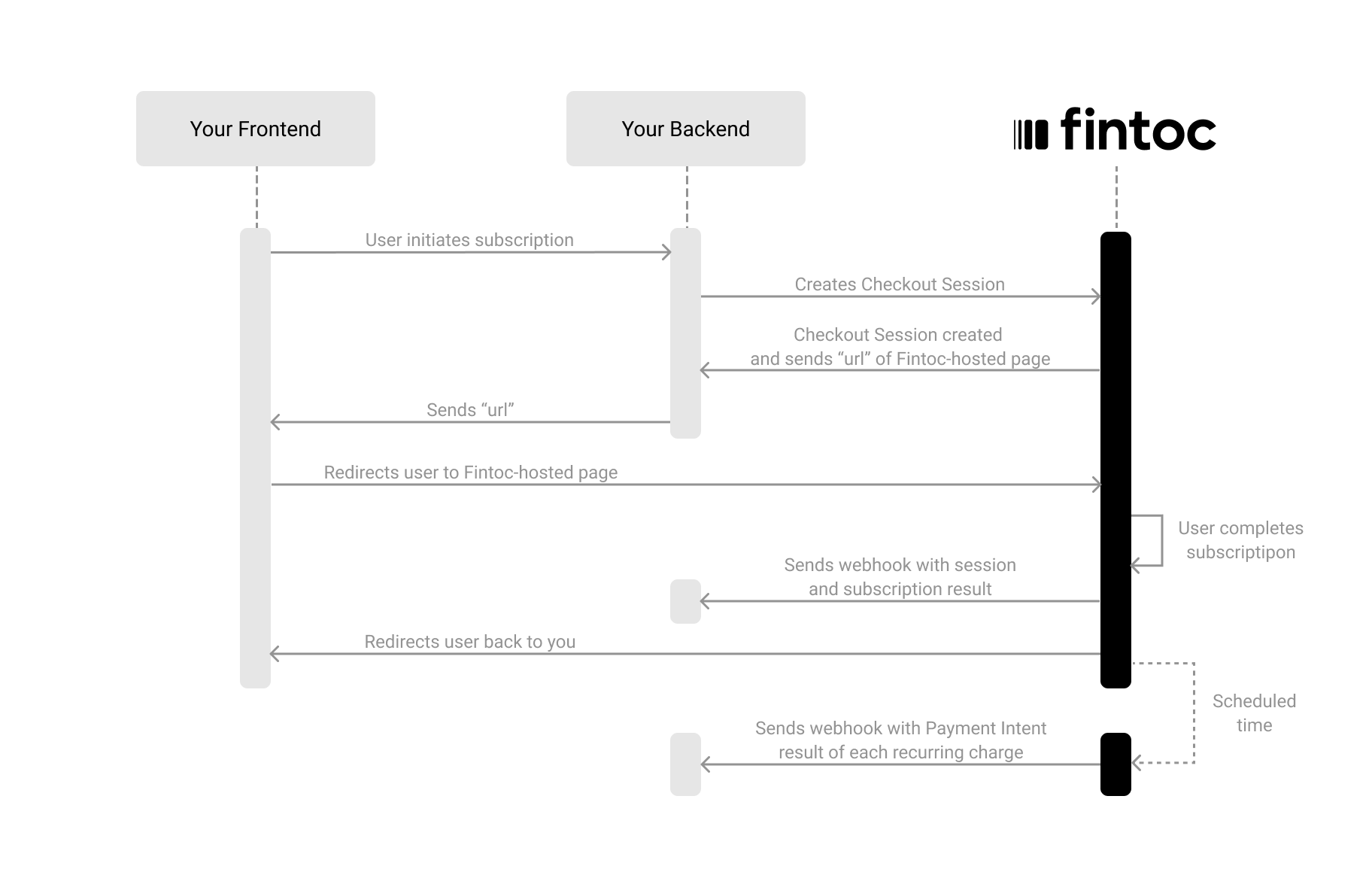
To accept recurring payments with Fintoc, you complete three steps:
1. On your backend, create a `Checkout Session` with `flow: subscription`.
2. Redirect the customer to complete the enrollment at the Fintoc-hosted checkout page.
3. Handle post-enrollment and recurring payment events (webhooks).
The following diagram shows how Fintoc interacts with both your backend and your frontend:
 ## Create a Checkout Session
The [Checkout Session](/reference/payments-api/checkout-sessions/checkout-session-object) object represents your intent to enroll a payment method for recurring charges, and to create a subscription with a fixed amount and periodicity.
Using your [Secret Key](/docs/home/api-keys), create a `Checkout Session` on your backend with `flow` set to `subscription`.
**Server**
```curl theme={null}
curl --request POST "https://api.fintoc.com/v2/checkout_sessions" \
--header "Authorization: YOUR_TEST_SECRET_API_KEY" \
--header "Content-Type: application/json" \
--data-raw '{
"flow": "subscription",
"amount": 350000,
"currency": "CLP",
"success_url": "https://merchant.com/success",
"cancel_url": "https://merchant.com/cancel",
"payment_method_types": [
"pac"
],
"customer_data": {
"tax_id": {
"type": "cl_rut",
"value": "11.111.111-1"
},
"name": "Felipe Castro",
"email": "jon@snow.com",
"metadata": {}
},
"line_items": [
{
"price_data": {
"currency": "CLP",
"unit_amount": 350000,
"product_data": {
"name": "Plan 1"
},
"recurring": {
"interval": "month",
"interval_count": 1
}
},
"quantity": 1
}
],
"metadata": {
"subscription_external_id": "sub_987654321"
}
}'
```
```javascript Node theme={null}
const { Fintoc } = require('fintoc');
const fintoc = new Fintoc('YOUR_TEST_SECRET_API_KEY');
const checkoutSession = await fintoc.checkoutSessions.create({
flow: 'subscription',
amount: 350000,
currency: 'CLP',
success_url: 'https://merchant.com/success',
cancel_url: 'https://merchant.com/cancel',
payment_method_types: ['pac'],
customer_data: {
tax_id: {
type: 'cl_rut',
value: '11.111.111-1'
},
name: 'Felipe Castro',
email: 'jon@snow.com',
metadata: {}
},
line_items: [
{
price_data: {
currency: 'CLP',
unit_amount: 350000,
product_data: {
name: 'Plan 1'
},
recurring: {
interval: 'month',
interval_count: 1
}
},
quantity: 1
}
],
metadata: {
subscription_external_id: 'sub_987654321'
}
});
```
```python theme={null}
from fintoc import Fintoc
client = Fintoc('YOUR_TEST_SECRET_API_KEY')
checkout_session = client.checkout_sessions.create(
flow='subscription',
amount=350000,
currency='CLP',
success_url='https://merchant.com/success',
cancel_url='https://merchant.com/cancel',
payment_method_types=['pac'],
customer_data={
'tax_id': {
'type': 'cl_rut',
'value': '11.111.111-1',
},
'name': 'Felipe Castro',
'email': 'jon@snow.com',
'metadata': {},
},
line_items=[
{
'price_data': {
'currency': 'CLP',
'unit_amount': 350000,
'product_data': {
'name': 'Plan 1',
},
'recurring': {
'interval': 'month',
'interval_count': 1,
},
},
'quantity': 1,
}
],
metadata={
'subscription_external_id': 'sub_987654321',
},
)
```
Fintoc responds with the [Checkout Session](/reference/payments-api/checkout-sessions/checkout-session-object) object. Store its `id` and `redirect_url` to continue the flow:
```json theme={null}
{
"id": "cs_li5531onlFDi235",
"object": "checkout_session",
"mode": "test",
"flow": "subscription",
"status": "created",
"amount": 350000,
"currency": "CLP",
"payment_method_types": ["pac"],
"customer": {
"id": "cus_NffrFeUfNV2Hib",
"object": "customer",
"name": "Felipe Castro",
"email": "jon@snow.com",
"metadata": {},
"tax_id": {
"type": "cl_rut",
"value": "11.111.111-1"
}
},
"line_items": [
{
"price": {
"product": {
"name": "Plan 1",
"description": "Fixed-amount monthly plan"
},
"currency": "CLP",
"unit_amount": 350000,
"recurring": {
"interval": "month",
"interval_count": 1
}
},
"quantity": 1
}
],
"metadata": {
"subscription_external_id": "sub_987654321"
},
"success_url": "https://merchant.com/success",
"cancel_url": "https://merchant.com/cancel",
"redirect_url": "https://pay.fintoc.com/checkout/cs_li5531onlFDi235"
}
```
The response includes a `redirect_url` attribute. In the next step, you redirect the customer to this location to complete the subscription.
The following table describes the parameters you send when creating a `Checkout Session`:
| Parameter | Example | Description |
| ---------------------- | ----------------------------------------------- | ------------------------------------------------------------------------------------------------------------------------------------------------------------------------------------------------------------------------------------------------------------------------------------------ |
| `amount` | 350000 | **Required.** A positive integer representing the value to charge, in the smallest currency unit (for example, `1000` for `$1000 CLP`, since CLP has no minor unit, or `2476` for `$24.76 MXN`, since MXN has a minor unit). See the [currencies](/docs/home/currencies) page for details. |
| `currency` | CLP | **Required.** Three-letter ISO 4217 currency code for the recurring payments. One of `CLP` or `MXN`. |
| `flow` | `subscription` | **Required.** Flow type for the session. One of `payment`, `setup`, or `subscription`. |
| `success_url` | `https://merchant.com/success` | **Required.** URL to redirect the customer to after a successful enrollment. |
| `cancel_url` | `https://merchant.com/cancel` | **Required.** URL to redirect the customer to if they cancel the enrollment and return to your website. |
| `customer` | `cus_3B2bODrQFje7ZVkT69xyaTSDwXQ` | **Required if no `customer_data`.** ID of an existing `Customer`. |
| `customer_data` | `(object)` | **Required if no `customer`.** Data for inline customer creation.
## Create a Checkout Session
The [Checkout Session](/reference/payments-api/checkout-sessions/checkout-session-object) object represents your intent to enroll a payment method for recurring charges, and to create a subscription with a fixed amount and periodicity.
Using your [Secret Key](/docs/home/api-keys), create a `Checkout Session` on your backend with `flow` set to `subscription`.
**Server**
```curl theme={null}
curl --request POST "https://api.fintoc.com/v2/checkout_sessions" \
--header "Authorization: YOUR_TEST_SECRET_API_KEY" \
--header "Content-Type: application/json" \
--data-raw '{
"flow": "subscription",
"amount": 350000,
"currency": "CLP",
"success_url": "https://merchant.com/success",
"cancel_url": "https://merchant.com/cancel",
"payment_method_types": [
"pac"
],
"customer_data": {
"tax_id": {
"type": "cl_rut",
"value": "11.111.111-1"
},
"name": "Felipe Castro",
"email": "jon@snow.com",
"metadata": {}
},
"line_items": [
{
"price_data": {
"currency": "CLP",
"unit_amount": 350000,
"product_data": {
"name": "Plan 1"
},
"recurring": {
"interval": "month",
"interval_count": 1
}
},
"quantity": 1
}
],
"metadata": {
"subscription_external_id": "sub_987654321"
}
}'
```
```javascript Node theme={null}
const { Fintoc } = require('fintoc');
const fintoc = new Fintoc('YOUR_TEST_SECRET_API_KEY');
const checkoutSession = await fintoc.checkoutSessions.create({
flow: 'subscription',
amount: 350000,
currency: 'CLP',
success_url: 'https://merchant.com/success',
cancel_url: 'https://merchant.com/cancel',
payment_method_types: ['pac'],
customer_data: {
tax_id: {
type: 'cl_rut',
value: '11.111.111-1'
},
name: 'Felipe Castro',
email: 'jon@snow.com',
metadata: {}
},
line_items: [
{
price_data: {
currency: 'CLP',
unit_amount: 350000,
product_data: {
name: 'Plan 1'
},
recurring: {
interval: 'month',
interval_count: 1
}
},
quantity: 1
}
],
metadata: {
subscription_external_id: 'sub_987654321'
}
});
```
```python theme={null}
from fintoc import Fintoc
client = Fintoc('YOUR_TEST_SECRET_API_KEY')
checkout_session = client.checkout_sessions.create(
flow='subscription',
amount=350000,
currency='CLP',
success_url='https://merchant.com/success',
cancel_url='https://merchant.com/cancel',
payment_method_types=['pac'],
customer_data={
'tax_id': {
'type': 'cl_rut',
'value': '11.111.111-1',
},
'name': 'Felipe Castro',
'email': 'jon@snow.com',
'metadata': {},
},
line_items=[
{
'price_data': {
'currency': 'CLP',
'unit_amount': 350000,
'product_data': {
'name': 'Plan 1',
},
'recurring': {
'interval': 'month',
'interval_count': 1,
},
},
'quantity': 1,
}
],
metadata={
'subscription_external_id': 'sub_987654321',
},
)
```
Fintoc responds with the [Checkout Session](/reference/payments-api/checkout-sessions/checkout-session-object) object. Store its `id` and `redirect_url` to continue the flow:
```json theme={null}
{
"id": "cs_li5531onlFDi235",
"object": "checkout_session",
"mode": "test",
"flow": "subscription",
"status": "created",
"amount": 350000,
"currency": "CLP",
"payment_method_types": ["pac"],
"customer": {
"id": "cus_NffrFeUfNV2Hib",
"object": "customer",
"name": "Felipe Castro",
"email": "jon@snow.com",
"metadata": {},
"tax_id": {
"type": "cl_rut",
"value": "11.111.111-1"
}
},
"line_items": [
{
"price": {
"product": {
"name": "Plan 1",
"description": "Fixed-amount monthly plan"
},
"currency": "CLP",
"unit_amount": 350000,
"recurring": {
"interval": "month",
"interval_count": 1
}
},
"quantity": 1
}
],
"metadata": {
"subscription_external_id": "sub_987654321"
},
"success_url": "https://merchant.com/success",
"cancel_url": "https://merchant.com/cancel",
"redirect_url": "https://pay.fintoc.com/checkout/cs_li5531onlFDi235"
}
```
The response includes a `redirect_url` attribute. In the next step, you redirect the customer to this location to complete the subscription.
The following table describes the parameters you send when creating a `Checkout Session`:
| Parameter | Example | Description |
| ---------------------- | ----------------------------------------------- | ------------------------------------------------------------------------------------------------------------------------------------------------------------------------------------------------------------------------------------------------------------------------------------------ |
| `amount` | 350000 | **Required.** A positive integer representing the value to charge, in the smallest currency unit (for example, `1000` for `$1000 CLP`, since CLP has no minor unit, or `2476` for `$24.76 MXN`, since MXN has a minor unit). See the [currencies](/docs/home/currencies) page for details. |
| `currency` | CLP | **Required.** Three-letter ISO 4217 currency code for the recurring payments. One of `CLP` or `MXN`. |
| `flow` | `subscription` | **Required.** Flow type for the session. One of `payment`, `setup`, or `subscription`. |
| `success_url` | `https://merchant.com/success` | **Required.** URL to redirect the customer to after a successful enrollment. |
| `cancel_url` | `https://merchant.com/cancel` | **Required.** URL to redirect the customer to if they cancel the enrollment and return to your website. |
| `customer` | `cus_3B2bODrQFje7ZVkT69xyaTSDwXQ` | **Required if no `customer_data`.** ID of an existing `Customer`. |
| `customer_data` | `(object)` | **Required if no `customer`.** Data for inline customer creation.
If a `Customer` with the same `tax_id` already exists, the request returns a `409 Conflict` error. To reuse an existing `Customer`, send its `id` in `customer` instead of `customer_data`. |
| `payment_method_types` | `["pac"]` | List of allowed payment methods during enrollment. One or more of `pac` (charges on bank accounts in Chile), `direct_debit` (charges on bank accounts in Mexico), and `card`. |
| `line_items` | `(array)` | **Required.** Array of items the customer subscribes to. Each item contains `quantity` and either `price` or `price_data`. |
| `metadata` | `{"subscription_external_id": "sub_987654321"}` | Set of key-value pairs you can attach to an object. Useful for storing additional information about the object in a structured format. |
### Include customer data (required for subscriptions)
When creating a `Checkout Session` with `flow: subscription`, you must include customer information. You can do this either by referencing an existing customer ID (`customer`) or by sending `customer_data` to create one inline:
| Attribute | Type | Description |
| ---------- | -------- | -------------------------------------------------------------------------------------------------------------------------------------------------------------------------------------------------------------------------------------------------------------------------------------------------------------------------------------------------------------------------------------------------------------------------------------------------------------------------------------------------------------------------------------------------------------- |
| `tax_id` | `object` | **Required if no `email`.** Object that identifies the customer at a fiscal or regulatory level. The `type` is `cl_rut` for a Chilean tax ID (RUT) or `mx_rfc` for a Mexican tax ID (RFC), and `value` is the tax identifier as a string. See the [Customer object](/reference/payments-api/checkout-sessions/checkout-session-object#customer-object).
If a `Customer` with the same `tax_id` already exists, the request returns a `409 Conflict` error. To reuse an existing `Customer`, send its `id` in `customer` instead of `customer_data`. |
| `name` | `string` | Full name of the customer. |
| `email` | `string` | **Required if no `tax_id`.** Email address of the customer. |
| `metadata` | `object` | Custom data that stores additional information about the customer, for example internal IDs, CRM references, or tags. |
### Include an items list (required for subscriptions)
When creating a `Checkout Session` with `flow: subscription`, you must include the items the customer subscribes to. This information lets Fintoc display the items on the checkout page and show only the payment methods available for specific products.
| Attribute | Type | Description |
| :----------- | :-------- | :---------------------------------------------------------------- |
| `quantity` | `integer` | **Required.** Number of units of this item being purchased. |
| `price_data` | `object` | **Required.** Data used to generate a new recurring price inline. |
Each item in `line_items` must include `price_data`.
#### `price_data` object
| Attribute | Type | Description |
| :------------- | :-------- | :-------------------------------------------------------------------------------------------------------------------------------------------------------------------------------------------------------------------------- |
| `product_data` | `object` | **Required.** Data used to generate a new `Product` object inline. |
| `currency` | `string` | Three-letter ISO 4217 currency code for the subscription. One of `CLP` or `MXN`. |
| `unit_amount` | `integer` | **Required.** A positive integer representing the price per unit, in the smallest currency unit (for example, `1000` for `$1000 CLP`, since CLP has no minor unit, or `2476` for `$24.76 MXN`, since MXN has a minor unit). |
| `recurring` | `object` | **Required.** Recurring configuration. `interval` is one of `day`, `week`, `month`, or `year`, and `interval_count` is the number of intervals between charges (for example, `1` for monthly when `interval` is `month`). |
#### `product_data` object
| Attribute | Type | Description |
| :---------- | :------- | :------------------------------------------------------------------------------ |
| `name` | `string` | **Required.** Name of the product or service being purchased. |
| `image_url` | `string` | Image URL for the product. Must be an HTTPS URL. Recommended aspect ratio: 9:4. |
## Redirect the customer to complete the enrollment
Next, redirect the customer to the Fintoc-hosted checkout page using the `redirect_url`. After the customer completes the enrollment, Fintoc redirects the customer back to your site: to the `success_url` on success, or to the `cancel_url` if they cancel.
**Client**
```javascript theme={null}
window.location.assign(REDIRECT_URL_FROM_YOUR_BACKEND);
```
## Handle post-session events
Once a `Checkout Session` finishes, you handle the result in your frontend and complete the subscription in your backend. For your backend, you use the events that Fintoc sends through webhooks.
### Complete the subscription on your backend
Fintoc sends a `checkout_session.finished` event when the session completes.
In a subscription flow, this event includes information about the session and references to the `subscription` and `payment_method` created during enrollment.
```json theme={null}
{
"id": "evt_a4xK32BanKWYn",
"object": "event",
"type": "checkout_session.finished",
"data": {
"id": "cs_li5531onlFDi235",
"flow": "subscription",
"customer": {
"id": "cus_NffrFeUfNV2Hib",
"object": "customer",
"name": "Felipe Castro",
"email": "jon@snow.com",
"metadata": {},
"tax_id": {
"type": "cl_rut",
"value": "11.111.111-1"
}
},
"payment_method_types": ["pac"],
"status": "finished",
"payment_status": "succeeded",
"subscription": "sub_NffrFeUfNV2Hib",
"payment_method": "pm_NffrFeUfNV2Hib"
}
}
```
You should handle the following post-session events:
| Event | Description | Action |
| :-------------------------- | :---------------------------------------------------------------------------- | :------------------------------------------------------------------------------------------------------------------------------------------ |
| `checkout_session.finished` | Sent when a subscription `Checkout Session` reaches a final state. | Activate the subscription on your side based on the final status, and store the created ids (`subscription`, `payment_method`, `customer`). |
| `checkout_session.expired` | Sent when a session expires. | Offer the customer another attempt to subscribe. |
| `payment_intent.succeeded` | Sent when a payment intent succeeds, like a charge on a bank account or card. | Confirm to your customer that the subscription charge succeeded. |
| `payment_intent.failed` | Sent when a payment intent fails. | Offer the customer another attempt to pay the subscription. |
## Test your integration
To confirm that your integration works correctly, you can simulate subscriptions and scheduled recurring payments without moving any money.
### 1) Create a subscription Checkout Session using test user credentials
Using your test mode Secret Key, create a `Checkout Session` with `flow: subscription` on your backend. Then complete the enrollment on the Fintoc-hosted checkout page with the following credentials:
**Test credentials**
* Username (RUT): `11.111.111-1`
* Password: `jonsnow`
### 2) Handle simulated scheduled payments of the subscription
In test mode, the subscription's scheduled payments are simulated so you can verify how your integration handles success and failure without moving any money. You handle them through the same `invoice.*` and `payment_intent.*` events described in the Manage invoices section below: a successful charge emits `invoice.payment_succeeded` and `payment_intent.succeeded`, and a failed one emits `invoice.payment_failed` and `payment_intent.failed`.
Test mode is not yet available for recurring payments in Mexico.
## Manage invoices
When a subscription is created after a successful checkout enrollment, Fintoc automatically generates an `Invoice` for each billing cycle. An invoice represents the amount the customer owes for a given period. Fintoc attempts to collect payment for the invoice using the enrolled payment method.
For full details on invoices, see the [Invoice Object](/reference/payments-api/invoices/invoice-object).
### Invoices in the subscription flow
After the `checkout_session.finished` event, the subscription becomes `active` and Fintoc creates the first invoice. From that point on, you should handle the following invoice-related events alongside the post-session events described above:
| Event | Description | Action |
| --------------------------- | --------------------------------------------------------------------------------------------------------------------------------- | ------------------------------------------------------------------------------------------------------ |
| `invoice.created` | Sent when Fintoc generates a new invoice for a billing cycle. | Log the invoice and update your records. |
| `invoice.finalized` | Sent when Fintoc finalizes the invoice and it becomes ready for payment. | Store the `hosted_invoice_url`, but send it to your customer only if the automatic charge later fails. |
| `invoice.payment_created` | Sent when a payment for the invoice starts, either from an automatic charge or from your customer using the `hosted_invoice_url`. | Treat the event as informational. Do not send the `hosted_invoice_url` while a payment is in progress. |
| `invoice.payment_succeeded` | Sent when Fintoc collects the invoice payment. | Confirm the payment to your customer and extend access. |
| `invoice.payment_failed` | Sent when a payment attempt for the invoice fails. | Send the `hosted_invoice_url` so your customer can pay the invoice. |
| `invoice.voided` | Sent when an invoice becomes void and Fintoc disables its `hosted_invoice_url`. | Update your records. |
**Month 1:** Right after the subscription is created, Fintoc generates the first invoice and attempts payment immediately. You'll receive `invoice.created`, followed by `invoice.finalized`, then `invoice.payment_succeeded` and `payment_intent.succeeded` on success.
**Month 2 onwards:** At each billing cycle renewal (based on the subscription's `billing_cycle_anchor`), Fintoc creates a new invoice in `draft` status. After 1 hour, Fintoc attempts payment automatically. On success you receive `invoice.payment_succeeded`. On failure, `invoice.payment_failed`.
### Recovering a failed payment
When an automatic charge fails, Fintoc emits `invoice.payment_failed`. To recover the payment, send the invoice's `hosted_invoice_url` to your customer through your own channel, such as email or WhatsApp. The hosted page lets your customer pay using the payment methods enabled on your organization's account. A successful payment creates a `payment_intent` on the invoice and settles the debt. The subscription's enrolled payment method stays valid, and Fintoc charges the next cycle automatically.
The `hosted_invoice_url` becomes available on the `Invoice` object once the invoice reaches `open` status. For details, see the [Invoice object](/reference/payments-api/invoices/invoice-object).
An invoice accepts only one payment at a time. If you open the `hosted_invoice_url` while an automatic charge is in progress, the page shows that an invoice payment is in progress and the payment link is disabled. Fintoc re-enables the payment link if the automatic charge fails.
### Test invoice creation with status `draft`
To test an invoice that is created in `draft` status, create a subscription with a line item using the product name `sandbox_draft`:
**Server**
```curl theme={null}
curl --request POST "https://api.fintoc.com/v2/checkout_sessions" \
--header "Authorization: YOUR_TEST_SECRET_API_KEY" \
--header "Content-Type: application/json" \
--data-raw '{
"flow": "subscription",
"amount": 350000,
"currency": "CLP",
"success_url": "https://merchant.com/success",
"cancel_url": "https://merchant.com/cancel",
"payment_method_types": ["pac"],
"customer_data": {
"tax_id": {
"type": "cl_rut",
"value": "11.111.111-1"
},
"name": "Felipe Castro",
"email": "jon@snow.com"
},
"line_items": [
{
"price_data": {
"currency": "CLP",
"unit_amount": 350000,
"product_data": {
"name": "sandbox_draft"
},
"recurring": {
"interval": "month",
"interval_count": 1
}
},
"quantity": 1
}
]
}'
```
```javascript Node theme={null}
const { Fintoc } = require('fintoc');
const fintoc = new Fintoc('YOUR_TEST_SECRET_API_KEY');
const checkoutSession = await fintoc.checkoutSessions.create({
flow: 'subscription',
amount: 350000,
currency: 'CLP',
success_url: 'https://merchant.com/success',
cancel_url: 'https://merchant.com/cancel',
payment_method_types: ['pac'],
customer_data: {
tax_id: {
type: 'cl_rut',
value: '11.111.111-1'
},
name: 'Felipe Castro',
email: 'jon@snow.com'
},
line_items: [
{
price_data: {
currency: 'CLP',
unit_amount: 350000,
product_data: {
name: 'sandbox_draft'
},
recurring: {
interval: 'month',
interval_count: 1
}
},
quantity: 1
}
]
});
```
```python theme={null}
from fintoc import Fintoc
client = Fintoc('YOUR_TEST_SECRET_API_KEY')
checkout_session = client.checkout_sessions.create(
flow='subscription',
amount=350000,
currency='CLP',
success_url='https://merchant.com/success',
cancel_url='https://merchant.com/cancel',
payment_method_types=['pac'],
customer_data={
'tax_id': {
'type': 'cl_rut',
'value': '11.111.111-1',
},
'name': 'Felipe Castro',
'email': 'jon@snow.com',
},
line_items=[
{
'price_data': {
'currency': 'CLP',
'unit_amount': 350000,
'product_data': {
'name': 'sandbox_draft',
},
'recurring': {
'interval': 'month',
'interval_count': 1,
},
},
'quantity': 1,
}
],
)
```
Fintoc creates the `Checkout Session`:
```json theme={null}
{
"id": "cs_li5531onlFDi235",
"object": "checkout_session",
"mode": "test",
"flow": "subscription",
"status": "created",
"amount": 350000,
"currency": "CLP",
"payment_method_types": ["pac"],
"customer": {
"id": "cus_NffrFeUfNV2Hib",
"object": "customer",
"name": "Felipe Castro",
"email": "jon@snow.com",
"metadata": {},
"tax_id": {
"type": "cl_rut",
"value": "11.111.111-1"
}
},
"line_items": [
{
"price": {
"product": {
"name": "sandbox_draft",
"description": "Fixed-amount monthly plan"
},
"currency": "CLP",
"unit_amount": 350000,
"recurring": {
"interval": "month",
"interval_count": 1
}
},
"quantity": 1
}
],
"success_url": "https://merchant.com/success",
"cancel_url": "https://merchant.com/cancel",
"redirect_url": "https://pay.fintoc.com/checkout/cs_li5531onlFDi235"
}
```
Fintoc creates the invoice in `draft` status, so you can edit its items with the [Add Lines](/reference/payments-api/invoices/invoices-add-lines) endpoint before the invoice transitions to the next status.
## Update the payment method on a subscription
When a customer's payment method fails, or when the customer wants to switch payment methods, you can update the payment method associated with a subscription. The update affects future billing cycles only. It does not charge open invoices. Collect open invoices separately using each invoice's `hosted_invoice_url`, one per invoice.
Two flows let you update a subscription's payment method:
* **Case A (user-initiated):** Send the customer a new enrollment link. Use this when the customer must authorize a new Chilean automatic debit (PAC) mandate or enter new card details.
* **Case B (merchant-initiated):** Associate an already-active payment method directly through the API, with no customer interaction.
### Case A: Send a re-enrollment link
Create a `CheckoutSession` with `flow: "setup"` and pass the existing subscription ID in `subscription`. The customer opens the link and enrolls a new payment method. Fintoc associates the payment method with the subscription once the mandate activates.
**Server**
```curl theme={null}
curl --request POST "https://api.fintoc.com/v2/checkout_sessions" \
--header "Authorization: YOUR_TEST_SECRET_API_KEY" \
--header "Content-Type: application/json" \
--data-raw '{
"flow": "setup",
"currency": "CLP",
"subscription": "sub_456789abcdef",
"success_url": "https://merchant.com/success",
"cancel_url": "https://merchant.com/cancel",
"customer": "cus_01234567",
"payment_method_types": ["pac"]
}'
```
```javascript Node theme={null}
const { Fintoc } = require('fintoc');
const fintoc = new Fintoc('YOUR_TEST_SECRET_API_KEY');
const checkoutSession = await fintoc.checkoutSessions.create({
flow: 'setup',
currency: 'CLP',
subscription: 'sub_456789abcdef',
success_url: 'https://merchant.com/success',
cancel_url: 'https://merchant.com/cancel',
customer: 'cus_01234567',
payment_method_types: ['pac']
});
```
```python theme={null}
from fintoc import Fintoc
client = Fintoc('YOUR_TEST_SECRET_API_KEY')
checkout_session = client.checkout_sessions.create(
flow='setup',
currency='CLP',
subscription='sub_456789abcdef',
success_url='https://merchant.com/success',
cancel_url='https://merchant.com/cancel',
customer='cus_01234567',
payment_method_types=['pac'],
)
```
Fintoc responds with the `CheckoutSession` object:
```json theme={null}
{
"id": "cs_li5531onlFDi235",
"object": "checkout_session",
"flow": "setup",
"status": "created",
"currency": "CLP",
"mode": "test",
"subscription": "sub_456789abcdef",
"customer": {
"id": "cus_01234567",
"object": "customer",
"name": "Test Customer 1",
"email": "jon@snow.com",
"metadata": {},
"tax_id": {
"type": "cl_rut",
"value": "11.111.111-1"
}
},
"payment_method_types": ["pac"],
"success_url": "https://merchant.com/success",
"cancel_url": "https://merchant.com/cancel",
"redirect_url": "https://pay.fintoc.com/checkout/cs_li5531onlFDi235"
}
```
Redirect the customer to `redirect_url` so the customer completes the enrollment.
#### PAC activation window
For PAC, bank confirmation takes approximately 5 business days. The new payment method stays in `pending` status during this window, and Fintoc has not yet executed the swap.
`checkout_session.finished` signals that the customer completed the enrollment flow, not that the swap occurred. Wait for `subscription.payment_method_updated` before you treat the new payment method as active.
To check the activation state while the mandate is pending, call `GET /v2/payment_methods/{id}` and read `pac.status`:
```json theme={null}
{
"id": "pm_000000000001",
"object": "payment_method",
"customer": "cus_01234567",
"type": "pac",
"pac": {
"account_holder_id": "11.111.111-1",
"account_number": "000000000000",
"account_type": "checking_account",
"institution": {
"id": "cl_banco_de_chile",
"country": "cl",
"name": "Banco de Chile"
},
"status": "pending"
}
}
```
#### Handle re-enrollment events
Subscribe to the following events when you update a subscription's payment method through a re-enrollment link:
| Event | Description | Action |
| ------------------------------------------- | ------------------------------------------------------------------------------------------------ | -------------------------------------------------------------------------------------------------------------------------------- |
| `checkout_session.finished` | The customer completed the enrollment flow. | Store the new `payment_method` ID. For cards the swap already occurred; for PAC, wait for `subscription.payment_method_updated`. |
| `checkout_session.expired` | The session expired before the customer completed enrollment. | Create a new session and send the customer the updated link. |
| `subscription.payment_method_updated` | The bank confirmed the new mandate. The subscription now charges against the new payment method. | Resume normal billing. Collect any open invoices using each invoice's `hosted_invoice_url`. |
| `subscription.payment_method_update_failed` | The bank rejected the mandate activation. The subscription keeps its previous payment method. | Create a new session so the customer can re-enroll. Collect open invoices using each invoice's `hosted_invoice_url`. |
### Case B: Associate an existing payment method
If the customer already has an active payment method on file, associate the payment method with a subscription directly, without a new enrollment link.
#### Swap the payment method on an existing subscription
Call `PATCH /v2/subscriptions/{id}` with the ID of the active payment method. The payment method must belong to the same customer as the subscription.
**Server**
```curl theme={null}
curl --request PATCH "https://api.fintoc.com/v2/subscriptions/sub_456789abcdef" \
--header "Authorization: YOUR_TEST_SECRET_API_KEY" \
--header "Content-Type: application/json" \
--data-raw '{
"payment_method": "pm_000000000001"
}'
```
```javascript Node theme={null}
const { Fintoc } = require('fintoc');
const fintoc = new Fintoc('YOUR_TEST_SECRET_API_KEY');
const subscription = await fintoc.subscriptions.update('sub_456789abcdef', {
payment_method: 'pm_000000000001'
});
```
```python theme={null}
from fintoc import Fintoc
client = Fintoc('YOUR_TEST_SECRET_API_KEY')
subscription = client.subscriptions.update(
'sub_456789abcdef',
payment_method='pm_000000000001',
)
```
Fintoc returns the updated `Subscription`:
```json theme={null}
{
"id": "sub_456789abcdef",
"object": "subscription",
"billing_cycle_anchor": "2025-08-01T00:00:00Z",
"collection_method": "charge_automatically",
"created_at": "2025-08-01T12:00:00Z",
"customer": "cus_01234567",
"items": [
{
"id": "si_89abcdef0123",
"object": "subscription_item",
"price": {
"currency": "CLP",
"product": { "name": "Pro Plan" },
"recurring": { "interval": "month", "interval_count": 1 },
"unit_amount": 15000
},
"quantity": 1
}
],
"metadata": {},
"mode": "test",
"payment_method": "pm_000000000001",
"status": "active",
"trial_end": null
}
```
The payment method's mandate is already active, so the swap is immediate. The `payment_method` value in the response points to the new payment method. Fintoc also emits `subscription.payment_method_updated`.
#### Create a new subscription with an existing payment method
Call `POST /v2/subscriptions` and include `payment_method` along with `customer` and `line_items`. The payment method must belong to the customer and be active.
**Server**
```curl theme={null}
curl --request POST "https://api.fintoc.com/v2/subscriptions" \
--header "Authorization: YOUR_TEST_SECRET_API_KEY" \
--header "Content-Type: application/json" \
--data-raw '{
"customer": "cus_01234567",
"line_items": [
{
"price": "price_000000000001",
"quantity": 1
}
],
"payment_method": "pm_000000000001"
}'
```
```javascript Node theme={null}
const { Fintoc } = require('fintoc');
const fintoc = new Fintoc('YOUR_TEST_SECRET_API_KEY');
const subscription = await fintoc.subscriptions.create({
customer: 'cus_01234567',
line_items: [
{
price: 'price_000000000001',
quantity: 1
}
],
payment_method: 'pm_000000000001'
});
```
```python theme={null}
from fintoc import Fintoc
client = Fintoc('YOUR_TEST_SECRET_API_KEY')
subscription = client.subscriptions.create(
customer='cus_01234567',
line_items=[
{
'price': 'price_000000000001',
'quantity': 1,
}
],
payment_method='pm_000000000001',
)
```
Fintoc returns the created `Subscription` with the payment method already associated:
```json theme={null}
{
"id": "sub_456789abcdef",
"object": "subscription",
"billing_cycle_anchor": "2025-08-01T00:00:00Z",
"collection_method": "charge_automatically",
"created_at": "2025-08-01T12:00:00Z",
"customer": "cus_01234567",
"items": [
{
"id": "si_89abcdef0123",
"object": "subscription_item",
"price": {
"currency": "CLP",
"product": { "name": "Pro Plan" },
"recurring": { "interval": "month", "interval_count": 1 },
"unit_amount": 15000
},
"quantity": 1
}
],
"metadata": {},
"mode": "test",
"payment_method": "pm_000000000001",
"status": "active",
"trial_end": null
}
```
### Updating the payment method on a subscription does not pay open invoices
Updating the payment method changes which method Fintoc charges for future billing cycles. It does not pay open invoices from previous cycles. If the subscription has open invoices when the swap occurs, collect them separately using each invoice's `hosted_invoice_url`, one per invoice.
### Edge cases
**One update at a time:** Only one payment method update can be in progress per subscription. A second attempt while a PAC mandate is `pending` returns a `payment_method_update_in_progress` error (`409 Conflict`).
**Billing cycle during the activation window:** If a billing cycle anchor falls while a new PAC mandate is still `pending`, Fintoc creates the invoice in `open` status without an automatic charge. Collect the invoice using its `hosted_invoice_url`.
**Cancellation during activation:** If you cancel the subscription while a PAC mandate awaits bank confirmation, the swap does not execute. Fintoc creates and stores the new payment method on the customer's record, but does not associate the payment method with any subscription.