> ## Documentation Index
> Fetch the complete documentation index at: https://docs.fintoc.com/llms.txt
> Use this file to discover all available pages before exploring further.
# Save a payment method for future charges
> Save a customer's payment method with a setup Checkout Session, then charge it on demand with the Payment Intent API.
Save a customer's payment method once and charge it later for on-demand or variable-amount payments, without creating a recurring subscription.
Unlike the [subscription flow](/docs/payments/accept-recurring-payments), the setup flow does not couple enrollment with recurring billing, so you decide when and how much to charge.
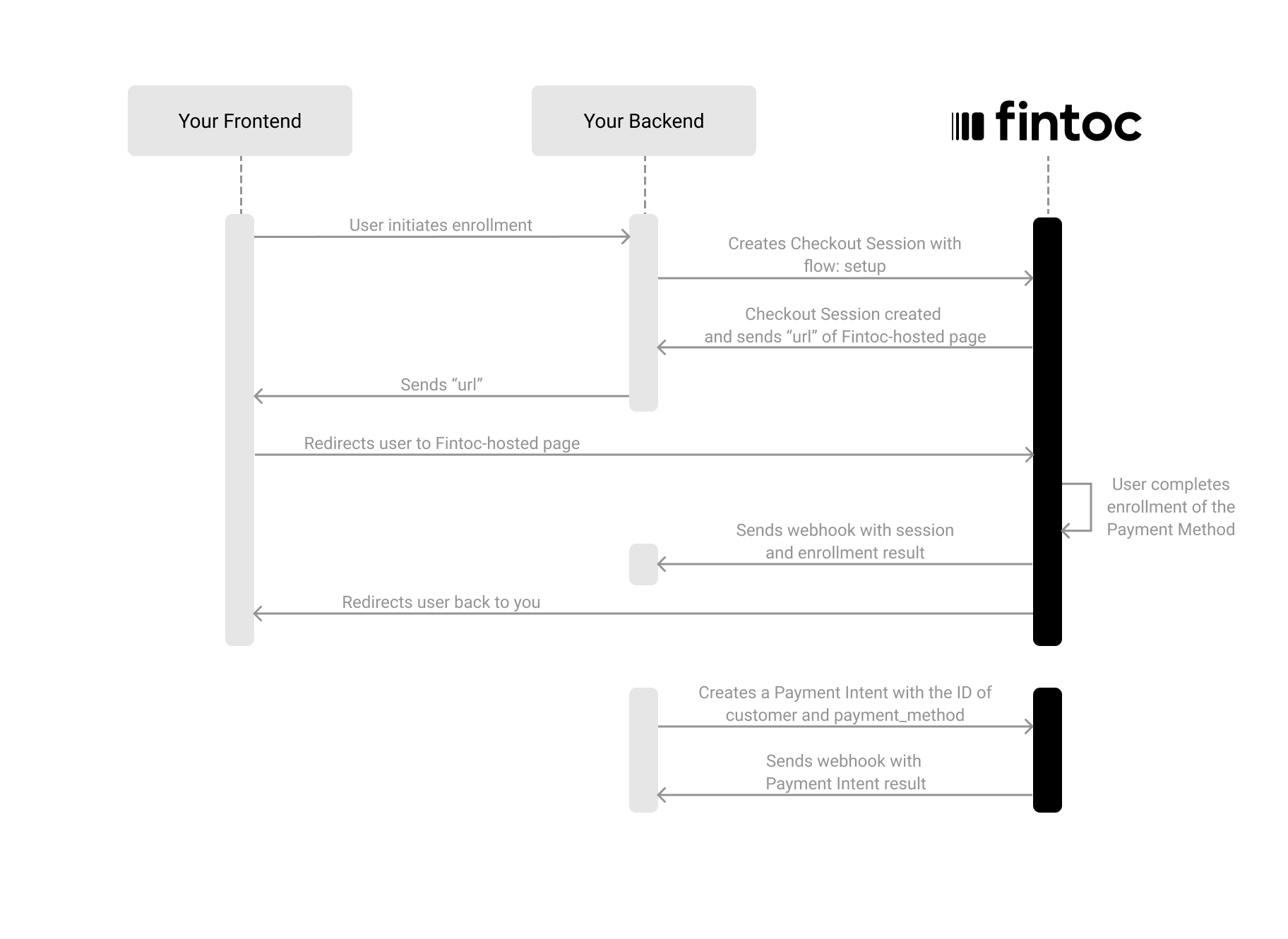
Set up a payment method and charge it later in four steps:
1. On your backend, create a Checkout Session with `flow: setup`.
2. Redirect your customer to complete the enrollment at the Fintoc-hosted checkout page.
3. Handle post-session events to save the `payment_method` and `customer`.
4. Create charges against the saved payment method using the Payment Intent API.
The following diagram shows how the setup flow works:
 ***
## Create a Checkout Session
The [Checkout Session](/reference/payments-api/checkout-sessions/checkout-session-object) with the `setup` flow represents your intent to save a payment method for future charges, without creating a recurring subscription.
Using your [Secret Key](/docs/home/api-keys), create a Checkout Session on your backend with `flow` set to `setup`:
**Server**
```curl theme={null}
curl --request POST "https://api.fintoc.com/v2/checkout_sessions" \
--header "Authorization: YOUR_SECRET_API_KEY" \
--header "Content-Type: application/json" \
--data-raw '{
"flow": "setup",
"currency": "CLP",
"success_url": "https://merchant.com/success",
"cancel_url": "https://merchant.com/cancel",
"customer_data": {
"tax_id": {
"type": "cl_rut",
"value": "11.111.111-1"
},
"name": "Felipe Castro",
"email": "jon@snow.com"
},
"metadata": {}
}'
```
```javascript Node theme={null}
const { Fintoc } = require('fintoc');
const fintoc = new Fintoc('YOUR_SECRET_API_KEY');
const checkoutSession = await fintoc.checkoutSessions.create({
flow: 'setup',
currency: 'CLP',
success_url: 'https://merchant.com/success',
cancel_url: 'https://merchant.com/cancel',
customer_data: {
tax_id: {
type: 'cl_rut',
value: '11.111.111-1'
},
name: 'Felipe Castro',
email: 'jon@snow.com'
},
metadata: {}
});
```
```python theme={null}
from fintoc import Fintoc
client = Fintoc('YOUR_SECRET_API_KEY')
checkout_session = client.checkout_sessions.create(
flow='setup',
currency='CLP',
success_url='https://merchant.com/success',
cancel_url='https://merchant.com/cancel',
customer_data={
'tax_id': {
'type': 'cl_rut',
'value': '11.111.111-1'
},
'name': 'Felipe Castro',
'email': 'jon@snow.com'
},
metadata={}
)
```
After creating the Checkout Session, Fintoc responds with the session details and a `redirect_url`:
```json theme={null}
{
"id": "cs_li5531onlFDi235",
"object": "checkout_session",
"flow": "setup",
"status": "created",
"currency": "CLP",
"customer": {
"id": "cus_NffrFeUfNV2Hib",
"object": "customer",
"email": "jon@snow.com",
"metadata": {},
"name": "Felipe Castro",
"tax_id": {
"type": "cl_rut",
"value": "11.111.111-1"
}
},
"success_url": "https://merchant.com/success",
"cancel_url": "https://merchant.com/cancel",
"redirect_url": "https://pay.fintoc.com/checkout/cs_li5531onlFDi235",
"metadata": {}
}
```
| Parameter | Example | Description |
| ------------------------ | --------------------------------- | ------------------------------------------------------------------------------------------------------------------------------------------------------------------------------------------------------------------------------------------------------------------------------------------------------------------------------------------------------------------------------------------ |
| `flow` | `setup` | **Required.** Flow type for the session. One of `payment`, `setup`, or `subscription`. Use `setup` to save a payment method without charging. |
| `currency` | `CLP` | **Required.** Three-letter ISO 4217 currency code. One of `CLP` or `MXN`. |
| `success_url` | `https://merchant.com/success` | **Required.** URL to redirect the customer after a successful enrollment. |
| `cancel_url` | `https://merchant.com/cancel` | **Required.** URL to redirect the customer if they cancel the enrollment. |
| `payment_method_types` | `["pac"]` | Payment methods available for the enrollment. One or more of `pac` (Chilean direct debit), `direct_debit` (Mexico), or `card`. |
| `customer` | `cus_3B2bODrQFje7ZVkT69xyaTSDwXQ` | **Required if no `customer_data`.** ID of an existing `Customer`. |
| `customer_data` | `{ tax_id: {...}, ... }` | **Required if no `customer`.** Data for inline customer creation. Send at least one of `email` or `tax_id`. If a `Customer` with the same `tax_id` already exists, the request returns a `409 Conflict` error. To reuse an existing `Customer`, send its `id` in `customer` instead of `customer_data`. |
| `payment_method_options` | `{ pac: { ... } }` | Options specific to each payment method, keyed by values in `payment_method_types` (for example, `pac`). For `pac`, restrict the `sender_account` with `types` (`checking_account`), `institution_id`, or `holder_id`; for `card`, restrict `kinds` (`credit`, `debit`). To apply no restriction, omit the option instead of sending an empty array because an empty array allows nothing. |
| `metadata` | `{ "order": "987654321" }` | Set of key-value pairs for storing additional information. |
****Difference from the subscription flow****
When you create a Checkout Session with `flow: setup`, Fintoc enrolls the customer's payment method and creates a `PaymentMethod`, but does **not** create a `subscription` or schedule any recurring charges. You control when and how much to charge by creating future payment intents.
### Include customer data
When creating a Checkout Session for setup, you must include customer information.
| Attribute | Type | Description |
| ---------- | -------- | ------------------------------------------------------------------------------------------------------------------------------------------------------------------------------------------------------------------------------------------------------------------------------------------------------------------------------------------------------------------------------------------------------------------------------------------------------------------------------------------------------------------------------------------------ |
| `tax_id` | `object` | **Required if no `email`.** Object that identifies the customer at a fiscal or regulatory level. The `type` is one of `cl_rut` (Chilean tax ID, RUT) or `mx_rfc` (Mexican tax ID, RFC), and `value` is the tax identifier as a string. See the [Customer object](/reference/payments-api/checkout-sessions/checkout-session-object#customer-object). If a `Customer` with the same `tax_id` already exists, the request returns a `409 Conflict` error. To reuse an existing `Customer`, send its `id` in `customer` instead of `customer_data`. |
| `name` | `string` | Full name of the customer. |
| `email` | `string` | **Required if no `tax_id`.** Email used to notify the customer about the enrollment and charges. |
| `metadata` | `object` | Set of key-value pairs for storing additional information. |
***
## Redirect the customer to complete the enrollment
Next, redirect the customer to the `redirect_url` from the response. The customer sees the Fintoc-hosted checkout page where they complete the enrollment.
After the customer completes the enrollment, Fintoc automatically redirects them to your `success_url` or `cancel_url`, depending on the outcome.
**Client**
```javascript theme={null}
window.location.assign(REDIRECT_URL_FROM_YOUR_BACKEND);
```
***
## Handle post-session events
Always use [webhooks](/docs/resources/webhooks-walkthrough) to determine the final outcome. Customers may close the tab, lose connection, or never reach your `success_url`.
### Checkout Session events
When the enrollment completes, Fintoc sends a `checkout_session.finished` event with the `customer` and `payment_method` information:
```json theme={null}
{
"id": "evt_a4xK32BanKWYn",
"object": "event",
"type": "checkout_session.finished",
"data": {
"id": "cs_li5531onlFDi235",
"object": "checkout_session",
"mode": "live",
"flow": "setup",
"status": "finished",
"currency": "CLP",
"customer": {
"id": "cus_NffrFeUfNV2Hib",
"name": "Felipe Castro",
"email": "jon@snow.com",
"tax_id": {
"type": "cl_rut",
"value": "11.111.111-1"
}
},
"payment_method": "pm_NffrFeUfNV2Hib",
"metadata": {},
"success_url": "https://merchant.com/success",
"cancel_url": "https://merchant.com/cancel"
}
}
```
### Payment Method events
Fintoc also sends a `payment_method.activated` event. The event's `data` field contains a `PaymentMethod` like this:
```json theme={null}
{
"id": "pm_NffrFeUfNV2Hib",
"object": "payment_method",
"card": null,
"created_at": "2021-10-15T15:22:11.474Z",
"customer": "cus_NffrFeUfNV2Hib",
"mode": "live",
"metadata": {},
"pac": {
"account_holder_id": "11.111.111-1",
"account_number": "19831940978",
"account_type": "checking_account",
"institution": {
"id": "cl_banco_falabella",
"country": "cl",
"name": "Banco Falabella"
},
"status": "active"
},
"type": "pac"
}
```
Store both the `customer` ID and the `payment_method` ID. You need them to create charges later.
### Events summary
You should subscribe to all the following post-session events:
| Event | Description | Recommended action |
| :-------------------------- | :-------------------------------------------------------- | :---------------------------------------------- |
| `checkout_session.finished` | Session successfully completed. Method enrolled. | Store `customer` + `payment_method`. |
| `checkout_session.expired` | Session expired before the customer completed enrollment. | Allow the customer to retry. |
| `payment_method.activated` | Payment method is active and ready for charges. | Create charges against this method when needed. |
| `payment_method.canceled` | Payment method is canceled and not available for charges. | Stop creating charges against the method. |
***
## Create a charge against the saved payment method
Once you have a saved `payment_method`, charge it by creating a Payment Intent with the `payment_method` and `customer` IDs:
**Server**
```curl theme={null}
curl --request POST "https://api.fintoc.com/v2/payment_intents" \
--header "Authorization: YOUR_SECRET_API_KEY" \
--header "Content-Type: application/json" \
--data-raw '{
"amount": 150000,
"currency": "CLP",
"customer": "cus_NffrFeUfNV2Hib",
"payment_method": "pm_NffrFeUfNV2Hib",
"metadata": {
"order_id": "order_98765"
}
}'
```
```javascript Node theme={null}
const { Fintoc } = require('fintoc');
const fintoc = new Fintoc('YOUR_SECRET_API_KEY');
const paymentIntent = await fintoc.paymentIntents.create({
amount: 150000,
currency: 'CLP',
customer: 'cus_NffrFeUfNV2Hib',
payment_method: 'pm_NffrFeUfNV2Hib',
metadata: {
order_id: 'order_98765'
}
});
```
```python theme={null}
from fintoc import Fintoc
client = Fintoc('YOUR_SECRET_API_KEY')
payment_intent = client.payment_intents.create(
amount=150000,
currency='CLP',
customer='cus_NffrFeUfNV2Hib',
payment_method='pm_NffrFeUfNV2Hib',
metadata={
'order_id': 'order_98765'
}
)
```
| Parameter | Example | Description |
| ---------------- | ------------------------------- | ---------------------------------------------------------------------------------------------------------------------------------------------------------------------------------------------------- |
| `amount` | `150000` | **Required.** A positive integer representing the amount to charge in the smallest currency unit (for example, `150000` for `CLP 150000`, since CLP has no minor unit, or `10000` for `MXN 100.00`). |
| `currency` | `CLP` | **Required.** Three-letter ISO 4217 currency code. One of `CLP` or `MXN`. |
| `customer` | `cus_NffrFeUfNV2Hib` | **Required.** ID of the `Customer` to charge. |
| `payment_method` | `pm_NffrFeUfNV2Hib` | **Required.** The saved payment method ID. |
| `metadata` | `{ "order_id": "order_98765" }` | Set of key-value pairs for storing additional information. |
Fintoc responds with the created Payment Intent:
```json theme={null}
{
"id": "pi_34i0T5AWRfIDMOJnhq9BgxXUiyt",
"object": "payment_intent",
"status": "created",
"amount": 150000,
"currency": "CLP",
"customer": "cus_NffrFeUfNV2Hib",
"payment_method": "pm_NffrFeUfNV2Hib",
"metadata": {
"order_id": "order_98765"
}
}
```
### Handle payment events
Subscribe to the following events to track the payment outcome:
| Event | Description | Recommended action |
| -------------------------- | -------------------------- | --------------------------------------------------- |
| `payment_intent.succeeded` | The charge was successful. | Fulfill the order and confirm to the customer. |
| `payment_intent.failed` | The charge failed. | Retry the charge or ask for another payment method. |
***
## Test your integration
Using your [test mode API Secret Key](/docs/resources/test-mode), create Checkout Sessions that simulate the full setup and payment flow without moving any money.
### 1) Create a setup Checkout Session using test credentials
Create a Checkout Session with `flow: setup` using your test mode Secret Key. Complete the enrollment flow on the Fintoc-hosted page using the following credentials:
**Test credentials:**
#### PAC:
* Username (RUT): `11.111.111-1`
* Password: `jonsnow`
Select the account based on the final outcome you want to test:
| Account number | Type of MFA | Correct code |
| :------------- | :--------------------------- | :------------------- |
| 813990168 | Security device | `000000` |
| 422159212 | Mobile Application - Success | `N/A` |
| 5233137377 | Mobile Application - Failure | `N/A` |
| 170086177 | SMS | `0000` |
| 746326042 | Coordinate Card | `['00', '00', '00']` |
#### Card:
| Card Number | Expiration Date | CVV | Holder Name | 3DS Challenge Code | Final Result |
| ---------------- | :-------------- | :-- | :---------- | :----------------- | ------------------------------------ |
| 4111111111111111 | Any future date | Any | Any | - | ✅ Succeeded |
| 4456524869770255 | Any future date | Any | Any | 1234 | ✅ Succeeded if code is correct |
| 4574441215190335 | Any future date | Any | Any | - | ❌ Failed due to invalid credentials |
| 4349003000047015 | Any future date | Any | Any | - | ❌ Failed due to rejected transaction |
### 2) Verify the saved payment method
After completing the test enrollment, you should receive the `checkout_session.finished` and `payment_method.activated` webhook events. Verify that:
* The `payment_method` ID is present in the event payload.
* The `customer` ID matches the customer you enrolled.
### 3) Create a test charge against the saved method
Using the `customer` and `payment_method` IDs from step 2, create a Payment Intent against the saved method. Verify that:
* You receive the `payment_intent.succeeded` event.
* The amount matches what you sent.
* The payment method used is the saved PAC or card.
Test mode does not yet support saving a Payment Method in Mexico.
***
## Create a Checkout Session
The [Checkout Session](/reference/payments-api/checkout-sessions/checkout-session-object) with the `setup` flow represents your intent to save a payment method for future charges, without creating a recurring subscription.
Using your [Secret Key](/docs/home/api-keys), create a Checkout Session on your backend with `flow` set to `setup`:
**Server**
```curl theme={null}
curl --request POST "https://api.fintoc.com/v2/checkout_sessions" \
--header "Authorization: YOUR_SECRET_API_KEY" \
--header "Content-Type: application/json" \
--data-raw '{
"flow": "setup",
"currency": "CLP",
"success_url": "https://merchant.com/success",
"cancel_url": "https://merchant.com/cancel",
"customer_data": {
"tax_id": {
"type": "cl_rut",
"value": "11.111.111-1"
},
"name": "Felipe Castro",
"email": "jon@snow.com"
},
"metadata": {}
}'
```
```javascript Node theme={null}
const { Fintoc } = require('fintoc');
const fintoc = new Fintoc('YOUR_SECRET_API_KEY');
const checkoutSession = await fintoc.checkoutSessions.create({
flow: 'setup',
currency: 'CLP',
success_url: 'https://merchant.com/success',
cancel_url: 'https://merchant.com/cancel',
customer_data: {
tax_id: {
type: 'cl_rut',
value: '11.111.111-1'
},
name: 'Felipe Castro',
email: 'jon@snow.com'
},
metadata: {}
});
```
```python theme={null}
from fintoc import Fintoc
client = Fintoc('YOUR_SECRET_API_KEY')
checkout_session = client.checkout_sessions.create(
flow='setup',
currency='CLP',
success_url='https://merchant.com/success',
cancel_url='https://merchant.com/cancel',
customer_data={
'tax_id': {
'type': 'cl_rut',
'value': '11.111.111-1'
},
'name': 'Felipe Castro',
'email': 'jon@snow.com'
},
metadata={}
)
```
After creating the Checkout Session, Fintoc responds with the session details and a `redirect_url`:
```json theme={null}
{
"id": "cs_li5531onlFDi235",
"object": "checkout_session",
"flow": "setup",
"status": "created",
"currency": "CLP",
"customer": {
"id": "cus_NffrFeUfNV2Hib",
"object": "customer",
"email": "jon@snow.com",
"metadata": {},
"name": "Felipe Castro",
"tax_id": {
"type": "cl_rut",
"value": "11.111.111-1"
}
},
"success_url": "https://merchant.com/success",
"cancel_url": "https://merchant.com/cancel",
"redirect_url": "https://pay.fintoc.com/checkout/cs_li5531onlFDi235",
"metadata": {}
}
```
| Parameter | Example | Description |
| ------------------------ | --------------------------------- | ------------------------------------------------------------------------------------------------------------------------------------------------------------------------------------------------------------------------------------------------------------------------------------------------------------------------------------------------------------------------------------------ |
| `flow` | `setup` | **Required.** Flow type for the session. One of `payment`, `setup`, or `subscription`. Use `setup` to save a payment method without charging. |
| `currency` | `CLP` | **Required.** Three-letter ISO 4217 currency code. One of `CLP` or `MXN`. |
| `success_url` | `https://merchant.com/success` | **Required.** URL to redirect the customer after a successful enrollment. |
| `cancel_url` | `https://merchant.com/cancel` | **Required.** URL to redirect the customer if they cancel the enrollment. |
| `payment_method_types` | `["pac"]` | Payment methods available for the enrollment. One or more of `pac` (Chilean direct debit), `direct_debit` (Mexico), or `card`. |
| `customer` | `cus_3B2bODrQFje7ZVkT69xyaTSDwXQ` | **Required if no `customer_data`.** ID of an existing `Customer`. |
| `customer_data` | `{ tax_id: {...}, ... }` | **Required if no `customer`.** Data for inline customer creation. Send at least one of `email` or `tax_id`. If a `Customer` with the same `tax_id` already exists, the request returns a `409 Conflict` error. To reuse an existing `Customer`, send its `id` in `customer` instead of `customer_data`. |
| `payment_method_options` | `{ pac: { ... } }` | Options specific to each payment method, keyed by values in `payment_method_types` (for example, `pac`). For `pac`, restrict the `sender_account` with `types` (`checking_account`), `institution_id`, or `holder_id`; for `card`, restrict `kinds` (`credit`, `debit`). To apply no restriction, omit the option instead of sending an empty array because an empty array allows nothing. |
| `metadata` | `{ "order": "987654321" }` | Set of key-value pairs for storing additional information. |
****Difference from the subscription flow****
When you create a Checkout Session with `flow: setup`, Fintoc enrolls the customer's payment method and creates a `PaymentMethod`, but does **not** create a `subscription` or schedule any recurring charges. You control when and how much to charge by creating future payment intents.
### Include customer data
When creating a Checkout Session for setup, you must include customer information.
| Attribute | Type | Description |
| ---------- | -------- | ------------------------------------------------------------------------------------------------------------------------------------------------------------------------------------------------------------------------------------------------------------------------------------------------------------------------------------------------------------------------------------------------------------------------------------------------------------------------------------------------------------------------------------------------ |
| `tax_id` | `object` | **Required if no `email`.** Object that identifies the customer at a fiscal or regulatory level. The `type` is one of `cl_rut` (Chilean tax ID, RUT) or `mx_rfc` (Mexican tax ID, RFC), and `value` is the tax identifier as a string. See the [Customer object](/reference/payments-api/checkout-sessions/checkout-session-object#customer-object). If a `Customer` with the same `tax_id` already exists, the request returns a `409 Conflict` error. To reuse an existing `Customer`, send its `id` in `customer` instead of `customer_data`. |
| `name` | `string` | Full name of the customer. |
| `email` | `string` | **Required if no `tax_id`.** Email used to notify the customer about the enrollment and charges. |
| `metadata` | `object` | Set of key-value pairs for storing additional information. |
***
## Redirect the customer to complete the enrollment
Next, redirect the customer to the `redirect_url` from the response. The customer sees the Fintoc-hosted checkout page where they complete the enrollment.
After the customer completes the enrollment, Fintoc automatically redirects them to your `success_url` or `cancel_url`, depending on the outcome.
**Client**
```javascript theme={null}
window.location.assign(REDIRECT_URL_FROM_YOUR_BACKEND);
```
***
## Handle post-session events
Always use [webhooks](/docs/resources/webhooks-walkthrough) to determine the final outcome. Customers may close the tab, lose connection, or never reach your `success_url`.
### Checkout Session events
When the enrollment completes, Fintoc sends a `checkout_session.finished` event with the `customer` and `payment_method` information:
```json theme={null}
{
"id": "evt_a4xK32BanKWYn",
"object": "event",
"type": "checkout_session.finished",
"data": {
"id": "cs_li5531onlFDi235",
"object": "checkout_session",
"mode": "live",
"flow": "setup",
"status": "finished",
"currency": "CLP",
"customer": {
"id": "cus_NffrFeUfNV2Hib",
"name": "Felipe Castro",
"email": "jon@snow.com",
"tax_id": {
"type": "cl_rut",
"value": "11.111.111-1"
}
},
"payment_method": "pm_NffrFeUfNV2Hib",
"metadata": {},
"success_url": "https://merchant.com/success",
"cancel_url": "https://merchant.com/cancel"
}
}
```
### Payment Method events
Fintoc also sends a `payment_method.activated` event. The event's `data` field contains a `PaymentMethod` like this:
```json theme={null}
{
"id": "pm_NffrFeUfNV2Hib",
"object": "payment_method",
"card": null,
"created_at": "2021-10-15T15:22:11.474Z",
"customer": "cus_NffrFeUfNV2Hib",
"mode": "live",
"metadata": {},
"pac": {
"account_holder_id": "11.111.111-1",
"account_number": "19831940978",
"account_type": "checking_account",
"institution": {
"id": "cl_banco_falabella",
"country": "cl",
"name": "Banco Falabella"
},
"status": "active"
},
"type": "pac"
}
```
Store both the `customer` ID and the `payment_method` ID. You need them to create charges later.
### Events summary
You should subscribe to all the following post-session events:
| Event | Description | Recommended action |
| :-------------------------- | :-------------------------------------------------------- | :---------------------------------------------- |
| `checkout_session.finished` | Session successfully completed. Method enrolled. | Store `customer` + `payment_method`. |
| `checkout_session.expired` | Session expired before the customer completed enrollment. | Allow the customer to retry. |
| `payment_method.activated` | Payment method is active and ready for charges. | Create charges against this method when needed. |
| `payment_method.canceled` | Payment method is canceled and not available for charges. | Stop creating charges against the method. |
***
## Create a charge against the saved payment method
Once you have a saved `payment_method`, charge it by creating a Payment Intent with the `payment_method` and `customer` IDs:
**Server**
```curl theme={null}
curl --request POST "https://api.fintoc.com/v2/payment_intents" \
--header "Authorization: YOUR_SECRET_API_KEY" \
--header "Content-Type: application/json" \
--data-raw '{
"amount": 150000,
"currency": "CLP",
"customer": "cus_NffrFeUfNV2Hib",
"payment_method": "pm_NffrFeUfNV2Hib",
"metadata": {
"order_id": "order_98765"
}
}'
```
```javascript Node theme={null}
const { Fintoc } = require('fintoc');
const fintoc = new Fintoc('YOUR_SECRET_API_KEY');
const paymentIntent = await fintoc.paymentIntents.create({
amount: 150000,
currency: 'CLP',
customer: 'cus_NffrFeUfNV2Hib',
payment_method: 'pm_NffrFeUfNV2Hib',
metadata: {
order_id: 'order_98765'
}
});
```
```python theme={null}
from fintoc import Fintoc
client = Fintoc('YOUR_SECRET_API_KEY')
payment_intent = client.payment_intents.create(
amount=150000,
currency='CLP',
customer='cus_NffrFeUfNV2Hib',
payment_method='pm_NffrFeUfNV2Hib',
metadata={
'order_id': 'order_98765'
}
)
```
| Parameter | Example | Description |
| ---------------- | ------------------------------- | ---------------------------------------------------------------------------------------------------------------------------------------------------------------------------------------------------- |
| `amount` | `150000` | **Required.** A positive integer representing the amount to charge in the smallest currency unit (for example, `150000` for `CLP 150000`, since CLP has no minor unit, or `10000` for `MXN 100.00`). |
| `currency` | `CLP` | **Required.** Three-letter ISO 4217 currency code. One of `CLP` or `MXN`. |
| `customer` | `cus_NffrFeUfNV2Hib` | **Required.** ID of the `Customer` to charge. |
| `payment_method` | `pm_NffrFeUfNV2Hib` | **Required.** The saved payment method ID. |
| `metadata` | `{ "order_id": "order_98765" }` | Set of key-value pairs for storing additional information. |
Fintoc responds with the created Payment Intent:
```json theme={null}
{
"id": "pi_34i0T5AWRfIDMOJnhq9BgxXUiyt",
"object": "payment_intent",
"status": "created",
"amount": 150000,
"currency": "CLP",
"customer": "cus_NffrFeUfNV2Hib",
"payment_method": "pm_NffrFeUfNV2Hib",
"metadata": {
"order_id": "order_98765"
}
}
```
### Handle payment events
Subscribe to the following events to track the payment outcome:
| Event | Description | Recommended action |
| -------------------------- | -------------------------- | --------------------------------------------------- |
| `payment_intent.succeeded` | The charge was successful. | Fulfill the order and confirm to the customer. |
| `payment_intent.failed` | The charge failed. | Retry the charge or ask for another payment method. |
***
## Test your integration
Using your [test mode API Secret Key](/docs/resources/test-mode), create Checkout Sessions that simulate the full setup and payment flow without moving any money.
### 1) Create a setup Checkout Session using test credentials
Create a Checkout Session with `flow: setup` using your test mode Secret Key. Complete the enrollment flow on the Fintoc-hosted page using the following credentials:
**Test credentials:**
#### PAC:
* Username (RUT): `11.111.111-1`
* Password: `jonsnow`
Select the account based on the final outcome you want to test:
| Account number | Type of MFA | Correct code |
| :------------- | :--------------------------- | :------------------- |
| 813990168 | Security device | `000000` |
| 422159212 | Mobile Application - Success | `N/A` |
| 5233137377 | Mobile Application - Failure | `N/A` |
| 170086177 | SMS | `0000` |
| 746326042 | Coordinate Card | `['00', '00', '00']` |
#### Card:
| Card Number | Expiration Date | CVV | Holder Name | 3DS Challenge Code | Final Result |
| ---------------- | :-------------- | :-- | :---------- | :----------------- | ------------------------------------ |
| 4111111111111111 | Any future date | Any | Any | - | ✅ Succeeded |
| 4456524869770255 | Any future date | Any | Any | 1234 | ✅ Succeeded if code is correct |
| 4574441215190335 | Any future date | Any | Any | - | ❌ Failed due to invalid credentials |
| 4349003000047015 | Any future date | Any | Any | - | ❌ Failed due to rejected transaction |
### 2) Verify the saved payment method
After completing the test enrollment, you should receive the `checkout_session.finished` and `payment_method.activated` webhook events. Verify that:
* The `payment_method` ID is present in the event payload.
* The `customer` ID matches the customer you enrolled.
### 3) Create a test charge against the saved method
Using the `customer` and `payment_method` IDs from step 2, create a Payment Intent against the saved method. Verify that:
* You receive the `payment_intent.succeeded` event.
* The amount matches what you sent.
* The payment method used is the saved PAC or card.
Test mode does not yet support saving a Payment Method in Mexico.