> ## Documentation Index
> Fetch the complete documentation index at: https://docs.fintoc.com/llms.txt
> Use this file to discover all available pages before exploring further.
# Quickstart
> Try the Checkout Session API in less than 10 minutes
To start using Fintoc's Checkout Session API, you just need to create an account on our Dashboard and follow these five steps:
1. Get your test API Keys
2. Create a Checkout Session
3. Redirect your user to the Fintoc-hosted checkout page
4. Handle post-payments events
5. Make your first payment
# Step 1: Initial Setup
## Get your test API Keys
Every interaction with the Fintoc API must be authenticated with the [API Keys](/docs/home/api-keys) of your Fintoc account. If an interaction with the API does not include your API Key or includes an incorrect API Key, Fintoc will return an error.
Every Fintoc account has two key pairs: one corresponds to the [test mode](), while the other corresponds to the actual API environment. Every resource is stored either in [test mode or in live mode](/docs/resources/test-mode), and resources from one environment cannot be manipulated by resources from the other environment.
Your API Keys will be available in the [Dashboard](https://app.fintoc.com). First you need to create an account on the Fintoc Dashboard. Once your Fintoc account has been created, you will be able to get your API Keys. In this case, you must use the **Public Key** and **Secret Key** from [test mode](/docs/resources/test-mode). To easily identify them, we added the prefix **pk\_test\_** and **sk\_test\_**, respectively.
## Optional: Install Fintoc's backend SDK
If you’re using Python, you can install our [Python SDK](https://github.com/fintoc-com/fintoc-python) to make it easier to interact with our API. The SDK automatically handles pagination, lets you easily verify Fintoc's webhooks, and offers many other helpful features.
```
pip install fintoc
```
If you’re using Node, you can install our [Node SDK](https://github.com/fintoc-com/fintoc-node) to make it easier to interact with our API. The SDK automatically handles pagination, lets you easily verify Fintoc's webhooks, and offers many other helpful features.
```
npm install fintoc
```
# Step 2: Create a Checkout Session
Using your test **Secret Key**, create a Checkout Session from your backend with the amount and currency of the payment. Always create the Checkout Session from your backend, or a malicious user could alter any of those fields.
If you plan on using the Refunds product, you must include a `customer_email` in the Checkout Session request.
Here's an example of creating a Checkout Session for Chile:
```curl theme={null}
curl --request POST "https://api.fintoc.com/v2/checkout_sessions" \
--header "Authorization: YOUR_TEST_SECRET_API_KEY" \
--header "Content-Type: application/json" \
--data-raw '{
"amount": 2476,
"currency": "CLP",
"customer_email": "name@example.com",
"success_url": "https://merchant.com/success",
"cancel_url": "https://merchant.com/987654321"
}'
```
```javascript Node theme={null}
const { Fintoc } = require('fintoc');
const fintoc = new Fintoc('YOUR_TEST_SECRET_API_KEY');
const checkoutSession = await fintoc.checkoutSessions.create({
amount: 1000,
currency: 'mxn',
customer_email: 'name@example.com'
});
```
```python theme={null}
from fintoc import Fintoc
client = Fintoc('YOUR_TEST_SECRET_API_KEY')
checkout_session = client.checkout_sessions.create(
amount=1000,
currency='clp',
customer_email='name@example.com'
)
```
```ruby theme={null}
require 'net/http'
require 'uri'
require 'json'
checkout_session = {
amount: 1000,
currency: 'clp',
customer_email: 'name@example.com'
}
uri = URI("https://api.fintoc.com/v2/checkout_sessions")
header = {
Accept: 'application/json', Authorization: 'YOUR_TEST_SECRET_API_KEY'
}
http = Net::HTTP.new(uri.host, uri.port)
request = Net::HTTP::Post.new(uri.request_uri, header)
request.body = checkout_session.to_json
response = http.request(request)
```
If you want to create a Checkout Session for Mexico, change the currency to `MXN`.
**Currencies are represented as integers**
The Fintoc API represents currencies in its smallest possible units with no decimals (as an integer). That means that an **amount of MXN 10.29 gets represented by Fintoc as 1029**. You can read more about currencies [here](/docs/home/currencies).
The response should look like this:
```json theme={null}
{
"id": "cs_li5531onlFDi235",
"object": "checkout_session",
"mode": "test",
"status": "created",
"amount": 350000,
"currency": "CLP",
"created_at": "2024-06-04T15:32:46.721Z",
"updated_at": "2024-06-04T15:32:46.721Z",
"success_url": "https://merchant.com/success",
"cancel_url": "https://merchant.com/987654321",
"redirect_url": "https://checkout.fintoc.com/checkout_session_01HXY3Z7X5YQ54V8G2E1KJQAVF",
"metadata": {},
"customer": {}
}
```
# Step 3: Redirect your user to the Fintoc-hosted checkout page
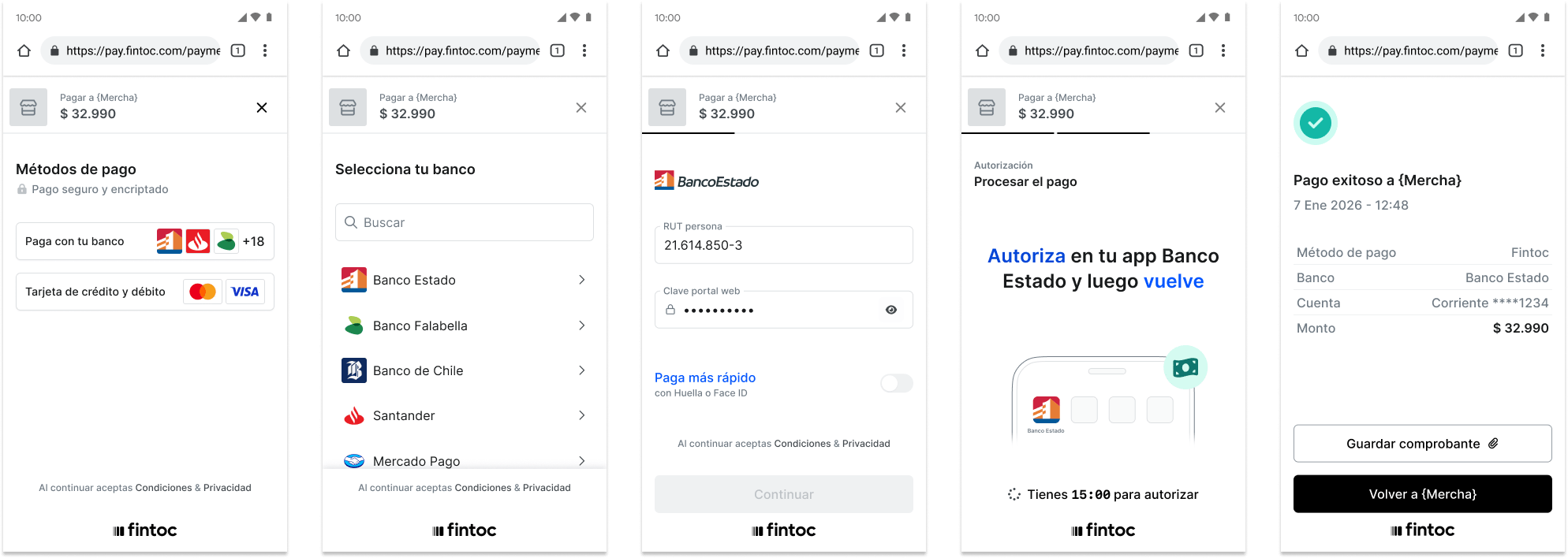
Your new created `checkout_session` should contain the `redirect_url` attribute. You must redirect your user to this url to complete the payment flow.
 # Step 4: Handle post-payment events
Fintoc sends a `checkout_session.finished` event when the payment related to a session is completed. Use the [webhook guide](/docs/resources/webhooks-walkthrough) to receive these events and run actions, such as sending an order confirmation email to your customer, logging the sale in a database, or starting a shipping workflow.
Listen for these events rather than waiting on a callback from the client. From the client side, On the client, the customer could close the browser window or quit the app before the callback executes, and malicious clients could manipulate the response.
We recommend handling the following events:
| Event | Description | Action |
| :-------------------------- | :------------------------------------------------------------------------------------------------------------------------------------------------------ | :--------------------------------------------------------------------------------------------------------------------- |
| `checkout_session.finished` | Sent when a customer has completed a payment. The webhook contains information about the Payment including its final status. | Depending on the final status of the related payment, confirm the order to the customer or offer to retry the payment. |
| `checkout_session.expired` | Triggers when a customer leaves the payment flow before finishing | Offer the customer another attempt to pay. |
| `payment_intent.succeeded` | Sent when the payment related to a checkout session succeeds. It's useful for confirming payments that were previously in pending status | Confirm the customer's order |
| `payment_intent.failed` | Sent when the payment related to a checkout session fails. It's used to determinate the final status of payments that were previously in pending status | Offer the customer another attempt to pay. |
**Learn more about webhooks**
To learn more about how to create your own webhook endpoint, test your webhook endpoint and security best practices read our [Webhooks guide](/docs/resources/webhooks-walkthrough).
# Step 5: Make your first payment
Once the you access the Fintoc-hosted checkout page, follow the payment flow using [Fintoc's test special values](/docs/payments/payment-initiation-test-your-integration). For a successful payment, you can use one of these values:
* In Chile, select any bank and login using the `41614850-3` rut and `jonsnow` password. Once you are logged in to the bank, select the account with the number `422159212`. After you select that account, wait 5 seconds and the payment should be successful.
* For Mexico, select any bank and write the number `5555555555`. Wait 5 seconds and the payment should be successful.
You should have received a `checkout_session.finished` event containing a successful payment in your webhook endpoint.
Congratulations! You just made your first Fintoc payment! To test different payment flows, see [Fintoc's test special values](/docs/payments/payment-initiation-test-your-integration).
# Step 4: Handle post-payment events
Fintoc sends a `checkout_session.finished` event when the payment related to a session is completed. Use the [webhook guide](/docs/resources/webhooks-walkthrough) to receive these events and run actions, such as sending an order confirmation email to your customer, logging the sale in a database, or starting a shipping workflow.
Listen for these events rather than waiting on a callback from the client. From the client side, On the client, the customer could close the browser window or quit the app before the callback executes, and malicious clients could manipulate the response.
We recommend handling the following events:
| Event | Description | Action |
| :-------------------------- | :------------------------------------------------------------------------------------------------------------------------------------------------------ | :--------------------------------------------------------------------------------------------------------------------- |
| `checkout_session.finished` | Sent when a customer has completed a payment. The webhook contains information about the Payment including its final status. | Depending on the final status of the related payment, confirm the order to the customer or offer to retry the payment. |
| `checkout_session.expired` | Triggers when a customer leaves the payment flow before finishing | Offer the customer another attempt to pay. |
| `payment_intent.succeeded` | Sent when the payment related to a checkout session succeeds. It's useful for confirming payments that were previously in pending status | Confirm the customer's order |
| `payment_intent.failed` | Sent when the payment related to a checkout session fails. It's used to determinate the final status of payments that were previously in pending status | Offer the customer another attempt to pay. |
**Learn more about webhooks**
To learn more about how to create your own webhook endpoint, test your webhook endpoint and security best practices read our [Webhooks guide](/docs/resources/webhooks-walkthrough).
# Step 5: Make your first payment
Once the you access the Fintoc-hosted checkout page, follow the payment flow using [Fintoc's test special values](/docs/payments/payment-initiation-test-your-integration). For a successful payment, you can use one of these values:
* In Chile, select any bank and login using the `41614850-3` rut and `jonsnow` password. Once you are logged in to the bank, select the account with the number `422159212`. After you select that account, wait 5 seconds and the payment should be successful.
* For Mexico, select any bank and write the number `5555555555`. Wait 5 seconds and the payment should be successful.
You should have received a `checkout_session.finished` event containing a successful payment in your webhook endpoint.
Congratulations! You just made your first Fintoc payment! To test different payment flows, see [Fintoc's test special values](/docs/payments/payment-initiation-test-your-integration).