> ## Documentation Index
> Fetch the complete documentation index at: https://docs.fintoc.com/llms.txt
> Use this file to discover all available pages before exploring further.
# Receive transfers
> Automatically track and reconcile your incoming payments in real time.
## Inbound transfers in Mexico
Complete the setup guide first. To receive inbound transfers, follow these steps:
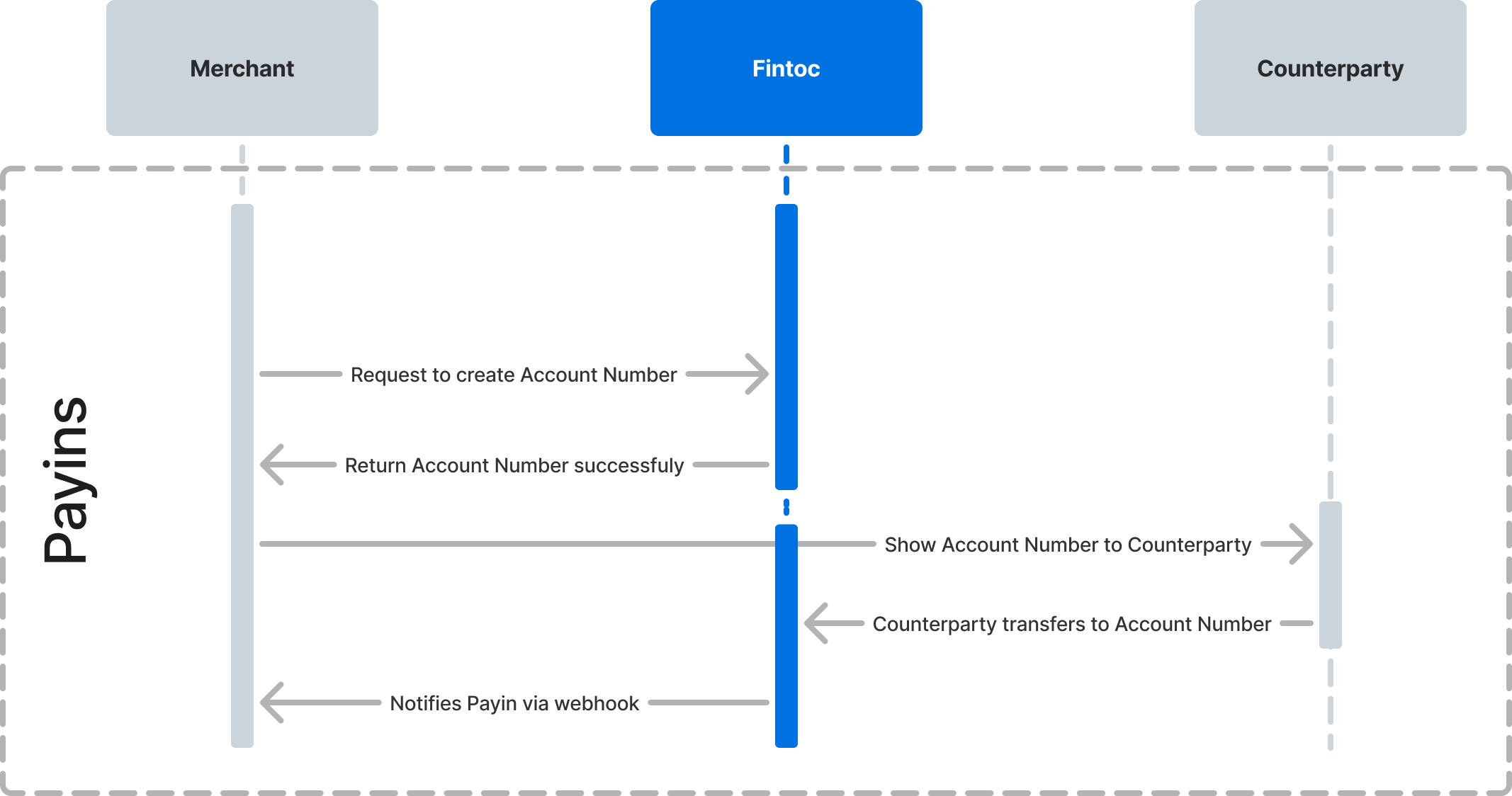
1. Create an `account_number`, a standardized Mexican bank account number (CLABE) used by the Sistema de Pagos Electrónicos Interbancarios (SPEI) rail, with your secret key.
2. Create a webhook endpoint to handle inbound transfer events.
3. Receive a transfer at the account number and get notified by webhook.
The following diagram shows how Fintoc interacts with you and the counterparty creating the payin.
### Step 1: Create an account number (CLABE)
An `AccountNumber` represents a CLABE. You can think of the account number as a reference that you assign to a customer or order to reconcile your incoming payments. Assign one account number per customer, so a transfer to that account number identifies the customer it came from. To learn more about account numbers, see the [data model](/docs/transfers/transfers-overview/v2-transfers-account-number-data-model).
#### Attach arbitrary key-value data to your account number
When you create an account number, attach arbitrary key-value data to the [`metadata`](/reference/fintoc-api/metadata) object. Use `metadata` to store your unique identifier for that account number, such as your internal customer ID. When you receive an inbound transfer, Fintoc attaches the `metadata` object so you can reconcile the transfer against your internal records.
#### Example
Using your test secret key and your account ID, create an `AccountNumber` from your backend, attaching an internal customer ID `id_cliente`:
```curl theme={null}
curl --request POST \
--url https://api.fintoc.com/v2/account_numbers \
--header 'Authorization: sk_test_9c8d8CeyBTx1VcJzuDgpm4H' \
--header 'accept: application/json' \
--header 'content-type: application/json' \
--data '
{
"account_id": "acc_Lq7dP901xZgA2B",
"metadata": {
"id_cliente": "12343212"
}
}
'
```
```node Node theme={null}
const accountNumber = await fintoc.v2.accountNumbers.create({
account_id: 'acc_Lq7dP901xZgA2B',
metadata: {
id_cliente: '12343212',
},
});
```
```python Python theme={null}
account_number = client.v2.account_numbers.create(
account_id="acc_Lq7dP901xZgA2B",
metadata={"id_cliente": "12343212"}
)
```
The response should look like this:
```json theme={null}
{
"id": "acno_Kasf91034gj1AD",
"object": "account_number",
"description": "My payins",
"number": "111111111111111111",
"account_id": "acc_Lq7dP901xZgA2B",
"created_at": "2024-03-01T20:09:42.949787176Z",
"mode": "test",
"metadata": {
"id_cliente": "12343212"
}
}
```
### Step 2: Create a webhook endpoint to handle inbound transfer events
Whenever you receive an inbound transfer, Fintoc sends a `transfer.inbound.succeeded` event. Follow the [webhook guide](/docs/resources/webhooks-walkthrough) to learn how to create a webhook endpoint to receive these events and run actions.
The `transfer.inbound.succeeded` event looks like this:
```json theme={null}
{
"id": "evt_a4xK32BanKWYn",
"type": "transfer.inbound.succeeded",
"object": "event",
"data": {
"id": "tr_jKaHD105H",
"object": "transfer",
"direction": "inbound",
"status": "succeeded",
"amount": 2864,
"currency": "mxn",
"mode": "test",
"post_date": "2020-04-17T00:00:00.000Z",
"transaction_date": "2020-04-17T05:12:41.462Z",
"comment": "Electricity bill",
"reference_id": "130824",
"receipt_url": "https://www.banxico.org.mx/cep/",
"tracking_key": "s2123423423324334",
"return_reason": null,
"account_number": {
"id": "acno_Kasf91034gj1AD",
"object": "account_number",
"account_id": "acc_Lq7dP901xZgA2B",
"description": "My payins",
"number": "111111111111111111",
"created_at": "2024-03-01T20:09:42.949787176Z",
"mode": "test",
"metadata": {
"id_cliente": "12343212"
}
},
"counterparty": {
"holder_id": "AAA010101AAA",
"holder_name": "Test Customer 1",
"account_number": "000000000000000000",
"type": "clabe",
"institution": {
"id": "40012",
"name": "BBVA Mexico",
"country": "mx"
}
}
},
"created_at": "2020-04-22T21:10:19.254Z",
"mode": "test"
}
```
### Step 3: Receive a transfer at the account number
Now that you have created an account number and added a webhook endpoint to handle notifications, you can transfer to it and start reconciling your payments.
#### Test the integration
In `test` mode, use the `/v2/simulate/receive-transfer` endpoint to simulate an inbound transfer. The behavior is identical to a real transfer sent to the same account number. Pass your test secret key, the `account_number_id` you created, an `amount` in the smallest currency unit, and the lowercase ISO 4217 `currency` code:
```curl theme={null}
curl --request POST \
--url https://api.fintoc.com/v2/simulate/receive-transfer \
--header 'Authorization: sk_test_9c8d8CeyBTx1VcJzuDgpm4H' \
-d account_number_id=acno_Kasf91034gj1AD \
-d amount=2864 \
-d currency=mxn
```
```node Node theme={null}
const transfer = await fintoc.v2.simulate.receiveTransfer({
account_number_id: 'acno_Kasf91034gj1AD',
amount: 2864,
currency: 'mxn',
});
```
```python Python theme={null}
transfer = client.v2.simulate.receive_transfer(
account_number_id="acno_Kasf91034gj1AD",
amount=2864,
currency="mxn",
)
```
```json Response theme={null}
{
"id": "tr_jKaHD105H",
"object": "transfer",
"direction": "inbound",
"status": "succeeded",
"amount": 2864,
"currency": "mxn",
"mode": "test",
"post_date": "2020-04-17T00:00:00.000Z",
"transaction_date": "2020-04-17T05:12:41.462Z",
"comment": "Electricity bill",
"reference_id": "130824",
"receipt_url": "https://www.banxico.org.mx/cep/",
"tracking_key": "s2123423423324334",
"return_reason": null,
"account_number": {
"id": "acno_Kasf91034gj1AD",
"object": "account_number",
"account_id": "acc_Lq7dP901xZgA2B",
"description": "My payins",
"number": "111111111111111111",
"created_at": "2024-03-01T20:09:42.949787176Z",
"mode": "test",
"metadata": {
"id_cliente": "12343212"
}
},
"counterparty": {
"holder_id": "AAA010101AAA",
"holder_name": "Test Customer 1",
"account_number": "000000000000000000",
"type": "clabe",
"institution": {
"id": "40012",
"name": "BBVA Mexico",
"country": "mx"
}
}
}
```
The endpoint settles the transfer and delivers a `transfer.inbound.succeeded` event to your webhook endpoint with the payload shown above. Receiving that event confirms your integration is working. For the full set of test values, see [Test your integration](/docs/transfers/transfers-setup/test-your-integration).
## Inbound transfers in Chile
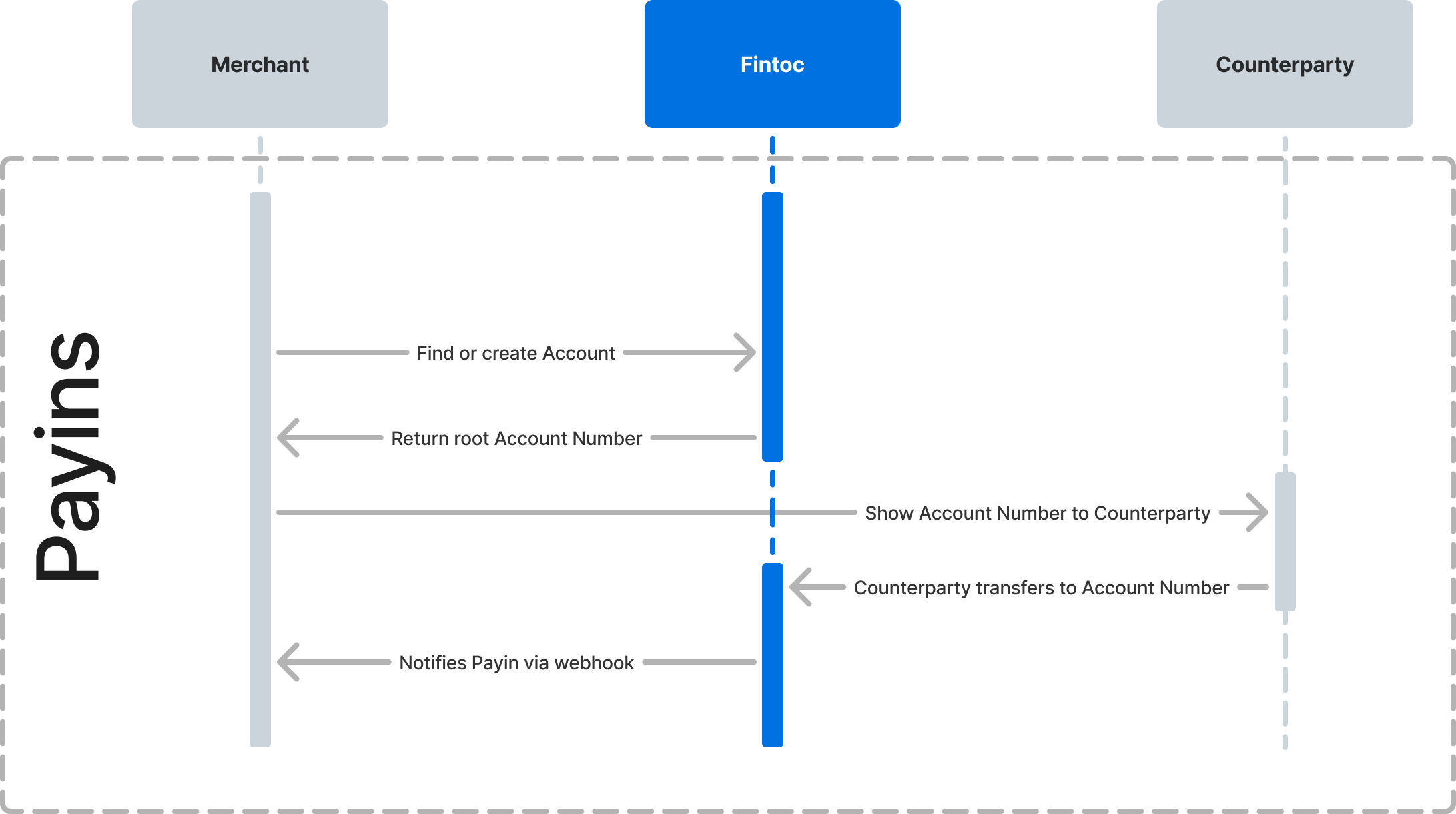
Complete the setup guide first. To receive inbound transfers, follow these steps:
1. Identify your account and its `root_account_number`, the account number that receives the transfer. See the [account data model](/docs/transfers/transfers-overview/v2-transfers-account-number-data-model) to learn how it is provisioned.
2. Create a webhook endpoint to handle inbound transfer events.
3. Receive a transfer at your account and get notified by webhook.
The following diagram shows how Fintoc interacts with you and the counterparty creating the payin.
 ### Step 1: Identify your account
Each Chilean account has a `root_account_number`, the account number that receives inbound transfers. This is the `account_number` that appears in the `transfer.inbound.succeeded` payload below. See the [account data model](/docs/transfers/transfers-overview/v2-transfers-account-number-data-model) to learn how it is provisioned.
### Step 2: Create a webhook endpoint to handle inbound transfer events
Whenever you receive an inbound transfer, Fintoc sends a `transfer.inbound.succeeded` event. Follow the [webhook guide](/docs/resources/webhooks-walkthrough) to learn how to create a webhook endpoint to receive these events and run actions.
The `transfer.inbound.succeeded` event looks like this:
```json theme={null}
{
"id": "evt_a4xK32BanKWYn",
"type": "transfer.inbound.succeeded",
"object": "event",
"data": {
"id": "tr_jKaHD105H",
"object": "transfer",
"direction": "inbound",
"status": "succeeded",
"amount": 2864,
"currency": "clp",
"mode": "test",
"post_date": "2020-04-17T00:00:00.000Z",
"transaction_date": "2020-04-17T05:12:41.462Z",
"comment": "Electricity bill",
"reference_id": null,
"receipt_url": null,
"tracking_key": null,
"return_reason": null,
"account_number": {
"id": "acno_Kasf91034gj1AD",
"object": "account_number",
"account_id": "acc_Lq7dP901xZgA2B",
"description": "My payins",
"number": "111111111111111111",
"created_at": "2024-03-01T20:09:42.949787176Z",
"mode": "test",
"metadata": {
"id_cliente": "12343212"
}
},
"counterparty": {
"holder_id": "11111111-1",
"holder_name": "Test Customer 1",
"account_number": "000000000",
"type": "checking_account",
"code": "01",
"institution": {
"id": "cl_banco_santander",
"name": "Banco Santander",
"country": "cl"
}
}
},
"created_at": "2020-04-22T21:10:19.254Z",
"mode": "test"
}
```
### Step 3: Receive a transfer at your account
Now that you have identified your account and its `root_account_number` and added a webhook endpoint to handle notifications, you can transfer to it and start reconciling your payments.
#### Test the integration
In `test` mode, use the `/v2/simulate/receive-transfer` endpoint to simulate an inbound transfer. The behavior is identical to a real transfer sent to the same account number. Pass your test secret key, the `account_number_id` for your account, an `amount` in the smallest currency unit, and the lowercase ISO 4217 `currency` code:
```curl theme={null}
curl --request POST \
--url https://api.fintoc.com/v2/simulate/receive-transfer \
--header 'Authorization: sk_test_9c8d8CeyBTx1VcJzuDgpm4H' \
-d account_number_id=acno_Kasf91034gj1AD \
-d amount=2864 \
-d currency=clp
```
```node Node theme={null}
const transfer = await fintoc.v2.simulate.receiveTransfer({
account_number_id: 'acno_Kasf91034gj1AD',
amount: 2864,
currency: 'clp',
});
```
```python Python theme={null}
transfer = client.v2.simulate.receive_transfer(
account_number_id="acno_Kasf91034gj1AD",
amount=2864,
currency="clp",
)
```
```json Response theme={null}
{
"id": "tr_jKaHD105H",
"object": "transfer",
"direction": "inbound",
"status": "succeeded",
"amount": 2864,
"currency": "clp",
"mode": "test",
"post_date": "2020-04-17T00:00:00.000Z",
"transaction_date": "2020-04-17T05:12:41.462Z",
"comment": "Electricity bill",
"reference_id": null,
"receipt_url": null,
"tracking_key": null,
"return_reason": null,
"account_number": {
"id": "acno_Kasf91034gj1AD",
"object": "account_number",
"account_id": "acc_Lq7dP901xZgA2B",
"description": "My payins",
"number": "111111111111111111",
"created_at": "2024-03-01T20:09:42.949787176Z",
"mode": "test",
"metadata": {
"id_cliente": "12343212"
}
},
"counterparty": {
"holder_id": "11111111-1",
"holder_name": "Test Customer 1",
"account_number": "000000000",
"type": "checking_account",
"code": "01",
"institution": {
"id": "cl_banco_santander",
"name": "Banco Santander",
"country": "cl"
}
}
}
```
The endpoint settles the transfer and delivers a `transfer.inbound.succeeded` event to your webhook endpoint with the payload shown above. Receiving that event confirms your integration is working. For the full set of test values, see [Test your integration](/docs/transfers/transfers-setup/test-your-integration).
### Step 1: Identify your account
Each Chilean account has a `root_account_number`, the account number that receives inbound transfers. This is the `account_number` that appears in the `transfer.inbound.succeeded` payload below. See the [account data model](/docs/transfers/transfers-overview/v2-transfers-account-number-data-model) to learn how it is provisioned.
### Step 2: Create a webhook endpoint to handle inbound transfer events
Whenever you receive an inbound transfer, Fintoc sends a `transfer.inbound.succeeded` event. Follow the [webhook guide](/docs/resources/webhooks-walkthrough) to learn how to create a webhook endpoint to receive these events and run actions.
The `transfer.inbound.succeeded` event looks like this:
```json theme={null}
{
"id": "evt_a4xK32BanKWYn",
"type": "transfer.inbound.succeeded",
"object": "event",
"data": {
"id": "tr_jKaHD105H",
"object": "transfer",
"direction": "inbound",
"status": "succeeded",
"amount": 2864,
"currency": "clp",
"mode": "test",
"post_date": "2020-04-17T00:00:00.000Z",
"transaction_date": "2020-04-17T05:12:41.462Z",
"comment": "Electricity bill",
"reference_id": null,
"receipt_url": null,
"tracking_key": null,
"return_reason": null,
"account_number": {
"id": "acno_Kasf91034gj1AD",
"object": "account_number",
"account_id": "acc_Lq7dP901xZgA2B",
"description": "My payins",
"number": "111111111111111111",
"created_at": "2024-03-01T20:09:42.949787176Z",
"mode": "test",
"metadata": {
"id_cliente": "12343212"
}
},
"counterparty": {
"holder_id": "11111111-1",
"holder_name": "Test Customer 1",
"account_number": "000000000",
"type": "checking_account",
"code": "01",
"institution": {
"id": "cl_banco_santander",
"name": "Banco Santander",
"country": "cl"
}
}
},
"created_at": "2020-04-22T21:10:19.254Z",
"mode": "test"
}
```
### Step 3: Receive a transfer at your account
Now that you have identified your account and its `root_account_number` and added a webhook endpoint to handle notifications, you can transfer to it and start reconciling your payments.
#### Test the integration
In `test` mode, use the `/v2/simulate/receive-transfer` endpoint to simulate an inbound transfer. The behavior is identical to a real transfer sent to the same account number. Pass your test secret key, the `account_number_id` for your account, an `amount` in the smallest currency unit, and the lowercase ISO 4217 `currency` code:
```curl theme={null}
curl --request POST \
--url https://api.fintoc.com/v2/simulate/receive-transfer \
--header 'Authorization: sk_test_9c8d8CeyBTx1VcJzuDgpm4H' \
-d account_number_id=acno_Kasf91034gj1AD \
-d amount=2864 \
-d currency=clp
```
```node Node theme={null}
const transfer = await fintoc.v2.simulate.receiveTransfer({
account_number_id: 'acno_Kasf91034gj1AD',
amount: 2864,
currency: 'clp',
});
```
```python Python theme={null}
transfer = client.v2.simulate.receive_transfer(
account_number_id="acno_Kasf91034gj1AD",
amount=2864,
currency="clp",
)
```
```json Response theme={null}
{
"id": "tr_jKaHD105H",
"object": "transfer",
"direction": "inbound",
"status": "succeeded",
"amount": 2864,
"currency": "clp",
"mode": "test",
"post_date": "2020-04-17T00:00:00.000Z",
"transaction_date": "2020-04-17T05:12:41.462Z",
"comment": "Electricity bill",
"reference_id": null,
"receipt_url": null,
"tracking_key": null,
"return_reason": null,
"account_number": {
"id": "acno_Kasf91034gj1AD",
"object": "account_number",
"account_id": "acc_Lq7dP901xZgA2B",
"description": "My payins",
"number": "111111111111111111",
"created_at": "2024-03-01T20:09:42.949787176Z",
"mode": "test",
"metadata": {
"id_cliente": "12343212"
}
},
"counterparty": {
"holder_id": "11111111-1",
"holder_name": "Test Customer 1",
"account_number": "000000000",
"type": "checking_account",
"code": "01",
"institution": {
"id": "cl_banco_santander",
"name": "Banco Santander",
"country": "cl"
}
}
}
```
The endpoint settles the transfer and delivers a `transfer.inbound.succeeded` event to your webhook endpoint with the payload shown above. Receiving that event confirms your integration is working. For the full set of test values, see [Test your integration](/docs/transfers/transfers-setup/test-your-integration).