> ## Documentation Index
> Fetch the complete documentation index at: https://docs.fintoc.com/llms.txt
> Use this file to discover all available pages before exploring further.
# Transfer
A `Transfer` is a single money movement, inbound or outbound. Inbound transfers are tied to an Account Number; outbound transfers debit an `Account`. This page explains the `Transfer` data model: the `Counterparty`, statuses, limits, returns, and authorization. For the field-by-field reference, see [the `Transfer` object](/reference/transfers-api/transfers/transfer-object).
## Transfer counterparty
Each `Transfer` includes a nested `Counterparty` object that represents the other party in the transfer: either the sender or the recipient, depending on the direction.
The `Counterparty` object includes information such as:
* Name of the counterparty (e.g. a customer, supplier, or partner).
* Bank account details, like account number and bank code.
You can think of the `Counterparty` as the “who” of the transfer:
* For inbound transfers, the `Counterparty` is the sender, the entity that initiated the transfer to your Account Number.
* For outbound transfers, the `Counterparty` is the recipient, the entity that receives funds from your `Account`.
This structure gives you one consistent way to view and reconcile every transfer, regardless of the counterparty.
## Transfer statuses and webhook notifications
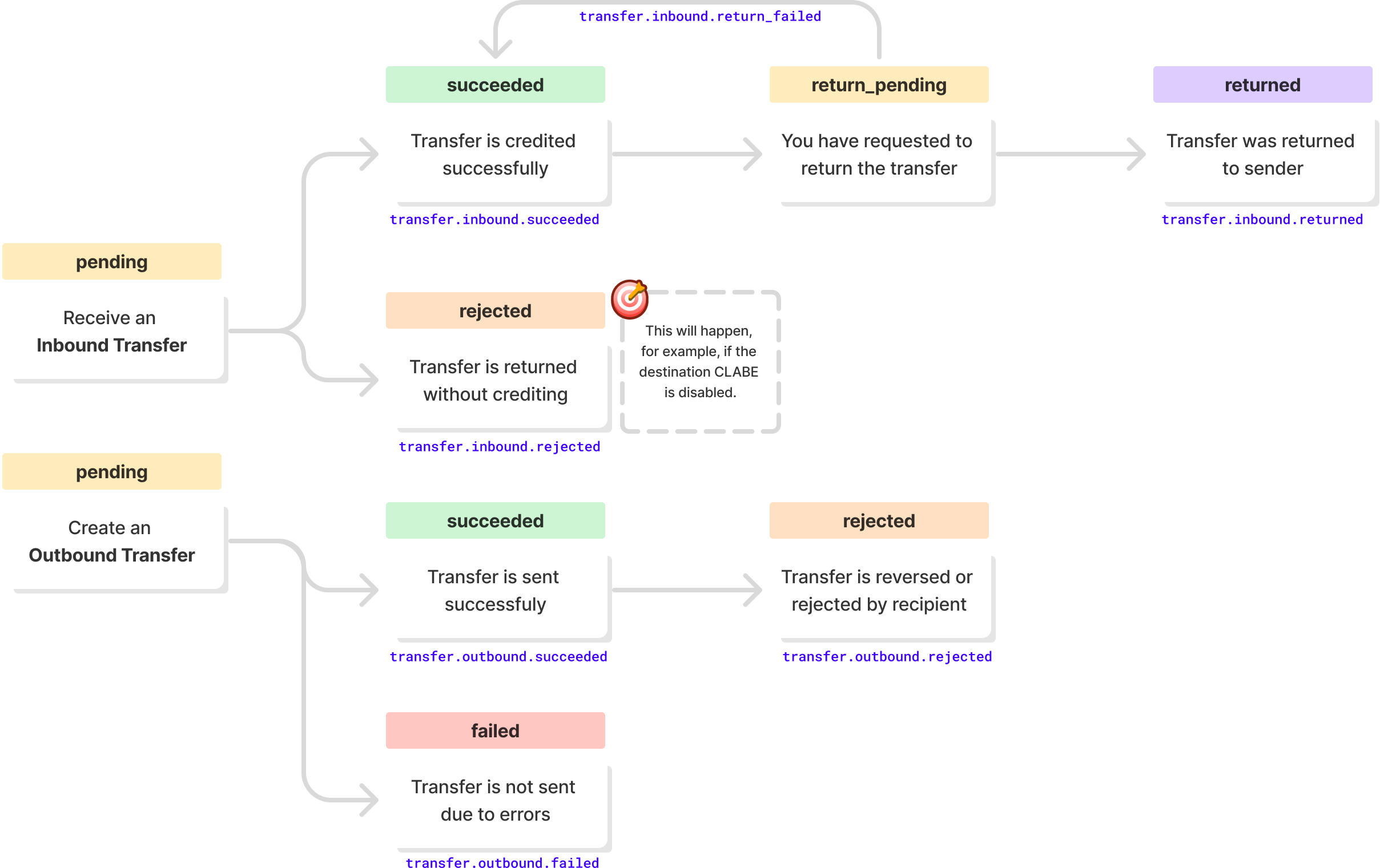
A `Transfer` moves through these statuses, and Fintoc emits a webhook for each transition:
## Transfer limits
The maximum amount per `Transfer` depends on the country:
Limit
🇲🇽 Mexico
🇨🇱 Chile
Maximum amount per transfer
No limit
\$7,000,000 CLP
## Rate limits
The default rate limit is 10 `Transfer` requests per second per client. To request a higher limit, contact Fintoc support.
## Transfer returns
### 🇲🇽 Mexico
In Mexico, you can request a return of an inbound `Transfer` if you don't recognize it or it doesn't meet your business's acceptance criteria. When Fintoc returns the `Transfer`, its status changes to `returned`. Fintoc deducts the amount from your account balance.
### 🇨🇱 Chile
In Chile, the [Centro de Compensación Automatizado](https://www.cca.cl/) (CCA) can reject inbound or outbound `Transfer` objects. When the CCA rejects a `Transfer`, the `Transfer` status changes to `returned` and Fintoc restores the funds to your account balance.
## Authorizing a transfer
The Transfers API supports a single authorizer. When one person in your organization who has authorizing permission confirms a `Transfer`, Fintoc pays it out immediately.
 ## Transfer limits
The maximum amount per `Transfer` depends on the country:
## Transfer limits
The maximum amount per `Transfer` depends on the country: