> ## Documentation Index
> Fetch the complete documentation index at: https://docs.fintoc.com/llms.txt
> Use this file to discover all available pages before exploring further.
# Manage invoices
> Handle the invoices a Fintoc subscription issues on every billing cycle, recover a failed charge, and create your own invoices for amounts outside the cycle.
When you create a [subscription](/guides/payments/accept-recurring-payments), Fintoc generates an `Invoice` for each billing cycle. An invoice represents the amount your customer owes for a given period. With `charge_automatically`, Fintoc attempts to collect the invoice using the enrolled payment method. With `send_invoice`, the invoice stays `open` for you to collect.
Fintoc creates the invoices of the subscription for you. You can also create your own invoices for amounts the subscription does not cover, and collect any open invoice on demand.
For full details on invoices, see the [Invoice object](/api/payments-api/invoices/invoice-object).
## Invoices in the subscription flow
After the `checkout_session.finished` event, Fintoc creates the first invoice and charges the enrolled payment method. With `charge_automatically`, the subscription stays `incomplete` until that first payment succeeds, and then becomes `active`. Handle the following invoice-related events alongside the post-session events in [Create subscriptions for your customer](/guides/payments/accept-recurring-payments#handle-post-session-events):
| Event | Description | Action |
| --------------------------- | --------------------------------------------------------------------------------------------------------------------------------- | ------------------------------------------------------------------------------------------------------- |
| `invoice.created` | Sent when Fintoc generates a new invoice for a billing cycle. | Log the invoice and update your records. |
| `invoice.finalized` | Sent when Fintoc finalizes the invoice and it becomes ready for payment. | Store the `hosted_invoice_url`, but send it to your customer only if the automatic charge later fails. |
| `invoice.payment_created` | Sent when a payment for the invoice starts, either from an automatic charge or from your customer using the `hosted_invoice_url`. | Treat the event as informational. Do not send the `hosted_invoice_url` while a payment is in progress. |
| `invoice.payment_succeeded` | Sent when Fintoc collects the invoice payment. | Confirm the payment to your customer and extend access. |
| `invoice.paid` | Sent on every transition to `paid`, whether Fintoc collected the invoice or you marked it as paid outside Fintoc. | Settle the debt in your records. Read `external_payment` to tell whether the money went through Fintoc. |
| `invoice.payment_failed` | Sent when a payment attempt for the invoice fails. | Send the `hosted_invoice_url` so your customer can pay the invoice. |
| `invoice.voided` | Sent when an invoice becomes void and Fintoc disables its `hosted_invoice_url`. | Update your records. |
**Month 1:** When the subscription is created, Fintoc generates the first invoice and finalizes it without the one-hour draft window. Fintoc then charges the enrolled payment method. On success, you receive `invoice.created`, followed by `invoice.finalized`, `invoice.payment_succeeded`, `invoice.paid`, and `payment_intent.succeeded`.
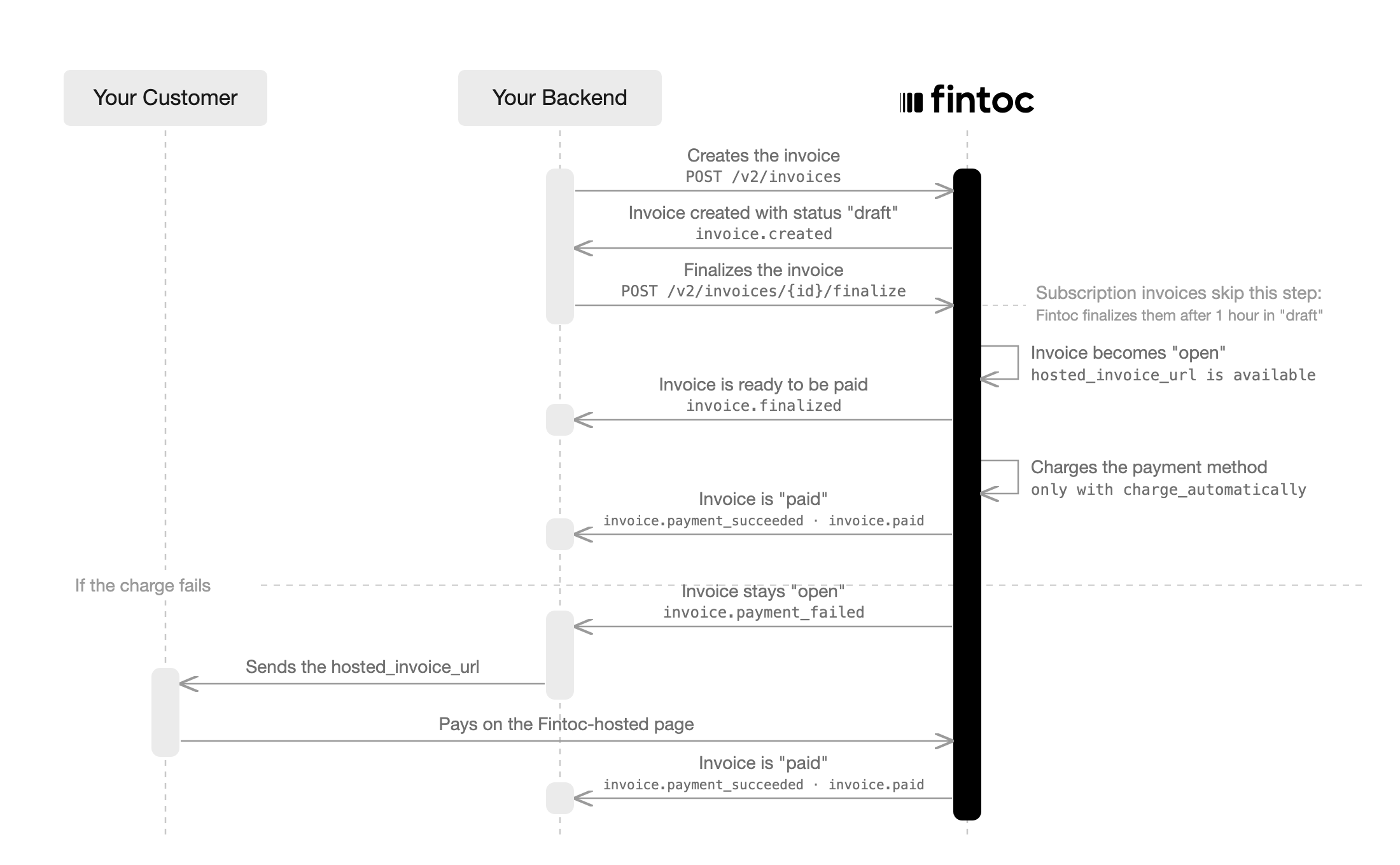
**Month 2 onwards:** At each billing cycle renewal, based on the subscription's `billing_cycle_anchor`, Fintoc creates a new invoice in `draft` status. After 1 hour, Fintoc finalizes the invoice, moves it to `open`, and charges the enrolled payment method. Use that hour to adjust the invoice before Fintoc charges it. On success, you receive `invoice.finalized`, `invoice.payment_succeeded`, and `invoice.paid`. On failure, you receive `invoice.payment_failed`.
Fintoc finalizes the invoices of a subscription for you. An invoice you create yourself stays `draft` until you finalize it, as described in [Charge an amount outside the billing cycle](#charge-an-amount-outside-the-billing-cycle).
## Recovering a failed payment
When an automatic charge fails, Fintoc emits `invoice.payment_failed`. To recover the payment, send the invoice's `hosted_invoice_url` to your customer through your own channel, such as email or WhatsApp. The hosted page lets your customer pay using the payment methods enabled on your organization's account. A successful payment creates a `payment_intent` on the invoice and settles the debt. The subscription's enrolled payment method stays valid, and Fintoc charges the next cycle automatically.
The `hosted_invoice_url` becomes available on the `Invoice` object once the invoice reaches `open` status. For details, see the [Invoice object](/api/payments-api/invoices/invoice-object).
An invoice accepts only one payment at a time. If you open the `hosted_invoice_url` while an automatic charge is in progress, the page shows that an invoice payment is in progress and the payment link is disabled. Fintoc re-enables the payment link if the automatic charge fails.
## Charge an amount outside the billing cycle
Fintoc issues the subscription invoices for you. You can also create an invoice yourself for an amount the subscription does not cover. Use this for a one-off adjustment, an extra service, or a charge outside the billing calendar. Create it for the same `customer`, with the payment method enrolled during checkout as `default_payment_method`.
 **Server**
```bash theme={null}
curl --request POST "https://api.fintoc.com/v2/invoices" \
--header "Authorization: YOUR_SECRET_API_KEY" \
--header "Content-Type: application/json" \
--data-raw '{
"customer": "cus_NffrFeUfNV2Hib",
"default_payment_method": "pm_NffrFeUfNV2Hib",
"collection_method": "charge_automatically",
"lines": [
{
"name": "Plan upgrade",
"amount": 50000,
"currency": "CLP",
"quantity": 1
}
],
"metadata": {
"order_id": "order_98765"
}
}'
```
```javascript Node theme={null}
const { Fintoc } = require('fintoc');
const fintoc = new Fintoc('YOUR_SECRET_API_KEY');
const invoice = await fintoc.v2.invoices.create({
customer: 'cus_NffrFeUfNV2Hib',
default_payment_method: 'pm_NffrFeUfNV2Hib',
collection_method: 'charge_automatically',
lines: [
{
name: 'Plan upgrade',
amount: 50000,
currency: 'CLP',
quantity: 1
}
],
metadata: {
order_id: 'order_98765'
}
});
```
```python theme={null}
from fintoc import Fintoc
client = Fintoc('YOUR_SECRET_API_KEY')
invoice = client.v2.invoices.create(
customer='cus_NffrFeUfNV2Hib',
default_payment_method='pm_NffrFeUfNV2Hib',
collection_method='charge_automatically',
lines=[
{
'name': 'Plan upgrade',
'amount': 50000,
'currency': 'CLP',
'quantity': 1,
}
],
metadata={
'order_id': 'order_98765'
}
)
```
Fintoc returns the invoice in `draft` status, with `subscription` set to `null`. The invoice bills the customer, not the subscription, so it does not change the subscription's billing cycle or amount. [Finalize the invoice](/api/payments-api/invoices/invoices-finalize) to move it to `open` and charge `default_payment_method`. Unlike the invoices of a subscription, which Fintoc finalizes on its own after an hour in `draft`, an invoice you create stays `draft` until you finalize it.
**Server**
```bash theme={null}
curl --request POST "https://api.fintoc.com/v2/invoices/inv_2bVdWxLpzXq8RkNcM3JtUv9AhTe/finalize" \
--header "Authorization: YOUR_SECRET_API_KEY"
```
After finalization, the invoice behaves like a subscription invoice. It emits the same `invoice.*` events, keeps the same `payments` history, and exposes the same `hosted_invoice_url` to fall back on when a charge fails. You can also retry a failed charge with [Pay an invoice](/api/payments-api/invoices/invoices-pay), against the enrolled payment method or another active payment method of the same customer.
For the full on-demand flow, including how to collect an invoice from a customer with no enrolled payment method, see [Save a payment method for future charges](/guides/payments/accept-recurring-payments/setup-a-payment-method-for-future-charges).
## Collect the invoices yourself instead of charging automatically
With `collection_method` set to `send_invoice`, Fintoc stops making automatic charges. Fintoc still issues one invoice per billing period, but each invoice stays `open` and you decide how to collect it. You have three ways to settle an open invoice:
1. Send your customer the payment link in `hosted_invoice_url` and let them pay through the Fintoc-hosted page.
2. Charge the invoice on demand with [Pay an invoice](/api/payments-api/invoices/invoices-pay), using the payment method attached to the subscription.
3. Collect the money outside Fintoc, by bank transfer or cash, and mark the invoice as paid. Fintoc records this with `external_payment` set to `true`.
Because `send_invoice` never charges automatically, it does not require a payment method. To create this subscription with the API, without sending your customer through a checkout enrollment, see [Issue invoices without charging](/guides/payments/accept-recurring-payments#issue-invoices-without-charging). You can still attach a payment method later, which lets you charge invoices on demand.
Fintoc does not contact your customer through any channel. Reaching out is your responsibility, whichever option you use.
Collecting the invoices yourself has three consequences:
* Unpaid invoices accumulate. Each billing period adds one invoice, and each one settles separately.
* The subscription starts `active`, and that does not mean your customer paid. With `send_invoice`, no automatic charge waits to complete, so Fintoc skips the `incomplete` status used with `charge_automatically`. Track the `status` of each invoice to know what your customer owes.
* Only [Update a subscription](/api/payments-api/subscriptions/subscriptions-update) changes the collection method. Attaching a payment method does not switch the subscription to `charge_automatically`.
The events differ depending on who collects. See [Invoice payment events](/api/main-resources/events-reference/types-of-events#invoice-payment-events).
## Test invoice creation with status `draft`
To test an invoice that is created in `draft` status, create a subscription with a line item using the product name `sandbox_draft`:
**Server**
```bash theme={null}
curl --request POST "https://api.fintoc.com/v2/checkout_sessions" \
--header "Authorization: YOUR_TEST_SECRET_API_KEY" \
--header "Content-Type: application/json" \
--data-raw '{
"flow": "subscription",
"amount": 350000,
"currency": "CLP",
"success_url": "https://merchant.com/success",
"cancel_url": "https://merchant.com/cancel",
"payment_method_types": ["pac"],
"customer_data": {
"tax_id": {
"type": "cl_rut",
"value": "11.111.111-1"
},
"name": "Felipe Castro",
"email": "jon@snow.com"
},
"line_items": [
{
"price_data": {
"currency": "CLP",
"unit_amount": 350000,
"product_data": {
"name": "sandbox_draft"
},
"recurring": {
"interval": "month",
"interval_count": 1
}
},
"quantity": 1
}
]
}'
```
```javascript Node theme={null}
const { Fintoc } = require('fintoc');
const fintoc = new Fintoc('YOUR_TEST_SECRET_API_KEY');
const checkoutSession = await fintoc.v2.checkoutSessions.create({
flow: 'subscription',
amount: 350000,
currency: 'CLP',
success_url: 'https://merchant.com/success',
cancel_url: 'https://merchant.com/cancel',
payment_method_types: ['pac'],
customer_data: {
tax_id: {
type: 'cl_rut',
value: '11.111.111-1'
},
name: 'Felipe Castro',
email: 'jon@snow.com'
},
line_items: [
{
price_data: {
currency: 'CLP',
unit_amount: 350000,
product_data: {
name: 'sandbox_draft'
},
recurring: {
interval: 'month',
interval_count: 1
}
},
quantity: 1
}
]
});
```
```python theme={null}
from fintoc import Fintoc
client = Fintoc('YOUR_TEST_SECRET_API_KEY')
checkout_session = client.v2.checkout_sessions.create(
flow='subscription',
amount=350000,
currency='CLP',
success_url='https://merchant.com/success',
cancel_url='https://merchant.com/cancel',
payment_method_types=['pac'],
customer_data={
'tax_id': {
'type': 'cl_rut',
'value': '11.111.111-1',
},
'name': 'Felipe Castro',
'email': 'jon@snow.com',
},
line_items=[
{
'price_data': {
'currency': 'CLP',
'unit_amount': 350000,
'product_data': {
'name': 'sandbox_draft',
},
'recurring': {
'interval': 'month',
'interval_count': 1,
},
},
'quantity': 1,
}
],
)
```
Fintoc creates the `Checkout Session`:
```json theme={null}
{
"id": "cs_li5531onlFDi235",
"object": "checkout_session",
"mode": "test",
"flow": "subscription",
"status": "created",
"amount": 350000,
"currency": "CLP",
"payment_method_types": ["pac"],
"customer": {
"id": "cus_NffrFeUfNV2Hib",
"object": "customer",
"name": "Felipe Castro",
"email": "jon@snow.com",
"metadata": {},
"tax_id": {
"type": "cl_rut",
"value": "11.111.111-1"
}
},
"line_items": [
{
"price": {
"product": {
"name": "sandbox_draft",
"description": "Fixed-amount monthly plan"
},
"currency": "CLP",
"unit_amount": 350000,
"recurring": {
"interval": "month",
"interval_count": 1
}
},
"quantity": 1
}
],
"success_url": "https://merchant.com/success",
"cancel_url": "https://merchant.com/cancel",
"redirect_url": "https://pay.fintoc.com/checkout/cs_li5531onlFDi235"
}
```
Fintoc creates the invoice in `draft` status, so you can edit its items with the [Add lines](/api/payments-api/invoices/invoices-add-lines) endpoint before the invoice leaves `draft`.
**Server**
```bash theme={null}
curl --request POST "https://api.fintoc.com/v2/invoices" \
--header "Authorization: YOUR_SECRET_API_KEY" \
--header "Content-Type: application/json" \
--data-raw '{
"customer": "cus_NffrFeUfNV2Hib",
"default_payment_method": "pm_NffrFeUfNV2Hib",
"collection_method": "charge_automatically",
"lines": [
{
"name": "Plan upgrade",
"amount": 50000,
"currency": "CLP",
"quantity": 1
}
],
"metadata": {
"order_id": "order_98765"
}
}'
```
```javascript Node theme={null}
const { Fintoc } = require('fintoc');
const fintoc = new Fintoc('YOUR_SECRET_API_KEY');
const invoice = await fintoc.v2.invoices.create({
customer: 'cus_NffrFeUfNV2Hib',
default_payment_method: 'pm_NffrFeUfNV2Hib',
collection_method: 'charge_automatically',
lines: [
{
name: 'Plan upgrade',
amount: 50000,
currency: 'CLP',
quantity: 1
}
],
metadata: {
order_id: 'order_98765'
}
});
```
```python theme={null}
from fintoc import Fintoc
client = Fintoc('YOUR_SECRET_API_KEY')
invoice = client.v2.invoices.create(
customer='cus_NffrFeUfNV2Hib',
default_payment_method='pm_NffrFeUfNV2Hib',
collection_method='charge_automatically',
lines=[
{
'name': 'Plan upgrade',
'amount': 50000,
'currency': 'CLP',
'quantity': 1,
}
],
metadata={
'order_id': 'order_98765'
}
)
```
Fintoc returns the invoice in `draft` status, with `subscription` set to `null`. The invoice bills the customer, not the subscription, so it does not change the subscription's billing cycle or amount. [Finalize the invoice](/api/payments-api/invoices/invoices-finalize) to move it to `open` and charge `default_payment_method`. Unlike the invoices of a subscription, which Fintoc finalizes on its own after an hour in `draft`, an invoice you create stays `draft` until you finalize it.
**Server**
```bash theme={null}
curl --request POST "https://api.fintoc.com/v2/invoices/inv_2bVdWxLpzXq8RkNcM3JtUv9AhTe/finalize" \
--header "Authorization: YOUR_SECRET_API_KEY"
```
After finalization, the invoice behaves like a subscription invoice. It emits the same `invoice.*` events, keeps the same `payments` history, and exposes the same `hosted_invoice_url` to fall back on when a charge fails. You can also retry a failed charge with [Pay an invoice](/api/payments-api/invoices/invoices-pay), against the enrolled payment method or another active payment method of the same customer.
For the full on-demand flow, including how to collect an invoice from a customer with no enrolled payment method, see [Save a payment method for future charges](/guides/payments/accept-recurring-payments/setup-a-payment-method-for-future-charges).
## Collect the invoices yourself instead of charging automatically
With `collection_method` set to `send_invoice`, Fintoc stops making automatic charges. Fintoc still issues one invoice per billing period, but each invoice stays `open` and you decide how to collect it. You have three ways to settle an open invoice:
1. Send your customer the payment link in `hosted_invoice_url` and let them pay through the Fintoc-hosted page.
2. Charge the invoice on demand with [Pay an invoice](/api/payments-api/invoices/invoices-pay), using the payment method attached to the subscription.
3. Collect the money outside Fintoc, by bank transfer or cash, and mark the invoice as paid. Fintoc records this with `external_payment` set to `true`.
Because `send_invoice` never charges automatically, it does not require a payment method. To create this subscription with the API, without sending your customer through a checkout enrollment, see [Issue invoices without charging](/guides/payments/accept-recurring-payments#issue-invoices-without-charging). You can still attach a payment method later, which lets you charge invoices on demand.
Fintoc does not contact your customer through any channel. Reaching out is your responsibility, whichever option you use.
Collecting the invoices yourself has three consequences:
* Unpaid invoices accumulate. Each billing period adds one invoice, and each one settles separately.
* The subscription starts `active`, and that does not mean your customer paid. With `send_invoice`, no automatic charge waits to complete, so Fintoc skips the `incomplete` status used with `charge_automatically`. Track the `status` of each invoice to know what your customer owes.
* Only [Update a subscription](/api/payments-api/subscriptions/subscriptions-update) changes the collection method. Attaching a payment method does not switch the subscription to `charge_automatically`.
The events differ depending on who collects. See [Invoice payment events](/api/main-resources/events-reference/types-of-events#invoice-payment-events).
## Test invoice creation with status `draft`
To test an invoice that is created in `draft` status, create a subscription with a line item using the product name `sandbox_draft`:
**Server**
```bash theme={null}
curl --request POST "https://api.fintoc.com/v2/checkout_sessions" \
--header "Authorization: YOUR_TEST_SECRET_API_KEY" \
--header "Content-Type: application/json" \
--data-raw '{
"flow": "subscription",
"amount": 350000,
"currency": "CLP",
"success_url": "https://merchant.com/success",
"cancel_url": "https://merchant.com/cancel",
"payment_method_types": ["pac"],
"customer_data": {
"tax_id": {
"type": "cl_rut",
"value": "11.111.111-1"
},
"name": "Felipe Castro",
"email": "jon@snow.com"
},
"line_items": [
{
"price_data": {
"currency": "CLP",
"unit_amount": 350000,
"product_data": {
"name": "sandbox_draft"
},
"recurring": {
"interval": "month",
"interval_count": 1
}
},
"quantity": 1
}
]
}'
```
```javascript Node theme={null}
const { Fintoc } = require('fintoc');
const fintoc = new Fintoc('YOUR_TEST_SECRET_API_KEY');
const checkoutSession = await fintoc.v2.checkoutSessions.create({
flow: 'subscription',
amount: 350000,
currency: 'CLP',
success_url: 'https://merchant.com/success',
cancel_url: 'https://merchant.com/cancel',
payment_method_types: ['pac'],
customer_data: {
tax_id: {
type: 'cl_rut',
value: '11.111.111-1'
},
name: 'Felipe Castro',
email: 'jon@snow.com'
},
line_items: [
{
price_data: {
currency: 'CLP',
unit_amount: 350000,
product_data: {
name: 'sandbox_draft'
},
recurring: {
interval: 'month',
interval_count: 1
}
},
quantity: 1
}
]
});
```
```python theme={null}
from fintoc import Fintoc
client = Fintoc('YOUR_TEST_SECRET_API_KEY')
checkout_session = client.v2.checkout_sessions.create(
flow='subscription',
amount=350000,
currency='CLP',
success_url='https://merchant.com/success',
cancel_url='https://merchant.com/cancel',
payment_method_types=['pac'],
customer_data={
'tax_id': {
'type': 'cl_rut',
'value': '11.111.111-1',
},
'name': 'Felipe Castro',
'email': 'jon@snow.com',
},
line_items=[
{
'price_data': {
'currency': 'CLP',
'unit_amount': 350000,
'product_data': {
'name': 'sandbox_draft',
},
'recurring': {
'interval': 'month',
'interval_count': 1,
},
},
'quantity': 1,
}
],
)
```
Fintoc creates the `Checkout Session`:
```json theme={null}
{
"id": "cs_li5531onlFDi235",
"object": "checkout_session",
"mode": "test",
"flow": "subscription",
"status": "created",
"amount": 350000,
"currency": "CLP",
"payment_method_types": ["pac"],
"customer": {
"id": "cus_NffrFeUfNV2Hib",
"object": "customer",
"name": "Felipe Castro",
"email": "jon@snow.com",
"metadata": {},
"tax_id": {
"type": "cl_rut",
"value": "11.111.111-1"
}
},
"line_items": [
{
"price": {
"product": {
"name": "sandbox_draft",
"description": "Fixed-amount monthly plan"
},
"currency": "CLP",
"unit_amount": 350000,
"recurring": {
"interval": "month",
"interval_count": 1
}
},
"quantity": 1
}
],
"success_url": "https://merchant.com/success",
"cancel_url": "https://merchant.com/cancel",
"redirect_url": "https://pay.fintoc.com/checkout/cs_li5531onlFDi235"
}
```
Fintoc creates the invoice in `draft` status, so you can edit its items with the [Add lines](/api/payments-api/invoices/invoices-add-lines) endpoint before the invoice leaves `draft`.