> ## Documentation Index
> Fetch the complete documentation index at: https://docs.fintoc.com/llms.txt
> Use this file to discover all available pages before exploring further.
# Get account statements
> List and download monthly PDF account statements for a Fintoc Account through the API or the dashboard, with filters by time period and account ID.
Get a monthly PDF that summarizes all movements for an account during a specific period.
You can list and download account statements through the API or the dashboard.
Fintoc generates account statements for every active account at the beginning of each month. Each statement covers the previous month and follows local regulatory requirements. You do not need to request statement generation.
## List account statements
Call the [List account statements endpoint](/api/transfers-api/account-statements/account-statements-list) with `account_id`. You can list all statements for the account or filter the statements by time period.
```bash theme={null}
curl --request GET \
--url 'https://api.fintoc.com/v2/accounts/acc_3AOIA4Hz09oHLeksYr9pYpBk3NS/account_statements?since=2026-03-01&until=2026-03-31' \
--header 'Authorization: sk_test_14ucwLs17VyE5XKFxMb3x8sHwPeSrGVh6hvVayzoi8Q' \
--header 'accept: application/json'
```
```javascript Node SDK theme={null}
const statements = await client.v2.accounts.accountStatements.list({
account_id: "acc_3AOIA4Hz09oHLeksYr9pYpBk3NS",
since: "2026-03-01",
until: "2026-03-31",
});
```
```python Python SDK theme={null}
statements = client.v2.accounts.account_statements.list(
account_id="acc_3AOIA4Hz09oHLeksYr9pYpBk3NS",
since="2026-03-01",
until="2026-03-31",
)
```
```json Response theme={null}
[
{
"id": "acst_8sFkj2mNpQ4rTvWx6yZ1bC3d",
"object": "account_statement",
"period": "2026-03",
"since": "2026-03-01",
"until": "2026-03-31",
"download_url": "https://files.fintoc.com/account_statements/acst_8sFkj2mNpQ4rTvWx6yZ1bC3d.pdf?signature=000000000000",
"created_at": "2026-04-01T00:00:00Z"
}
]
```
## Download the PDF
The `download_url` field contains a signed URL. Make a `GET` request to the URL to download the PDF. If the URL has expired, list the account statements again to get a new URL.
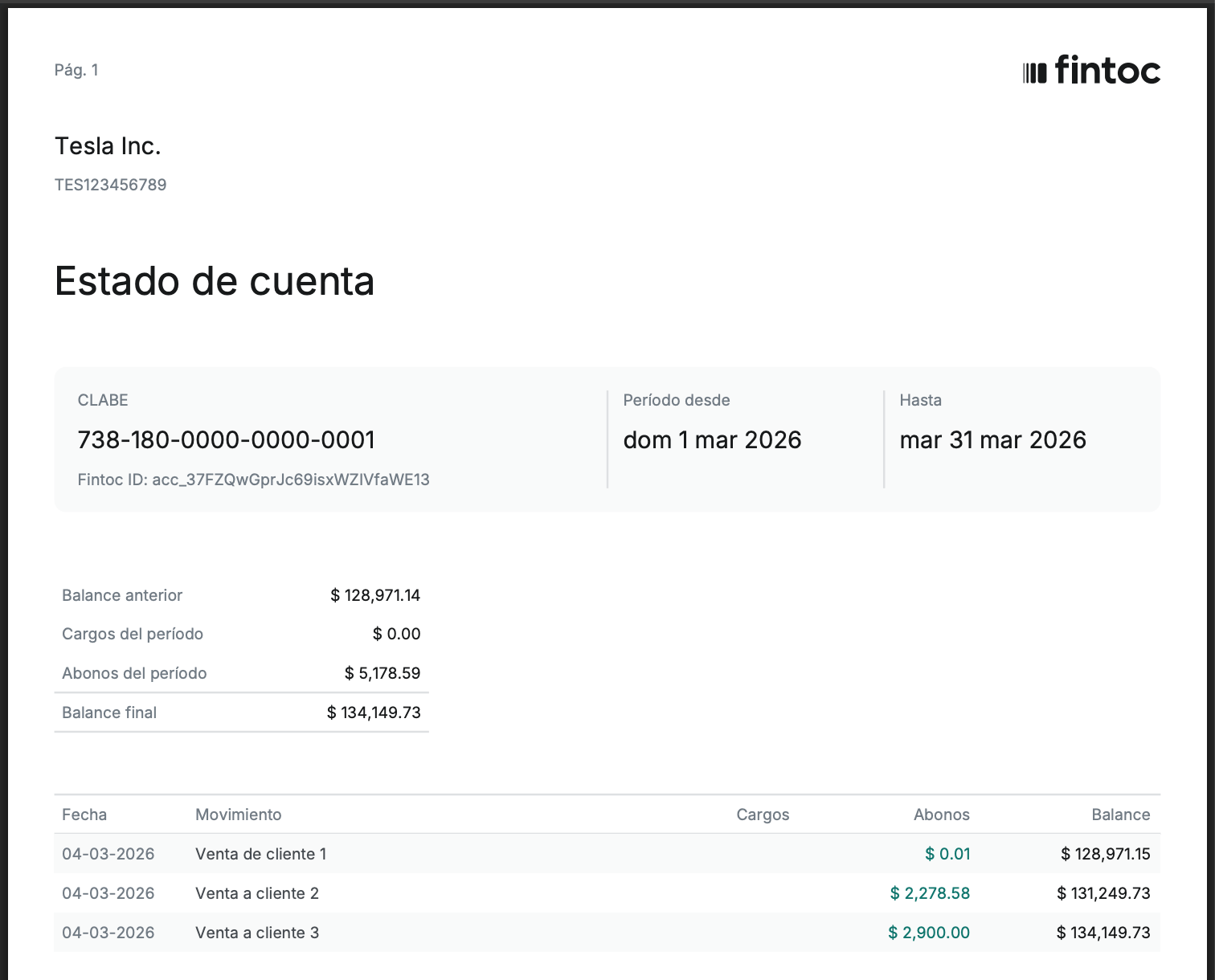
The downloaded statement looks like this:
 ## Test the integration
In `test` mode, list the account statements and open the `download_url` from any item in the response. The signed URL opens the account statement PDF in your browser. If the PDF opens, the integration works end to end.
## Test the integration
In `test` mode, list the account statements and open the `download_url` from any item in the response. The signed URL opens the account statement PDF in your browser. If the PDF opens, the integration works end to end.