> ## Documentation Index
> Fetch the complete documentation index at: https://docs.fintoc.com/llms.txt
> Use this file to discover all available pages before exploring further.
# Send transfers
> Initiate real-time payments using Fintoc's outbound Transfers API
Complete the setup guide and these steps to send outbound transfers with Fintoc's Transfers API:
1. Configure JSON Web Signature (JWS) signing keys and generate a JWS signature.
2. Add funds to the account's `root_account_number`.
3. Create a transfer from your backend using your **Secret Key** and a **JWS signature**.
4. Monitor transfer status.
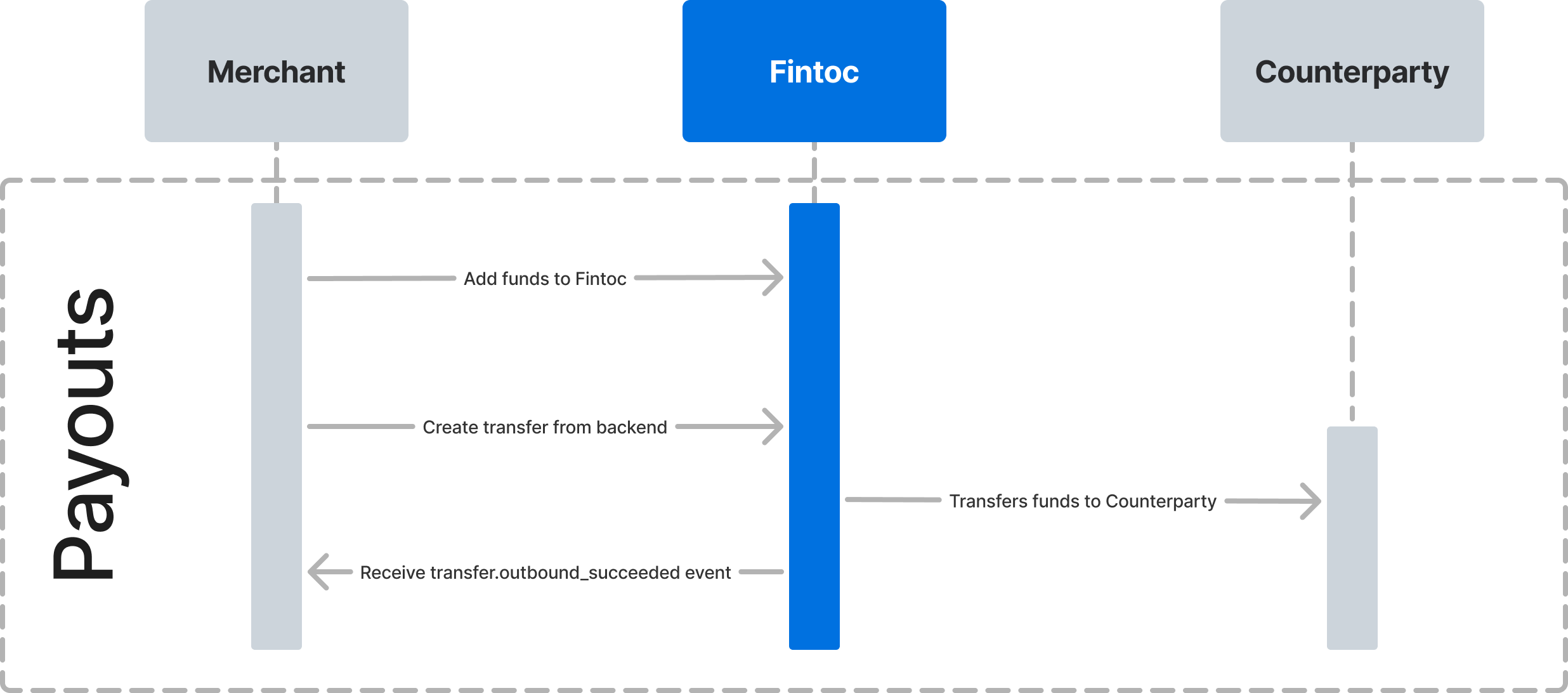
The following diagram shows how Fintoc interacts with you and the counterparty receiving the payout.
 ## Step 1: Configure JWS signing keys and generate a JWS signature
Every request to a Fintoc Transfers API endpoint requires a JWS signature. JWS digitally signs data to verify its integrity and authenticity.
To sign an API request, follow the [JWS signature guide](/guides/transfers/transfers-setup/setting-up-jws-keys).
## Step 2: Add funds to Fintoc
Before creating transfers, deposit funds into your `Account` through its `root_account_number`. The deposit appears as an inbound transfer.
## Step 3: Create a transfer
After you add funds to your account, create a transfer from your backend. Include your test **Secret Key**, **JWS signature**, origin account, amount, currency, and counterparty.
The following examples show successful transfer responses. To test other terminal outcomes, use the table in [Test the integration](#test-the-integration).
### Use an idempotency key
Fintoc supports [idempotency](https://en.wikipedia.org/wiki/Idempotence) so you can retry transfers without creating duplicates. Use an idempotency key when creating a transfer. If a connection error occurs, retry the request with the same key.
To make an idempotent request, include the `Idempotency-Key` header. See [Idempotent requests](/api/fintoc-api/idempotent-requests) for details.
### Create a transfer for Mexico 🇲🇽
Here is an example that creates a transfer of $590.13 MXN. The `amount` field is in the smallest currency unit, so $590.13 is the integer `59013`.
```bash curl theme={null}
curl --request POST \
--url https://api.fintoc.com/v2/transfers \
--header 'Authorization: sk_test_9c8d8CeyBTx1VcJzuDgpm4H' \
--header 'Fintoc-JWS-Signature: CNMaYaDGU3ZhFV1ve6p3sAdYXhEklej8DVIAMqIWCkpNmT6Jp7iigcndXwH5q3WQFHiswgIQU5-_-4rV3jKGptCROmEyWPW8_elhYH1apzAyjOjyZ55ygv37xKHzIFhixzAwmXlAv4pfD4lVelYWVNOSN7REA0QJeCy2vKdqZ5cjqCXQ1lkQUlzOE7dpuNoAkhAhAJJ8HaamFKy7Gl7uwmqbIr-dVYv21d_9O7mO26n0gy3zWXD2nJDxU5Mzl2pZd8-sFvUr9Kmp_YkeRMh4bSe0fr1Uc_YgkjpmYUyu7kaxRWTbAdJ3GwqWFMUDiyfhHdzvZPZyU4VkWreimoydMA' \
--header 'Idempotency-Key: 1ebfd86c-a75b-4606-872f-9f1cdd9724ca' \
--header 'accept: application/json' \
--header 'content-type: application/json' \
--data '
{
"amount": 59013,
"currency": "mxn",
"account_id": "acc_M8sKf230BgHjD4",
"comment": "Pago de credito 10451",
"reference_id": "150195",
"counterparty": {
"account_number": "000000000000000000"
},
"metadata": {
"customer_id": "12050123"
}
}
'
```
```javascript Node theme={null}
const transfer = await fintoc.v2.transfers.create({
idempotency_key: '1ebfd86c-a75b-4606-872f-9f1cdd9724ca',
amount: 59013,
currency: 'mxn',
account_id: 'acc_M8sKf230BgHjD4',
comment: 'Pago de credito 10451',
reference_id: '150195',
counterparty: { account_number: '000000000000000000' },
metadata: { customer_id: '12050123' }
});
```
```python Python theme={null}
transfer = client.v2.transfers.create(
idempotency_key="1ebfd86c-a75b-4606-872f-9f1cdd9724ca",
amount=59013,
currency="mxn",
account_id="acc_M8sKf230BgHjD4",
comment="Pago de credito 10451",
reference_id="150195",
counterparty={"account_number": "000000000000000000"},
metadata={"customer_id": "12050123"}
)
```
A successful request returns this response:
```json theme={null}
{
"object": "transfer",
"id": "tr_jKaHD105H",
"amount": 59013,
"currency": "mxn",
"direction": "outbound",
"status": "succeeded",
"transaction_date": "2020-04-17T05:12:41.462Z",
"post_date": "2020-04-17T00:00:00.000Z",
"comment": "Pago de credito 10451",
"reference_id": "150195",
"tracking_key": "s2123423423324334",
"receipt_url": "https://www.banxico.org.mx/cep/",
"mode": "test",
"return_reason": null,
"counterparty": {
"holder_id": "AAA010101AAA",
"holder_name": "Test Customer 1",
"account_number": "000000000000000000",
"account_type": "clabe",
"institution": {
"id": "mx_bbva_mexico",
"name": "BBVA Mexico",
"country": "mx"
}
},
"account_number": {
"id": "acno_Kasf91034gj1AD",
"account_id": "acc_Jas92lf9adg94ka",
"number": "111111111111111111",
"created_at": "2024-03-01T20:09:42.949787176Z",
"mode": "test",
"description": null,
"metadata": {},
"object": "account_number"
},
"metadata": {
"customer_id": "12050123"
}
}
```
**Currencies are represented as integers**
For example, Fintoc represents **MXN \$10.29** as `1029`.
See [Currencies](/guides/home/currencies) for details.
**Add `institution_id` for mobile numbers and debit cards**
When transferring to a standardized Mexican bank account number (CLABE), you do not need `institution_id`. Fintoc determines the institution from the CLABE. For a **mobile phone number** or **debit card**, include the five-digit `institution_id` from the [Banco de México institution list](https://www.banxico.org.mx/cep-scl/listaInstituciones.do). Otherwise, the API returns a `400 Bad Request` error.
In Mexico, the `Counterparty` object requires one attribute:
| Parameter | Description |
| :--------------- | :---------------------------------------------------------- |
| `account_number` | The recipient's CLABE, mobile number, or debit card number. |
## Step 1: Configure JWS signing keys and generate a JWS signature
Every request to a Fintoc Transfers API endpoint requires a JWS signature. JWS digitally signs data to verify its integrity and authenticity.
To sign an API request, follow the [JWS signature guide](/guides/transfers/transfers-setup/setting-up-jws-keys).
## Step 2: Add funds to Fintoc
Before creating transfers, deposit funds into your `Account` through its `root_account_number`. The deposit appears as an inbound transfer.
## Step 3: Create a transfer
After you add funds to your account, create a transfer from your backend. Include your test **Secret Key**, **JWS signature**, origin account, amount, currency, and counterparty.
The following examples show successful transfer responses. To test other terminal outcomes, use the table in [Test the integration](#test-the-integration).
### Use an idempotency key
Fintoc supports [idempotency](https://en.wikipedia.org/wiki/Idempotence) so you can retry transfers without creating duplicates. Use an idempotency key when creating a transfer. If a connection error occurs, retry the request with the same key.
To make an idempotent request, include the `Idempotency-Key` header. See [Idempotent requests](/api/fintoc-api/idempotent-requests) for details.
### Create a transfer for Mexico 🇲🇽
Here is an example that creates a transfer of $590.13 MXN. The `amount` field is in the smallest currency unit, so $590.13 is the integer `59013`.
```bash curl theme={null}
curl --request POST \
--url https://api.fintoc.com/v2/transfers \
--header 'Authorization: sk_test_9c8d8CeyBTx1VcJzuDgpm4H' \
--header 'Fintoc-JWS-Signature: CNMaYaDGU3ZhFV1ve6p3sAdYXhEklej8DVIAMqIWCkpNmT6Jp7iigcndXwH5q3WQFHiswgIQU5-_-4rV3jKGptCROmEyWPW8_elhYH1apzAyjOjyZ55ygv37xKHzIFhixzAwmXlAv4pfD4lVelYWVNOSN7REA0QJeCy2vKdqZ5cjqCXQ1lkQUlzOE7dpuNoAkhAhAJJ8HaamFKy7Gl7uwmqbIr-dVYv21d_9O7mO26n0gy3zWXD2nJDxU5Mzl2pZd8-sFvUr9Kmp_YkeRMh4bSe0fr1Uc_YgkjpmYUyu7kaxRWTbAdJ3GwqWFMUDiyfhHdzvZPZyU4VkWreimoydMA' \
--header 'Idempotency-Key: 1ebfd86c-a75b-4606-872f-9f1cdd9724ca' \
--header 'accept: application/json' \
--header 'content-type: application/json' \
--data '
{
"amount": 59013,
"currency": "mxn",
"account_id": "acc_M8sKf230BgHjD4",
"comment": "Pago de credito 10451",
"reference_id": "150195",
"counterparty": {
"account_number": "000000000000000000"
},
"metadata": {
"customer_id": "12050123"
}
}
'
```
```javascript Node theme={null}
const transfer = await fintoc.v2.transfers.create({
idempotency_key: '1ebfd86c-a75b-4606-872f-9f1cdd9724ca',
amount: 59013,
currency: 'mxn',
account_id: 'acc_M8sKf230BgHjD4',
comment: 'Pago de credito 10451',
reference_id: '150195',
counterparty: { account_number: '000000000000000000' },
metadata: { customer_id: '12050123' }
});
```
```python Python theme={null}
transfer = client.v2.transfers.create(
idempotency_key="1ebfd86c-a75b-4606-872f-9f1cdd9724ca",
amount=59013,
currency="mxn",
account_id="acc_M8sKf230BgHjD4",
comment="Pago de credito 10451",
reference_id="150195",
counterparty={"account_number": "000000000000000000"},
metadata={"customer_id": "12050123"}
)
```
A successful request returns this response:
```json theme={null}
{
"object": "transfer",
"id": "tr_jKaHD105H",
"amount": 59013,
"currency": "mxn",
"direction": "outbound",
"status": "succeeded",
"transaction_date": "2020-04-17T05:12:41.462Z",
"post_date": "2020-04-17T00:00:00.000Z",
"comment": "Pago de credito 10451",
"reference_id": "150195",
"tracking_key": "s2123423423324334",
"receipt_url": "https://www.banxico.org.mx/cep/",
"mode": "test",
"return_reason": null,
"counterparty": {
"holder_id": "AAA010101AAA",
"holder_name": "Test Customer 1",
"account_number": "000000000000000000",
"account_type": "clabe",
"institution": {
"id": "mx_bbva_mexico",
"name": "BBVA Mexico",
"country": "mx"
}
},
"account_number": {
"id": "acno_Kasf91034gj1AD",
"account_id": "acc_Jas92lf9adg94ka",
"number": "111111111111111111",
"created_at": "2024-03-01T20:09:42.949787176Z",
"mode": "test",
"description": null,
"metadata": {},
"object": "account_number"
},
"metadata": {
"customer_id": "12050123"
}
}
```
**Currencies are represented as integers**
For example, Fintoc represents **MXN \$10.29** as `1029`.
See [Currencies](/guides/home/currencies) for details.
**Add `institution_id` for mobile numbers and debit cards**
When transferring to a standardized Mexican bank account number (CLABE), you do not need `institution_id`. Fintoc determines the institution from the CLABE. For a **mobile phone number** or **debit card**, include the five-digit `institution_id` from the [Banco de México institution list](https://www.banxico.org.mx/cep-scl/listaInstituciones.do). Otherwise, the API returns a `400 Bad Request` error.
In Mexico, the `Counterparty` object requires one attribute:
| Parameter | Description |
| :--------------- | :---------------------------------------------------------- |
| `account_number` | The recipient's CLABE, mobile number, or debit card number. |
### Create a transfer for Chile 🇨🇱
Here is an example that creates a transfer of \$1,869 CLP. Because CLP has no minor unit, the `amount` field is the same integer, `1869`.
```bash curl theme={null}
curl --request POST \
--url https://api.fintoc.com/v2/transfers \
--header 'Authorization: sk_test_9c8d8CeyBTx1VcJzuDgpm4H' \
--header 'Fintoc-JWS-Signature: CNMaYaDGU3ZhFV1ve6p3sAdYXhEklej8DVIAMqIWCkpNmT6Jp7iigcndXwH5q3WQFHiswgIQU5-_-4rV3jKGptCROmEyWPW8_elhYH1apzAyjOjyZ55ygv37xKHzIFhixzAwmXlAv4pfD4lVelYWVNOSN7REA0QJeCy2vKdqZ5cjqCXQ1lkQUlzOE7dpuNoAkhAhAJJ8HaamFKy7Gl7uwmqbIr-dVYv21d_9O7mO26n0gy3zWXD2nJDxU5Mzl2pZd8-sFvUr9Kmp_YkeRMh4bSe0fr1Uc_YgkjpmYUyu7kaxRWTbAdJ3GwqWFMUDiyfhHdzvZPZyU4VkWreimoydMA' \
--header 'Idempotency-Key: 1ebfd86c-a75b-4606-872f-9f1cdd9724ca' \
--header 'accept: application/json' \
--header 'content-type: application/json' \
--data '
{
"amount": 1869,
"currency": "clp",
"account_id": "acc_M8sKf230BgHjD4",
"comment": "Pago de credito 10451",
"counterparty": {
"holder_id": "11.111.111-1",
"holder_name": "Test Customer 1",
"account_number": "000000000",
"account_type": "checking_account",
"institution_id": "cl_banco_de_chile"
},
"metadata": {
"customer_id": "12050123"
}
}
'
```
```javascript Node theme={null}
const transfer = await fintoc.v2.transfers.create({
idempotency_key: '1ebfd86c-a75b-4606-872f-9f1cdd9724ca',
amount: 1869,
currency: 'clp',
account_id: 'acc_M8sKf230BgHjD4',
comment: 'Pago de credito 10451',
counterparty: {
holder_id: '11.111.111-1',
holder_name: 'Test Customer 1',
account_number: '000000000',
account_type: 'checking_account',
institution_id: 'cl_banco_de_chile'
},
metadata: { customer_id: '12050123' }
});
```
```python Python theme={null}
transfer = client.v2.transfers.create(
idempotency_key="1ebfd86c-a75b-4606-872f-9f1cdd9724ca",
amount=1869,
currency="clp",
account_id="acc_M8sKf230BgHjD4",
comment="Pago de credito 10451",
counterparty={
"holder_id": "11.111.111-1",
"holder_name": "Test Customer 1",
"account_number": "000000000",
"account_type": "checking_account",
"institution_id": "cl_banco_de_chile"
},
metadata={"customer_id": "12050123"}
)
```
A successful request returns this response:
```json theme={null}
{
"object": "transfer",
"id": "tr_jKaHD105H",
"amount": 1869,
"currency": "clp",
"direction": "outbound",
"status": "succeeded",
"transaction_date": "2020-04-17T05:12:41.462Z",
"post_date": "2020-04-17T00:00:00.000Z",
"comment": "Pago de credito 10451",
"reference_id": null,
"receipt_url": null,
"tracking_key": null,
"mode": "test",
"return_reason": null,
"counterparty": {
"holder_id": "11.111.111-1",
"holder_name": "Test Customer 1",
"account_number": "000000000",
"account_type": "checking_account",
"institution": {
"id": "cl_banco_de_chile",
"name": "Banco de Chile",
"country": "cl"
}
},
"account_number": {
"id": "acno_Kasf91034gj1AD",
"account_id": "acc_Jas92lf9adg94ka",
"number": "111111111111111111",
"created_at": "2024-03-01T20:09:42.949787176Z",
"mode": "test",
"object": "account_number",
"description": null,
"metadata": {}
},
"metadata": {
"customer_id": "12050123"
}
}
```
In Chile, the `Counterparty` object requires five attributes:
| Parameter | Description |
| :--------------- | :----------------------------------------------------------------------------------------------------------------------------------- |
| `holder_id` | The account holder's [Chilean tax ID (RUT)](https://es.wikipedia.org/wiki/Rol_%C3%9Anico_Tributario). |
| `holder_name` | The account holder's full name. |
| `account_number` | The recipient's bank account number at the counterparty institution. |
| `account_type` | Type of account. Supported types are `checking_account` and `sight_account`. |
| `institution_id` | Fintoc institution ID for the bank receiving the transfer. See [Chilean institution codes](/api/fintoc-api/chile-institution-codes). |
## Step 4: Monitor transfer status
### Transfer status flow
A transfer's status is one of `pending`, `succeeded`, `failed`, `returned`, `return_pending`, or `rejected`. For more details on transfer statuses, see the [Transfers data model](/guides/transfers/transfers-overview/v2-transfers-data-model).
### Monitor status using webhooks
Fintoc sends a `transfer.outbound.succeeded` event when the transfer settles. Use the [webhook guide](/guides/resources/webhooks-walkthrough) to receive these events. You can then notify your customer or log the transfer in your ERP.
We recommend handling the following events:
| Event | Description |
| ----------------------------- | -------------------------------------------------------------------------------------------------------------------------------------------------------------------------------------------------------------------------------------------------------- |
| `transfer.outbound.succeeded` | Sent when the transfer settles successfully. |
| `transfer.outbound.rejected` | Sent when Banco de México or the recipient institution rejects a transfer in Mexico, or when the recipient institution rejects the transfer in Chile. See the [rejection causes](/api/transfers-api/transfers/spei-codes); `rejected` is a final status. |
| `transfer.outbound.failed` | Sent when the transfer cannot reach the destination account because an error occurs during processing. |
**Webhooks may arrive out of order**
For example, a `transfer.outbound.rejected` event can arrive before the same transfer's `transfer.outbound.succeeded` event. The transfer still succeeded before it was rejected.
## Test the integration
Use your test **Secret Key** (`sk_test_...`) to run transfers in `test` mode without moving real money. Every response sets `mode` to `test`.
In `test` mode, a transfer reaches the same terminal statuses as in production. Predefined inputs do not force an outcome. The outcome depends on how the receiving party resolves the transfer. Use these three terminal statuses to confirm your webhook handling:
| Outcome | Resulting status | Webhook event |
| :-------- | :--------------- | :---------------------------- |
| Succeeded | `succeeded` | `transfer.outbound.succeeded` |
| Rejected | `rejected` | `transfer.outbound.rejected` |
| Failed | `failed` | `transfer.outbound.failed` |