> ## Documentation Index
> Fetch the complete documentation index at: https://docs.fintoc.com/llms.txt
> Use this file to discover all available pages before exploring further.
# Return a Transfer
> Automatically return a transfer based on your business logic.
### Only available in Mexico
Fintoc lets you return an inbound transfer up to 90 days after the original transfer using the **return transfer** endpoint. This is useful when you want to return transfers based on your own business logic—for example, if you expect a specific amount but receive a different one.
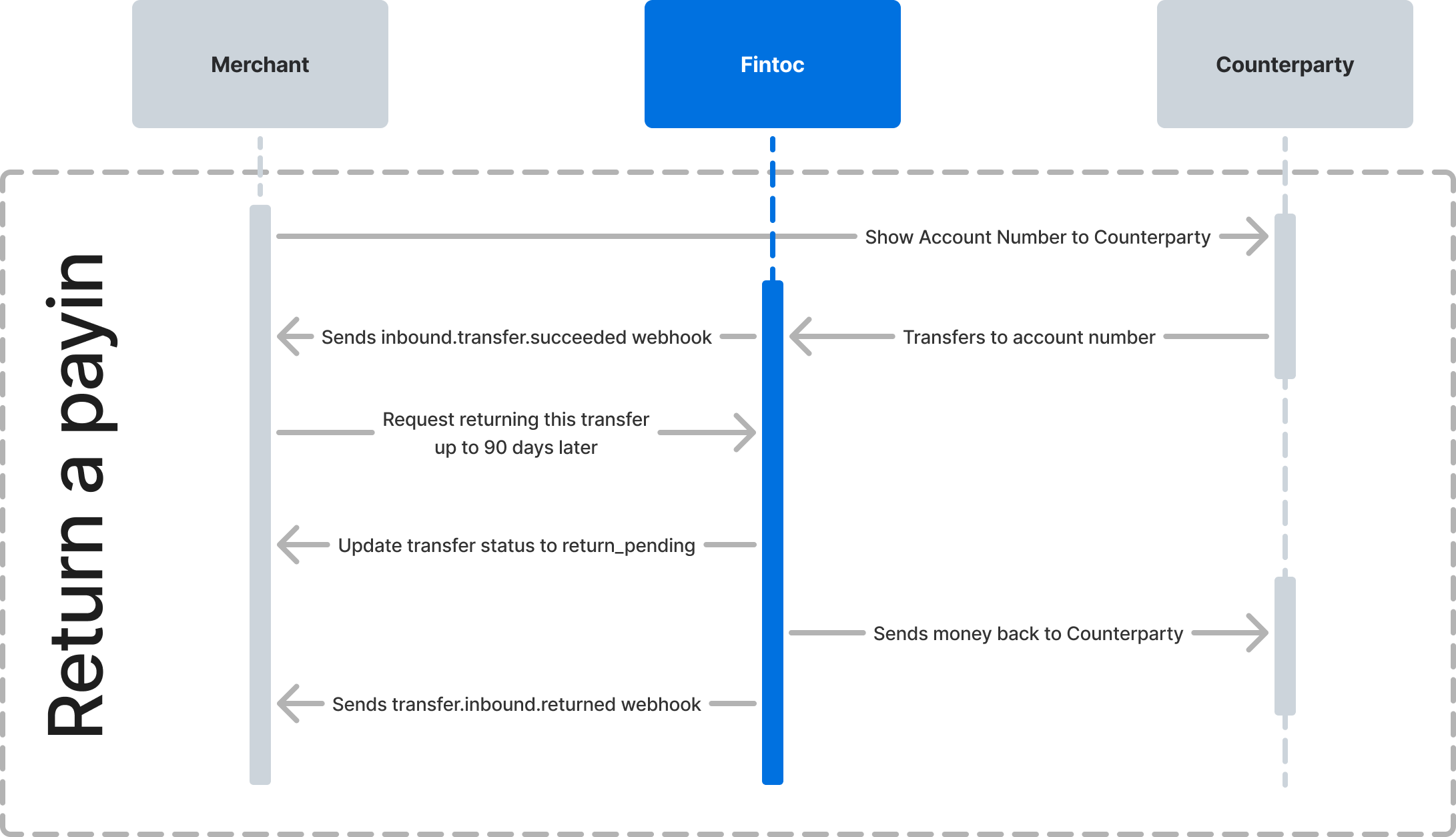
## Trigger the return
Using the `transfer_id` and the [Fintoc-JWS-Signature](/v2023-11-15/docs/transfers/setting-up-jws-keys)for the request, call the return endpoint:
### cURL
```curl theme={null}
curl --request POST \
--url https://api.fintoc.com/v2/transfers/return \
--header 'Authorization: sk_test_9c8d8CeyBTx1VcJzuDgpm4H-bywJCeSx' \
--header 'Fintoc-JWS-Signature: CNMaYaDGU3ZhFV1ve6p3sAdYXhEklej8DVIAMqIWCkpNmT6Jp7iigcndXwH5q3WQFHiswgIQU5-_-4rV3jKGptCROmEyWPW8_elhYH1apzAyjOjyZ55ygv37xKHzIFhixzAwmXlAv4pfD4lVelYWVNOSN7REA0QJeCy2vKdqZ5cjqCXQ1lkQUlzOE7dpuNoAkhAhAJJ8HaamFKy7Gl7uwmqbIr-dVYv21d_9O7mO26n0gy3zWXD2nJDxU5Mzl2pZd8-sFvUr9Kmp_YkeRMh4bSe0fr1Uc_YgkjpmYUyu7kaxRWTbAdJ3GwqWFMUDiyfhHdzvZPZyU4VkWreimoydMA' \
--header 'Idempotency-Key: 1ebfd86c-a75b-4606-872f-9f1cdd9724ca' \
--header 'accept: application/json' \
--header 'content-type: application/json' \
--data '
{
"transfer_id": "tr_Kasf91034gj1AD"
}
'
```
If successful, the returned object will be a transfer object with `return_pending` status. Once the return is processed, the status will change to `returned`.
### Using the SDK
```python theme={null}
transfer = client.v2.transfers.return(
transfer_id = "tr_2wlt3xRBaEstTGPezqIGXy6JUU8"
)
```
## Handling the result of a returned transfer
You should handle the following webhook events when handling transfer returns:
| Event | Description |
| :------------------------------- | :--------------------------------------------------------------------------------------------------------------------------------------------- |
| `transfer.inbound.returned` | The transfer was returned successfully. The `receipt_url` shows the original Comprobante Electrónico de Pago (CEP) with the status "Devuelta". |
| `transfer.inbound.return_failed` | The transfer could not be returned and will go back to the original status: succeeded. |
See [our test guide](/v2023-11-15/docs/transfers/test-your-integration) to simulate both scenarios so you can handle the result in your integration correctly.