> ## Documentation Index
> Fetch the complete documentation index at: https://docs.fintoc.com/llms.txt
> Use this file to discover all available pages before exploring further.
# Sending transfers
> Initiate real-time payments using our outbound Transfers API
To start using Fintoc's Transfers API to create outbound transfers, once you have completed the setup guide, you just need to follow these steps:
1. Configure JWS Signing Keys and generate JWS Signature
2. Add funds to the Account's `root_account_number`
3. From your backend, create a `Transfer` using your **Secret Key** and a **JWS Signature**
4. Monitor transfer status
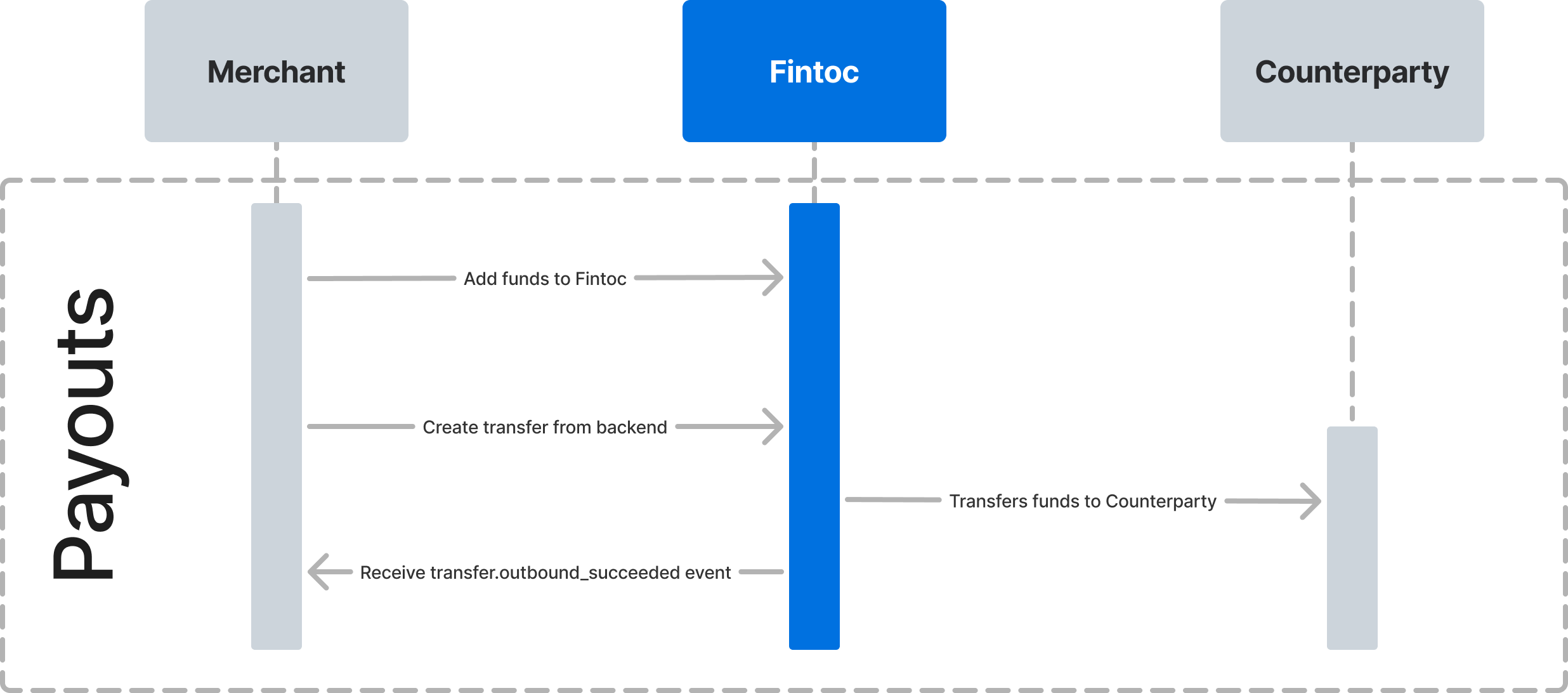
The following diagram shows how Fintoc will interact with you and the counterparty receiving the payout.
 # Step 1: Configure JWS Signing Keys and generate JWS Signature
To make requests to our Transfers endpoints, a JSON Web Signature (JWS) is required. JWS is a standard mechanism used to digitally sign a piece of data to ensure its integrity and authenticity.
To learn how to sign an API call, follow the steps in the [JWS Signature guide](/v2023-11-15/docs/transfers/setting-up-jws-keys).
# Step 2: Add funds to Fintoc
To create Transfers, fund your `Account` first. You can achieve this by adding funds to the `root_account_number`. This will appear as an **Inbound Transfer**.
# Step 3: Create Transfer
You can start making real-time transfers once you add funds to your account. Using your test **Secret Key** and including your **JWS Signature**, create a Transfer from your backend with the origin account (where the funds should come out of), amount, currency, and counterparty that will receive the payment.
The examples below show successful Transfer responses. You can test out unsuccessful results with the predefined inputs in the [Test your integration](/v2023-11-15/docs/transfers/test-your-integration#test-outbound-transfers) section.
## Use an Idempotency Key
Fintoc supports [idempotency](https://en.wikipedia.org/wiki/Idempotence) to safely retry Transfers without accidentally performing the same operation twice. When creating a Transfer, use an idempotency key. Then, if a connection error occurs, you can safely repeat the Transfers request without risk of creating a second Transfer.
To perform an idempotent request, provide an `Idempotency-Key` header to the request. Learn more about idempotent request in this guide.
## Create a Transfer for Mexico 🇲🇽
Here is an example of how to create a Transfer for \$590.13 Mexican Pesos:
```curl theme={null}
curl --request POST \
--url https://api.fintoc.com/v2/transfers \
--header 'Authorization: sk_test_9c8d8CeyBTx1VcJzuDgpm4H' \
--header 'Fintoc-JWS-Signature: CNMaYaDGU3ZhFV1ve6p3sAdYXhEklej8DVIAMqIWCkpNmT6Jp7iigcndXwH5q3WQFHiswgIQU5-_-4rV3jKGptCROmEyWPW8_elhYH1apzAyjOjyZ55ygv37xKHzIFhixzAwmXlAv4pfD4lVelYWVNOSN7REA0QJeCy2vKdqZ5cjqCXQ1lkQUlzOE7dpuNoAkhAhAJJ8HaamFKy7Gl7uwmqbIr-dVYv21d_9O7mO26n0gy3zWXD2nJDxU5Mzl2pZd8-sFvUr9Kmp_YkeRMh4bSe0fr1Uc_YgkjpmYUyu7kaxRWTbAdJ3GwqWFMUDiyfhHdzvZPZyU4VkWreimoydMA' \
--header 'Idempotency-Key: 1ebfd86c-a75b-4606-872f-9f1cdd9724ca' \
--header 'accept: application/json' \
--header 'content-type: application/json' \
--data '
{
"amount": 59013,
"currency": "mxn",
"account_id": "acc_M8sKf230BgHjD4",
"comment": "Pago de credito 10451",
"reference_id": "150195",
"counterparty": {
"account_number": "012969123456789120"
},
"metadata": {
"customer_id": "12050123"
}
}
'
```
**Currencies are represented as integers**
The Fintoc API represents currencies in its smallest possible units with no decimals (as an integer). That means that an **amount of MXN \$10.29 gets represented by Fintoc as 1029**.
You can [read more about currencies here](/v2023-11-15/docs/home/currencies).
### Remember to add the institution ID
When transferring to a CLABE, no Counterparty Institution ID is necessary since Fintoc can deduce it from the CLABE number. However, if your Counterparty is a **mobile phone number** or **debit card**, you must include the institution ID, as a 5 digit number as shown [here](https://www.banxico.org.mx/cep-scl/listaInstituciones.do) . Otherwise, you will get a 400 Error.
### Using our SDK
If you are using our Python SDK or Node SDK, you can create the transfer like this:
```python theme={null}
transfer = client.v2.transfers.create(
idempotency_key="12345678910",
amount=59013,
currency="MXN",
account_id="acc_M8sKf230BgHjD4",
comment="Pago de credito 10451",
reference_id="150195",
counterparty={"account_number": "012969123456789120"},
metadata={"customer_id": "12050123"}
)
```
```node Node theme={null}
const transfer = await fintoc.v2.transfers.create({
idempotency_key: '12345678910',
amount: 59013,
currency: 'mxn',
account_id: 'acc_2tgq0oPCyMInAZWiZt5',
counterparty: {
account_number: '012969100000000026',
},
metadata: {
customer_id: '19385014'
}
});
```
In Mexico, the Counterparty object is defined by a minimum of 1 attribute:
| Parameter | Description |
| :--------------- | :------------------------------------------------------------------------- |
| `account_number` | Recipient Account Number (🇲🇽 CLABE, mobile number or debit card number). |
A successful request response looks like this:
```json theme={null}
{
"object": "transfer",
"id": "tr_jKaHD105H",
"amount": 59013,
"currency": "MXN",
"direction": "outbound",
"status": "succeeded",
"transaction_date": "2020-04-17T05:12:41.462Z",
"post_date": "2020-04-17T00:00:00.000Z",
"comment": "Pago de gas",
"reference_id": "150195",
"tracking_key": "s2123423423324334",
"receipt_url": "https://www.banxico.org.mx/cep/",
"mode": "test",
"return_reason": null,
"counterparty": {
"holder_id": "OODC911119JL3",
"holder_name": "Carmen Marcela",
"account_number": "012969123456789120",
"account_type": "clabe",
"institution": {
"id": "mx_bbva_mexico",
"name": "BBVA Mexico",
"country": "mx"
}
},
"account_number": {
"id": "acno_Kasf91034gj1AD",
"account_id": "acc_Jas92lf9adg94ka",
"number": "738969123456789120",
"created_at": "2024-03-01T20:09:42.949787176Z",
"mode": "test",
"description": null,
"metadata": {},
"object": "account_number",
},
"metadata": {
"order_id": 1234
}
}
```
# Step 1: Configure JWS Signing Keys and generate JWS Signature
To make requests to our Transfers endpoints, a JSON Web Signature (JWS) is required. JWS is a standard mechanism used to digitally sign a piece of data to ensure its integrity and authenticity.
To learn how to sign an API call, follow the steps in the [JWS Signature guide](/v2023-11-15/docs/transfers/setting-up-jws-keys).
# Step 2: Add funds to Fintoc
To create Transfers, fund your `Account` first. You can achieve this by adding funds to the `root_account_number`. This will appear as an **Inbound Transfer**.
# Step 3: Create Transfer
You can start making real-time transfers once you add funds to your account. Using your test **Secret Key** and including your **JWS Signature**, create a Transfer from your backend with the origin account (where the funds should come out of), amount, currency, and counterparty that will receive the payment.
The examples below show successful Transfer responses. You can test out unsuccessful results with the predefined inputs in the [Test your integration](/v2023-11-15/docs/transfers/test-your-integration#test-outbound-transfers) section.
## Use an Idempotency Key
Fintoc supports [idempotency](https://en.wikipedia.org/wiki/Idempotence) to safely retry Transfers without accidentally performing the same operation twice. When creating a Transfer, use an idempotency key. Then, if a connection error occurs, you can safely repeat the Transfers request without risk of creating a second Transfer.
To perform an idempotent request, provide an `Idempotency-Key` header to the request. Learn more about idempotent request in this guide.
## Create a Transfer for Mexico 🇲🇽
Here is an example of how to create a Transfer for \$590.13 Mexican Pesos:
```curl theme={null}
curl --request POST \
--url https://api.fintoc.com/v2/transfers \
--header 'Authorization: sk_test_9c8d8CeyBTx1VcJzuDgpm4H' \
--header 'Fintoc-JWS-Signature: CNMaYaDGU3ZhFV1ve6p3sAdYXhEklej8DVIAMqIWCkpNmT6Jp7iigcndXwH5q3WQFHiswgIQU5-_-4rV3jKGptCROmEyWPW8_elhYH1apzAyjOjyZ55ygv37xKHzIFhixzAwmXlAv4pfD4lVelYWVNOSN7REA0QJeCy2vKdqZ5cjqCXQ1lkQUlzOE7dpuNoAkhAhAJJ8HaamFKy7Gl7uwmqbIr-dVYv21d_9O7mO26n0gy3zWXD2nJDxU5Mzl2pZd8-sFvUr9Kmp_YkeRMh4bSe0fr1Uc_YgkjpmYUyu7kaxRWTbAdJ3GwqWFMUDiyfhHdzvZPZyU4VkWreimoydMA' \
--header 'Idempotency-Key: 1ebfd86c-a75b-4606-872f-9f1cdd9724ca' \
--header 'accept: application/json' \
--header 'content-type: application/json' \
--data '
{
"amount": 59013,
"currency": "mxn",
"account_id": "acc_M8sKf230BgHjD4",
"comment": "Pago de credito 10451",
"reference_id": "150195",
"counterparty": {
"account_number": "012969123456789120"
},
"metadata": {
"customer_id": "12050123"
}
}
'
```
**Currencies are represented as integers**
The Fintoc API represents currencies in its smallest possible units with no decimals (as an integer). That means that an **amount of MXN \$10.29 gets represented by Fintoc as 1029**.
You can [read more about currencies here](/v2023-11-15/docs/home/currencies).
### Remember to add the institution ID
When transferring to a CLABE, no Counterparty Institution ID is necessary since Fintoc can deduce it from the CLABE number. However, if your Counterparty is a **mobile phone number** or **debit card**, you must include the institution ID, as a 5 digit number as shown [here](https://www.banxico.org.mx/cep-scl/listaInstituciones.do) . Otherwise, you will get a 400 Error.
### Using our SDK
If you are using our Python SDK or Node SDK, you can create the transfer like this:
```python theme={null}
transfer = client.v2.transfers.create(
idempotency_key="12345678910",
amount=59013,
currency="MXN",
account_id="acc_M8sKf230BgHjD4",
comment="Pago de credito 10451",
reference_id="150195",
counterparty={"account_number": "012969123456789120"},
metadata={"customer_id": "12050123"}
)
```
```node Node theme={null}
const transfer = await fintoc.v2.transfers.create({
idempotency_key: '12345678910',
amount: 59013,
currency: 'mxn',
account_id: 'acc_2tgq0oPCyMInAZWiZt5',
counterparty: {
account_number: '012969100000000026',
},
metadata: {
customer_id: '19385014'
}
});
```
In Mexico, the Counterparty object is defined by a minimum of 1 attribute:
| Parameter | Description |
| :--------------- | :------------------------------------------------------------------------- |
| `account_number` | Recipient Account Number (🇲🇽 CLABE, mobile number or debit card number). |
A successful request response looks like this:
```json theme={null}
{
"object": "transfer",
"id": "tr_jKaHD105H",
"amount": 59013,
"currency": "MXN",
"direction": "outbound",
"status": "succeeded",
"transaction_date": "2020-04-17T05:12:41.462Z",
"post_date": "2020-04-17T00:00:00.000Z",
"comment": "Pago de gas",
"reference_id": "150195",
"tracking_key": "s2123423423324334",
"receipt_url": "https://www.banxico.org.mx/cep/",
"mode": "test",
"return_reason": null,
"counterparty": {
"holder_id": "OODC911119JL3",
"holder_name": "Carmen Marcela",
"account_number": "012969123456789120",
"account_type": "clabe",
"institution": {
"id": "mx_bbva_mexico",
"name": "BBVA Mexico",
"country": "mx"
}
},
"account_number": {
"id": "acno_Kasf91034gj1AD",
"account_id": "acc_Jas92lf9adg94ka",
"number": "738969123456789120",
"created_at": "2024-03-01T20:09:42.949787176Z",
"mode": "test",
"description": null,
"metadata": {},
"object": "account_number",
},
"metadata": {
"order_id": 1234
}
}
```
## Create a Transfer for Chile 🇨🇱
Here is an example to create a transfer of \$1869 Chilean Pesos:
```curl theme={null}
curl --request POST \
--url https://api.fintoc.com/v2/transfers \
--header 'Authorization: sk_test_9c8d8CeyBTx1VcJzuDgpm4H' \
--header 'Fintoc-JWS-Signature: CNMaYaDGU3ZhFV1ve6p3sAdYXhEklej8DVIAMqIWCkpNmT6Jp7iigcndXwH5q3WQFHiswgIQU5-_-4rV3jKGptCROmEyWPW8_elhYH1apzAyjOjyZ55ygv37xKHzIFhixzAwmXlAv4pfD4lVelYWVNOSN7REA0QJeCy2vKdqZ5cjqCXQ1lkQUlzOE7dpuNoAkhAhAJJ8HaamFKy7Gl7uwmqbIr-dVYv21d_9O7mO26n0gy3zWXD2nJDxU5Mzl2pZd8-sFvUr9Kmp_YkeRMh4bSe0fr1Uc_YgkjpmYUyu7kaxRWTbAdJ3GwqWFMUDiyfhHdzvZPZyU4VkWreimoydMA' \
--header 'Idempotency-Key: 1ebfd86c-a75b-4606-872f-9f1cdd9724ca' \
--header 'accept: application/json' \
--header 'content-type: application/json' \
--data '
{
"amount": 1869,
"currency": "CLP",
"account_id": "acc_M8sKf230BgHjD4",
"comment": "Pago de credito 10451",
"counterparty": {
"holder_id": "771433855",
"holder_name": "Piped Piper SpA",
"account_number": "502955923",
"account_type": "checking_account",
"institution_id": "cl_banco_de_chile"
},
"metadata": {
"customer_id": "12050123"
}
}
'
```
### Using our SDK
If you are using our Python SDK or Node SDK, you can create the transfer like this:
```python theme={null}
transfer = client.v2.transfers.create(
idempotency_key="12345678910",
amount=1869,
currency="CLP",
account_id="acc_M8sKf230BgHjD4",
comment="Pago de credito 10451",
counterparty={
"holder_id": "771433855",
"holder_name": "Piped Piper SpA",
"account_number": "502955923",
"account_type": "checking_account",
"institution_id": "cl_banco_de_chile"
},
metadata={"customer_id": "12050123"}
)
```
```node Node theme={null}
const transfer = await fintoc.v2.transfers.create({
idempotency_key: '12345678910',
amount: 59013,
currency: 'CLP',
account_id: 'acc_2tgq0oPCyMInAZWiZt5',
comment: 'Pago de credito 12543',
counterparty: {
holder_id: '771433855',
holder_name: 'Pied Piper SpA',
account_number: '012969100000000026',
account_type: 'checking_account',
institution_id: 'cl_banco_de_chile'
},
metadata: {
customer_id: '19385014'
}
});
```
In Chile, the Counterparty object is defined by a minimum of 5 attributes:
| Parameter | Description |
| :--------------- | :------------------------------------------------------------------------------------------------------------- |
| `holder_id` | Account holder's [RUT](https://es.wikipedia.org/wiki/Rol_%C3%9Anico_Tributario) |
| `holder_name` | Account holder's name |
| `account_number` | Account number |
| `account_type` | Type of account. Supported types are `checking_account` and `sight_account`. |
| `institution_id` | Fintoc institution id for the bank receiving the bank transfer. You can see the code for each institution here |
A successful request response looks like this:
```json theme={null}
{
"object": "transfer",
"id": "tr_jKaHD105H",
"amount": 1869,
"currency": "clp",
"direction": "outbound",
"status": "succeeded",
"transaction_date": "2020-04-17T05:12:41.462Z",
"post_date": "2020-04-17T00:00:00.000Z",
"comment": "Pago de gas",
"reference_id": null,
"receipt_url": null,
"tracking_key": null,
"mode": "test",
"return_reason": null,
"counterparty": {
"holder_id": "771433855",
"holder_name": "Piped Piper SpA",
"account_number": "502955923",
"account_type": "checking_account",
"institution": {
"id": "cl_banco_de_chile",
"name": "Banco de Chile",
"country": "cl"
}
},
"account_number": {
"id": "acno_Kasf91034gj1AD",
"account_id": "acc_Jas92lf9adg94ka",
"number": "738969123456789120",
"created_at": "2024-03-01T20:09:42.949787176Z",
"mode": "test",
"object": "account_number",
"description": null,
"metadata": {}
},
"metadata": {
"order_id": 1234
}
}
```
# Step 4: Monitor transfer status
## Transfer status flow
Transfers' status can be either pending, succeeded, failed, returned, return\_pending or rejected. For more details on transfer statuses, check out the [Transfers data model](https://docs.fintoc.com/update/docs/v2-transfers-data-model#/).
## Monitor status using webhooks
Fintoc sends a `transfer.outbound.succeeded` event when the transfer settles. Use the [webhook guide](/v2023-11-15/docs/resources/webhooks-walkthrough) to receive these events and run actions, such as sending a notification email to your customer or logging the transfer in your ERP.
We recommend handling the following events:
| Event | Description |
| :---------------------------- | :----------------------------------------------------------------------------------------------------------------------------------------------------------------------------------------------------------------------------------------------------------------------------------------------------------------------- |
| `transfer.outbound.succeeded` | Sent when the transfer is sent successfully. |
| `transfer.outbound.rejected` | 🇲🇽 In Mexico: Sent when either Banco de Mexico or the counterparty institution has rejected the transfer. You can see the rejection causes here
🇨🇱 In Chile: Sent when the counterparty institution has rejected the transfer.
`rejected` is a final state and will suffer no further changes. |
| `transfer.outbound.failed` | Sent when the transfer has not been able to reach its destination account, due to an error during the process. |
**Webhooks may arrive in disorder**
For example: a `transfer.outbound.rejected` webhook event could arrive before the same transfer's `transfer.outbound.succeeded` webhook, even though the transfer first succeeded and then was rejected.