> ## Documentation Index
> Fetch the complete documentation index at: https://docs.fintoc.com/llms.txt
> Use this file to discover all available pages before exploring further.
# Accept recurring payments
> Enroll customers in recurring payments on Fintoc's legacy v2023-11-15 API, covering subscription creation, charge cycles, and webhook events you handle.
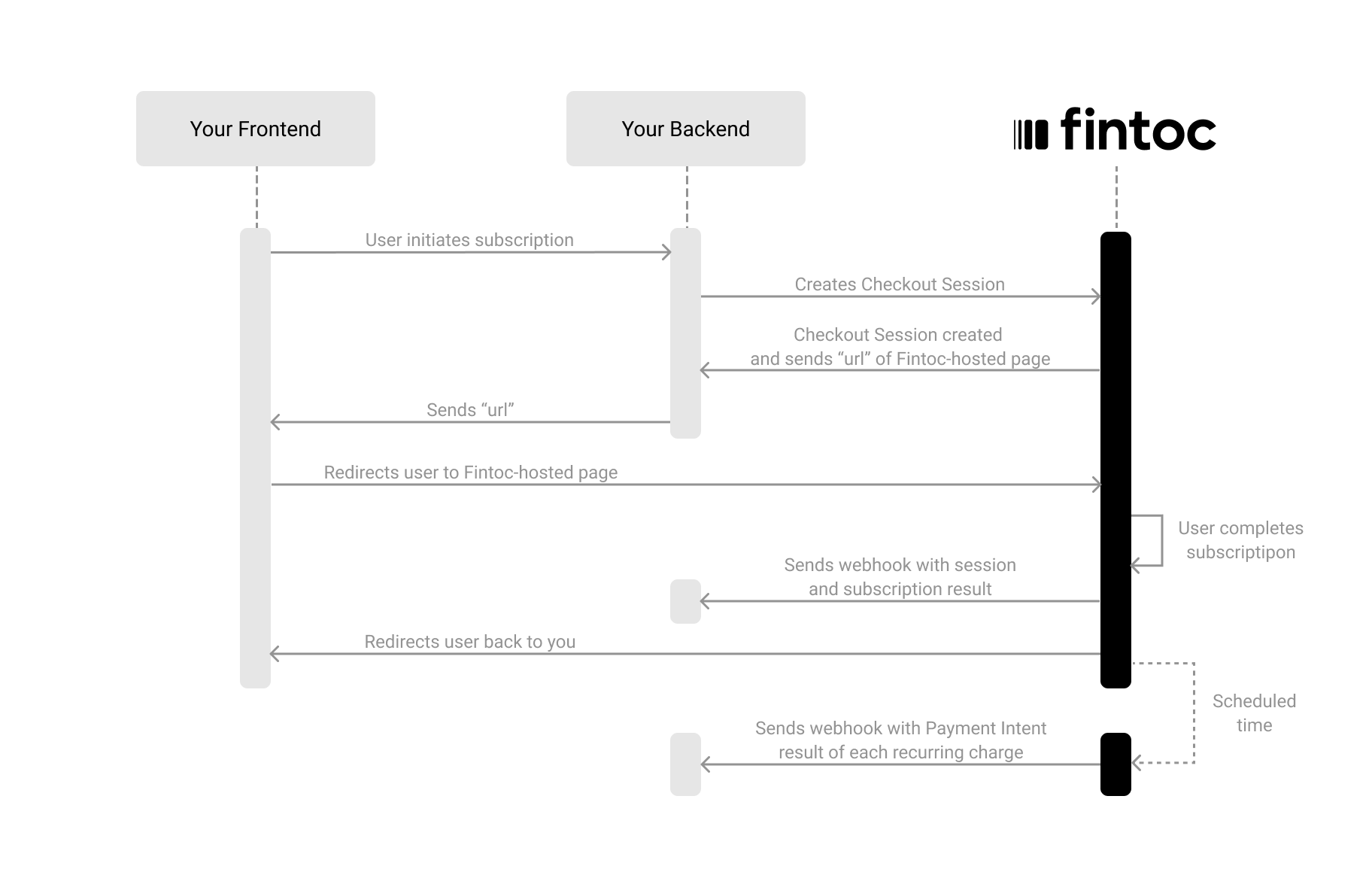
Accepting recurring payments with Fintoc takes three steps:
1. On your backend, create a `Checkout Session` with `flow: subscription`
2. Redirect your user to complete the enrollment at the Fintoc-hosted checkout page
3. Handle post-enrollment and recurring payment events (webhooks)
The following diagram shows how Fintoc interacts with both your backend and your frontend:
 # Create a Session
The Checkout Session object represents your intent to enroll a payment method for recurring charges (PAC), and to create a subscription with a fixed amount and periodicity.
Using your [Secret Key](/v2023-11-15/guides/home/api-keys), create a `Checkout Session` on your backend with `flow` set to `subscription`.
```bash theme={null}
curl --request POST "https://api.fintoc.com/v2/checkout_sessions" \
--header "Authorization: YOUR_TEST_SECRET_API_KEY" \
--header "Content-Type: application/json" \
--data-raw '{
"flow": "subscription",
"amount": 350000,
"currency": "clp",
"success_url": "https://merchant.com/success",
"cancel_url": "https://merchant.com/987654321",
"payment_method_types": [
"pac"
],
"customer_data": {
"tax_id": {
"type": "cl_rut",
"value": "111111111"
},
"name": "Felipe Castro",
"email": "name@example.com",
"metadata": {}
},
"line_items": [
{
"price_data": {
"currency": "clp",
"unit_amount": 350000,
"product_data": {
"name": "SoyFocus plan"
},
"recurring": {
"interval": "month",
"interval_count": 1
}
},
"quantity": 1
}
],
"metadata": {
"subscription_external_id": "sub_987654321"
}
}'
```
```javascript Node theme={null}
const { Fintoc } = require('fintoc');
const fintoc = new Fintoc('YOUR_SECRET_KEY');
const checkoutSession = await fintoc.checkoutSessions.create({
amount: 1000,
currency: 'clp',
customer_email: 'name@example.com'
});
```
```python theme={null}
from fintoc import Fintoc
client = Fintoc('YOUR_TEST_SECRET_API_KEY')
checkout_session = client.checkout_sessions.create(
amount=1000,
currency='clp',
customer_email='name@example.com'
)
```
| Parameter | Example | Description |
| :--------------------- | :------------------------------- | :------------------------------------------------------------------------------------------------------------------------------------------------------------------------------------------------------------------------------------------------------------------------------------------------------------------------------------------------------------------------------------ |
| `amount` | 2476 | A positive integer representing the amount to charge, in the smallest possible unit of the currency you're using.
# Create a Session
The Checkout Session object represents your intent to enroll a payment method for recurring charges (PAC), and to create a subscription with a fixed amount and periodicity.
Using your [Secret Key](/v2023-11-15/guides/home/api-keys), create a `Checkout Session` on your backend with `flow` set to `subscription`.
```bash theme={null}
curl --request POST "https://api.fintoc.com/v2/checkout_sessions" \
--header "Authorization: YOUR_TEST_SECRET_API_KEY" \
--header "Content-Type: application/json" \
--data-raw '{
"flow": "subscription",
"amount": 350000,
"currency": "clp",
"success_url": "https://merchant.com/success",
"cancel_url": "https://merchant.com/987654321",
"payment_method_types": [
"pac"
],
"customer_data": {
"tax_id": {
"type": "cl_rut",
"value": "111111111"
},
"name": "Felipe Castro",
"email": "name@example.com",
"metadata": {}
},
"line_items": [
{
"price_data": {
"currency": "clp",
"unit_amount": 350000,
"product_data": {
"name": "SoyFocus plan"
},
"recurring": {
"interval": "month",
"interval_count": 1
}
},
"quantity": 1
}
],
"metadata": {
"subscription_external_id": "sub_987654321"
}
}'
```
```javascript Node theme={null}
const { Fintoc } = require('fintoc');
const fintoc = new Fintoc('YOUR_SECRET_KEY');
const checkoutSession = await fintoc.checkoutSessions.create({
amount: 1000,
currency: 'clp',
customer_email: 'name@example.com'
});
```
```python theme={null}
from fintoc import Fintoc
client = Fintoc('YOUR_TEST_SECRET_API_KEY')
checkout_session = client.checkout_sessions.create(
amount=1000,
currency='clp',
customer_email='name@example.com'
)
```
| Parameter | Example | Description |
| :--------------------- | :------------------------------- | :------------------------------------------------------------------------------------------------------------------------------------------------------------------------------------------------------------------------------------------------------------------------------------------------------------------------------------------------------------------------------------ |
| `amount` | 2476 | A positive integer representing the amount to charge, in the smallest possible unit of the currency you're using.
If your payment uses Chilean peso, an amount of CLP 2476 is represented as 2476.
If your payment uses Mexican peso, an amount of MXN 24.76 is represented as 2476.
[Read here to learn more](/v2023-11-15/guides/home/currencies). |
| `currency` | `clp` | Three-letter ISO 4217 currency code, in lowercase. Fintoc currently only supports `clp` for recurring payments. |
| `flow` | `subscription` | **Required.** Type of the flow for the session. One of `payment`, `setup`, or `subscription`. |
| `success_url` | `https://merchant.com/success` | **Required.** URL to redirect the user after the payment succeeds. |
| `cancel_url` | `https://merchant.com/987654321` | **Required.** URL to redirect the user if they cancel the payment and return to your website. |
| `customer` | `cus_alm1321knjl1233` | Unique identifier for an existing customer. Required if `customer_data` is not provided. |
| `customer_data` | `(object)` | Data for creating a customer inline. Required if `customer` is not provided. |
| `payment_method_types` | `["pac"]` | Array of payment method types allowed during enrollment. `pac` represents charges on a bank account. |
| `line_items` | `(array)` | **Required.** Subscription items. |
| `metadata` | `{"order": "987654321"}` | Optional set of key-value pairs that you can attach to an object. This can be useful for storing additional information about the object in a structured format. |
## Include Customer Data (Required for subscriptions)
When creating a `Checkout Session` with `flow: subscription`, you must include customer information. You can do this either by referencing an existing customer ID (`customer`) or by sending `customer_data` to create one inline:
| Attribute | Type | Description |
| :--------- | :------- | :--------------------------------------------------------------------------------------------------------------------------------------------------------------------------------------------------------------------------------------------------------------------------------------------- |
| `tax_id` | `object` | **Required.** Object that identifies the customer at a fiscal or regulatory level. Includes a `type` field indicating the format or country-specific identifier (for example, `cl_rut` for the Chilean tax ID (RUT)) and a `value` field containing the tax identification number as a string. |
| `name` | `string` | Optional full name of the customer. |
| `email` | `string` | Optional customer email linked to a Checkout Session. This is used to notify a user in case of a refund. |
| `metadata` | `object` | Optional custom data that can store additional information about the customer (e.g., internal IDs, CRM references, or tags) |
## Include a Items list (Required for subscriptions)
When creating a `Checkout Session`, you can also include information about session items. This enables Fintoc to display this information on the checkout page and show only the payment methods available for specific products.
| Attribute | Type | Description |
| :----------- | :-------- | :---------------------------------------------------------------------------------------------- |
| `quantity` | `integer` | **Required.** Number of units of this item being purchased. |
| `price_data` | `object` | Data used to generate a new recurring price inline. One of `price` or `price_data` is required. |
Each `line_item` needs one of `price_data` or `price`.
### **price\_data** Object
| Attribute | Type | Description |
| :------------- | :--------- | :---------------------------------------------------------------------------------------------------------------------- |
| `product_data` | `object` | Data used to generate a new Product object inline. One of `product` or `product_data` is required. |
| `currency` | string | Currency used for the subscription. Fintoc currently only supports `clp`. |
| `unit_amount` | `integer` | **Required.** Price per unit of the item, expressed in the smallest currency unit (for example, CLP has no minor unit). |
| `recurring` | `(object)` | **Required.** Recurring configuration for the billing interval (for example, `interval: month`, `interval_count: 1`). |
### **product\_data** Object
| Attribute | Type | Description |
| :-------- | :------- | :------------------------------------------------------------ |
| `name` | `string` | **Required.** Name of the product or service being purchased. |
# Response when creating a Checkout Session
After making the request to create the Checkout Session, Fintoc should respond with something like this:
```json theme={null}
{
"id": "cs_li5531onlFDi235",
"flow": "subscription",
"customer": {
"name": "Felipe Castro",
"email": "name@example.com",
"metadata": {},
"tax_id": {
"type": "cl_rut",
"value": "111111111"
}
},
"line_items": [
{
"price": {
"product": {
"name": "Plan A",
"description": "Pago recurrente monto fijo"
},
"currency": "clp",
"unit_amount": 350000,
"recurring": {
"interval": "month",
"interval_count": 1
}
},
"quantity": 1
}
],
"success_url": "https://merchant.example/success",
"cancel_url": "https://merchant.example/cancel",
"redirect_url": "https://pay.fintoc.com/checkout/cs_123"
}
```
In the response, you should receive the `url` attribute. In the following step, you'll use this attribute to redirect the user to complete the subscription.
## Redirect the user to complete the payment
Next, you will redirect users to the Fintoc Checkout page. After completing the payment, they'll be automatically redirected back to your site.
Based on the result, the user will be redirected to either the success or cancel URL.
# Handle post-session events
Once a Checkout Session finishes, you handle the result in your frontend and complete the subscription in your backend. For your backend, you will use the events sent by webhooks.
## Complete the subscription on your backend
Fintoc sends a `checkout_session.finished` event when the session completes.
In a subscription flow, this event includes information about the session and references to the `subscription` and `payment_method` created during enrollment.
```json theme={null}
{
"id": "evt_a4xK32BanKWYn",
"object": "event",
"type": "checkout_session.finished",
"data": {
"id": "cs_li5531onlFDi235",
"flow": "subscription",
"customer": {
"name": "Felipe Castro",
"email": "name@example.com",
"metadata": {},
"tax_id": {
"type": "cl_rut",
"value": "111111111"
}
},
"payment_method_types": ["pac"],
"status": "finished",
"payment_status": "succeeded",
"subscription": "sub_NffrFeUfNV2Hib",
"payment_method": "pm_NffrFeUfNV2Hib"
}
}
```
You should handle the following post-session events:
| Event | Description | Action |
| :-------------------------- | :---------------------------------------------------------------------------- | :------------------------------------------------------------------------------------------------------------------------------------------ |
| `checkout_session.finished` | Sent when a subscription Checkout Session reaches a final state | Activate the subscription on your side based on the final status, and store the created ids (`subscription`, `payment_method`, `customer`). |
| `checkout_session.expired` | Sent when a session expires | Offer the customer another attempt to subscribe. |
| `payment_intent.succeeded` | Sent when a payment intent succeeds, like a charge on a bank account or card. | Confirm to your customer that the charge of the subscription was successfully done |
| `payment_intent.failed` | Sent when a payment intent fails | Offer the customer another attempt to pay the subscription. |
# Test your integration
To confirm that your integration works correctly, you can simulate subscriptions and scheduled recurring payments without moving any money.
## 1) Create a subscription Checkout Session using test user credentials
Using your test mode API Secret Key, create a Checkout Session of `flow: subscription` on your backend and complete the subscription enrollment flow on the fintoc-hosted page using the following credentials:
**Test credentials**
* Username (RUT): `41614850-3`
* Password: `jonsnow`
### 2) Handle simulated scheduled payments of the subscription
In test mode, once the subscription is created, Fintoc immediately triggers successful and failed payment intents, allowing you to test the handling of all post-session events.