> ## Documentation Index
> Fetch the complete documentation index at: https://docs.fintoc.com/llms.txt
> Use this file to discover all available pages before exploring further.
# Building with AI
> Use AI tools in your Fintoc integration workflow.
This guide explains how to use artificial intelligence (AI) tools while building your Fintoc integration.
# Ask AI dropdown
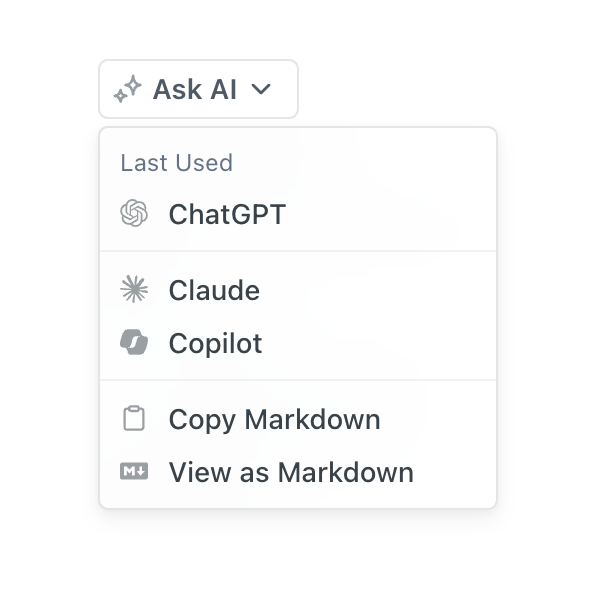 Use the Ask AI dropdown to open an AI tool from the documentation. Select the AI menu icon on any guide to ask questions, understand the API, or generate code examples.
## Plain-text documentation
You can also use the dropdown to copy any documentation page in Markdown format. Paste the content into another AI tool, code editor, or document while preserving its formatting.
Plain text helps AI tools and agents process the complete contents of a documentation page. Use this format instead of scraping or copying a page rendered with HTML and JavaScript because:
* Plain text contains fewer formatting tokens.
* Plain text includes content hidden from the default view, such as content in a tab.
* Large language models can parse and understand Markdown hierarchy.
## `llms.txt`
Fintoc hosts an [`llms.txt`](https://docs.fintoc.com/llms.txt) file that tells AI tools and agents how to retrieve plain-text versions of the documentation. The `llms.txt` format is an emerging standard for making website content accessible to large language models.
# Model Context Protocol (MCP)
The Fintoc MCP server connects AI tools to Fintoc's documentation. You can connect code editors such as Cursor and Claude Code, or general-purpose tools such as Claude Desktop.
## What is MCP?
MCP is an open standard that allows AI applications to securely access external data sources and tools. The Fintoc MCP server provides AI agents with:
* A deep understanding of the Fintoc API
* Documentation search capabilities
* Code generation assistance to integrate with Fintoc
## Fintoc MCP server setup
Fintoc hosts a remote MCP server at `https://docs.fintoc.com/mcp`. Configure your AI development tools to connect to the server.
Open Cursor to add the Fintoc MCP server automatically. Alternatively, add the following configuration to `~/.cursor/mcp.json`. For more information, see the Cursor documentation.
```json theme={null}
{
"mcpServers": {
"fintoc": {
"url": "https://docs.fintoc.com/mcp"
}
}
}
```
Open VS Code to add the Fintoc MCP server automatically. Alternatively, add the following configuration to `~/.vscode/mcp.json`. For more information, see the VS Code documentation.
```json theme={null}
{
"servers": {
"fintoc": {
"type": "http",
"url": "https://docs.fintoc.com/mcp"
}
}
}
```
To add the Fintoc MCP server to Claude Code, run the following command. For more information, see the Claude Code documentation.
```bash theme={null}
claude mcp add --transport http fintoc https://docs.fintoc.com/mcp
```
## Test your MCP setup
Test the connection to the Fintoc MCP server:
1. **Open your AI editor**, such as Cursor or VS Code.
2. **Start a new chat** with the AI assistant.
3. **Ask about Fintoc.** Try questions such as:
* "Muestrame un ejemplo para crear un Checkout Session en Python usando la API de Fintoc"
* "Crea una JWS Signature para la API de Fintoc en Java"
* "Qué endpoint puedo usar para cancelar un refund en Fintoc?"
The AI assistant can now access the Fintoc documentation through the MCP server.
Use the Ask AI dropdown to open an AI tool from the documentation. Select the AI menu icon on any guide to ask questions, understand the API, or generate code examples.
## Plain-text documentation
You can also use the dropdown to copy any documentation page in Markdown format. Paste the content into another AI tool, code editor, or document while preserving its formatting.
Plain text helps AI tools and agents process the complete contents of a documentation page. Use this format instead of scraping or copying a page rendered with HTML and JavaScript because:
* Plain text contains fewer formatting tokens.
* Plain text includes content hidden from the default view, such as content in a tab.
* Large language models can parse and understand Markdown hierarchy.
## `llms.txt`
Fintoc hosts an [`llms.txt`](https://docs.fintoc.com/llms.txt) file that tells AI tools and agents how to retrieve plain-text versions of the documentation. The `llms.txt` format is an emerging standard for making website content accessible to large language models.
# Model Context Protocol (MCP)
The Fintoc MCP server connects AI tools to Fintoc's documentation. You can connect code editors such as Cursor and Claude Code, or general-purpose tools such as Claude Desktop.
## What is MCP?
MCP is an open standard that allows AI applications to securely access external data sources and tools. The Fintoc MCP server provides AI agents with:
* A deep understanding of the Fintoc API
* Documentation search capabilities
* Code generation assistance to integrate with Fintoc
## Fintoc MCP server setup
Fintoc hosts a remote MCP server at `https://docs.fintoc.com/mcp`. Configure your AI development tools to connect to the server.
Open Cursor to add the Fintoc MCP server automatically. Alternatively, add the following configuration to `~/.cursor/mcp.json`. For more information, see the Cursor documentation.
```json theme={null}
{
"mcpServers": {
"fintoc": {
"url": "https://docs.fintoc.com/mcp"
}
}
}
```
Open VS Code to add the Fintoc MCP server automatically. Alternatively, add the following configuration to `~/.vscode/mcp.json`. For more information, see the VS Code documentation.
```json theme={null}
{
"servers": {
"fintoc": {
"type": "http",
"url": "https://docs.fintoc.com/mcp"
}
}
}
```
To add the Fintoc MCP server to Claude Code, run the following command. For more information, see the Claude Code documentation.
```bash theme={null}
claude mcp add --transport http fintoc https://docs.fintoc.com/mcp
```
## Test your MCP setup
Test the connection to the Fintoc MCP server:
1. **Open your AI editor**, such as Cursor or VS Code.
2. **Start a new chat** with the AI assistant.
3. **Ask about Fintoc.** Try questions such as:
* "Muestrame un ejemplo para crear un Checkout Session en Python usando la API de Fintoc"
* "Crea una JWS Signature para la API de Fintoc en Java"
* "Qué endpoint puedo usar para cancelar un refund en Fintoc?"
The AI assistant can now access the Fintoc documentation through the MCP server.