> ## Documentation Index
> Fetch the complete documentation index at: https://docs.fintoc.com/llms.txt
> Use this file to discover all available pages before exploring further.
# Send transfers
> Send outbound transfers in real time with Fintoc's legacy v2023-11-15 Transfers API over SPEI in Mexico or TEF in Chile, and track status via webhooks.
After you complete the setup guide, follow these steps to send an outbound transfer:
1. Configure JSON Web Signature (JWS) signing keys and generate a JWS signature.
2. Add funds to the `Account` object's `root_account_number`.
3. Create a `Transfer` from your backend using your **Secret Key** and a **JWS Signature**.
4. Monitor the transfer status.
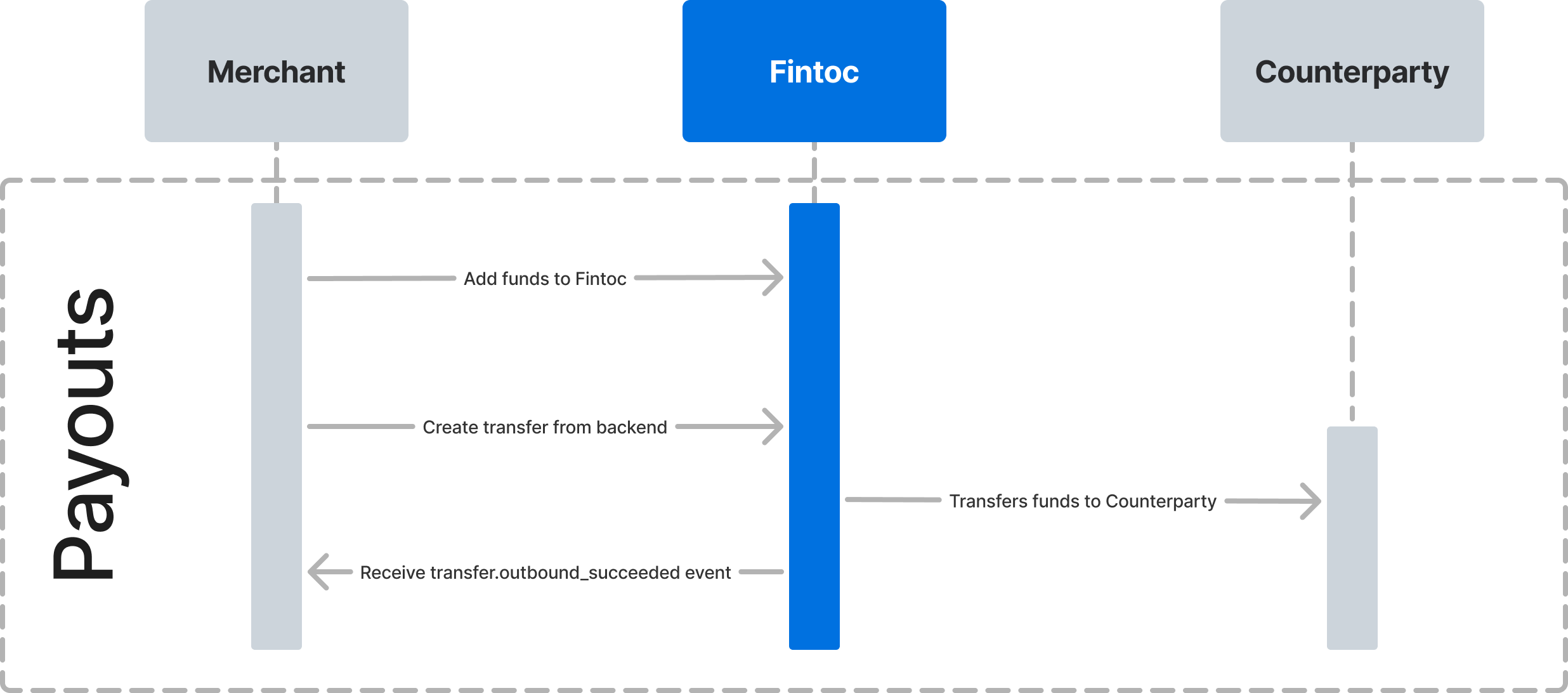
The following diagram shows how Fintoc interacts with your integration and the counterparty receiving the payout.
 # Step 1: Configure JWS signing keys and generate a JWS signature
Requests to the Transfers endpoints require a JWS. A JWS digitally signs data to verify its integrity and authenticity.
To learn how to sign an API call, follow the steps in the [JWS Signature guide](/v2023-11-15/guides/transfers/setting-up-jws-keys).
# Step 2: Add funds to Fintoc
To create a `Transfer`, first add funds to your `Account` object's `root_account_number`. The funds appear as an inbound transfer.
# Step 3: Create a transfer
You can send real-time transfers after you fund your account. From your backend, create a `Transfer` using your test **Secret Key** and **JWS Signature**. Include the origin account, amount, currency, and counterparty receiving the payment.
The examples below show successful `Transfer` responses. Use the predefined inputs in [Test your integration](/v2023-11-15/guides/transfers/test-your-integration#test-outbound-transfers) to test unsuccessful results.
## Use an idempotency key
Fintoc supports [idempotency](https://en.wikipedia.org/wiki/Idempotence) so you can retry a `Transfer` request without performing the operation twice. Use an idempotency key when creating a `Transfer`. If a connection error occurs, retry the request with the same key to avoid creating a second `Transfer`.
To make an idempotent request, include the `Idempotency-Key` header.
## Create a transfer for Mexico 🇲🇽
The following example creates a `Transfer` for MXN \$590.13:
```bash theme={null}
curl --request POST \
--url https://api.fintoc.com/v2/transfers \
--header 'Authorization: sk_test_9c8d8CeyBTx1VcJzuDgpm4H' \
--header 'Fintoc-JWS-Signature: CNMaYaDGU3ZhFV1ve6p3sAdYXhEklej8DVIAMqIWCkpNmT6Jp7iigcndXwH5q3WQFHiswgIQU5-_-4rV3jKGptCROmEyWPW8_elhYH1apzAyjOjyZ55ygv37xKHzIFhixzAwmXlAv4pfD4lVelYWVNOSN7REA0QJeCy2vKdqZ5cjqCXQ1lkQUlzOE7dpuNoAkhAhAJJ8HaamFKy7Gl7uwmqbIr-dVYv21d_9O7mO26n0gy3zWXD2nJDxU5Mzl2pZd8-sFvUr9Kmp_YkeRMh4bSe0fr1Uc_YgkjpmYUyu7kaxRWTbAdJ3GwqWFMUDiyfhHdzvZPZyU4VkWreimoydMA' \
--header 'Idempotency-Key: 1ebfd86c-a75b-4606-872f-9f1cdd9724ca' \
--header 'accept: application/json' \
--header 'content-type: application/json' \
--data '
{
"amount": 59013,
"currency": "mxn",
"account_id": "acc_M8sKf230BgHjD4",
"comment": "Pago de credito 10451",
"reference_id": "150195",
"counterparty": {
"account_number": "000000000000000000"
},
"metadata": {
"customer_id": "12050123"
}
}
'
```
**Currencies are represented as integers**
The Fintoc API represents amounts as integers in the smallest currency unit. For example, Fintoc represents **MXN \$10.29 as 1029**.
For more information, see [Currencies](/v2023-11-15/guides/home/currencies).
### Add the institution ID
For a standardized Mexican bank account number (CLABE), Fintoc derives the counterparty institution ID from the CLABE. For a **mobile phone number** or **debit card**, include the five-digit institution ID. Find the ID in the [Bank of Mexico institution list](https://www.banxico.org.mx/cep-scl/listaInstituciones.do). Otherwise, the API returns a `400 Bad Request` error.
### Use an SDK
Use the Python or Node SDK to create the transfer:
```python theme={null}
transfer = client.v2.transfers.create(
idempotency_key="12345678910",
amount=59013,
currency="MXN",
account_id="acc_M8sKf230BgHjD4",
comment="Pago de credito 10451",
reference_id="150195",
counterparty={"account_number": "000000000000000000"},
metadata={"customer_id": "12050123"}
)
```
```javascript Node theme={null}
const transfer = await fintoc.v2.transfers.create({
idempotency_key: '12345678910',
amount: 59013,
currency: 'mxn',
account_id: 'acc_2tgq0oPCyMInAZWiZt5',
counterparty: {
account_number: '000000000000000000',
},
metadata: {
customer_id: '19385014'
}
});
```
In Mexico, the `Counterparty` object requires the following attribute:
| Parameter | Description |
| :--------------- | :------------------------------------------------------------------------------------ |
| `account_number` | Recipient account number, such as a CLABE, mobile phone number, or debit card number. |
A successful request returns the following response:
```json theme={null}
{
"object": "transfer",
"id": "tr_jKaHD105H",
"amount": 59013,
"currency": "MXN",
"direction": "outbound",
"status": "succeeded",
"transaction_date": "2020-04-17T05:12:41.462Z",
"post_date": "2020-04-17T00:00:00.000Z",
"comment": "Pago de gas",
"reference_id": "150195",
"tracking_key": "s2123423423324334",
"receipt_url": "https://www.banxico.org.mx/cep/",
"mode": "test",
"return_reason": null,
"counterparty": {
"holder_id": "AAAA010101AAA",
"holder_name": "Test Customer 1",
"account_number": "000000000000000000",
"account_type": "clabe",
"institution": {
"id": "mx_bbva_mexico",
"name": "BBVA Mexico",
"country": "mx"
}
},
"account_number": {
"id": "acno_Kasf91034gj1AD",
"account_id": "acc_Jas92lf9adg94ka",
"number": "000000000000000000",
"created_at": "2024-03-01T20:09:42.949787176Z",
"mode": "test",
"description": null,
"metadata": {},
"object": "account_number"
},
"metadata": {
"order_id": 1234
}
}
```
# Step 1: Configure JWS signing keys and generate a JWS signature
Requests to the Transfers endpoints require a JWS. A JWS digitally signs data to verify its integrity and authenticity.
To learn how to sign an API call, follow the steps in the [JWS Signature guide](/v2023-11-15/guides/transfers/setting-up-jws-keys).
# Step 2: Add funds to Fintoc
To create a `Transfer`, first add funds to your `Account` object's `root_account_number`. The funds appear as an inbound transfer.
# Step 3: Create a transfer
You can send real-time transfers after you fund your account. From your backend, create a `Transfer` using your test **Secret Key** and **JWS Signature**. Include the origin account, amount, currency, and counterparty receiving the payment.
The examples below show successful `Transfer` responses. Use the predefined inputs in [Test your integration](/v2023-11-15/guides/transfers/test-your-integration#test-outbound-transfers) to test unsuccessful results.
## Use an idempotency key
Fintoc supports [idempotency](https://en.wikipedia.org/wiki/Idempotence) so you can retry a `Transfer` request without performing the operation twice. Use an idempotency key when creating a `Transfer`. If a connection error occurs, retry the request with the same key to avoid creating a second `Transfer`.
To make an idempotent request, include the `Idempotency-Key` header.
## Create a transfer for Mexico 🇲🇽
The following example creates a `Transfer` for MXN \$590.13:
```bash theme={null}
curl --request POST \
--url https://api.fintoc.com/v2/transfers \
--header 'Authorization: sk_test_9c8d8CeyBTx1VcJzuDgpm4H' \
--header 'Fintoc-JWS-Signature: CNMaYaDGU3ZhFV1ve6p3sAdYXhEklej8DVIAMqIWCkpNmT6Jp7iigcndXwH5q3WQFHiswgIQU5-_-4rV3jKGptCROmEyWPW8_elhYH1apzAyjOjyZ55ygv37xKHzIFhixzAwmXlAv4pfD4lVelYWVNOSN7REA0QJeCy2vKdqZ5cjqCXQ1lkQUlzOE7dpuNoAkhAhAJJ8HaamFKy7Gl7uwmqbIr-dVYv21d_9O7mO26n0gy3zWXD2nJDxU5Mzl2pZd8-sFvUr9Kmp_YkeRMh4bSe0fr1Uc_YgkjpmYUyu7kaxRWTbAdJ3GwqWFMUDiyfhHdzvZPZyU4VkWreimoydMA' \
--header 'Idempotency-Key: 1ebfd86c-a75b-4606-872f-9f1cdd9724ca' \
--header 'accept: application/json' \
--header 'content-type: application/json' \
--data '
{
"amount": 59013,
"currency": "mxn",
"account_id": "acc_M8sKf230BgHjD4",
"comment": "Pago de credito 10451",
"reference_id": "150195",
"counterparty": {
"account_number": "000000000000000000"
},
"metadata": {
"customer_id": "12050123"
}
}
'
```
**Currencies are represented as integers**
The Fintoc API represents amounts as integers in the smallest currency unit. For example, Fintoc represents **MXN \$10.29 as 1029**.
For more information, see [Currencies](/v2023-11-15/guides/home/currencies).
### Add the institution ID
For a standardized Mexican bank account number (CLABE), Fintoc derives the counterparty institution ID from the CLABE. For a **mobile phone number** or **debit card**, include the five-digit institution ID. Find the ID in the [Bank of Mexico institution list](https://www.banxico.org.mx/cep-scl/listaInstituciones.do). Otherwise, the API returns a `400 Bad Request` error.
### Use an SDK
Use the Python or Node SDK to create the transfer:
```python theme={null}
transfer = client.v2.transfers.create(
idempotency_key="12345678910",
amount=59013,
currency="MXN",
account_id="acc_M8sKf230BgHjD4",
comment="Pago de credito 10451",
reference_id="150195",
counterparty={"account_number": "000000000000000000"},
metadata={"customer_id": "12050123"}
)
```
```javascript Node theme={null}
const transfer = await fintoc.v2.transfers.create({
idempotency_key: '12345678910',
amount: 59013,
currency: 'mxn',
account_id: 'acc_2tgq0oPCyMInAZWiZt5',
counterparty: {
account_number: '000000000000000000',
},
metadata: {
customer_id: '19385014'
}
});
```
In Mexico, the `Counterparty` object requires the following attribute:
| Parameter | Description |
| :--------------- | :------------------------------------------------------------------------------------ |
| `account_number` | Recipient account number, such as a CLABE, mobile phone number, or debit card number. |
A successful request returns the following response:
```json theme={null}
{
"object": "transfer",
"id": "tr_jKaHD105H",
"amount": 59013,
"currency": "MXN",
"direction": "outbound",
"status": "succeeded",
"transaction_date": "2020-04-17T05:12:41.462Z",
"post_date": "2020-04-17T00:00:00.000Z",
"comment": "Pago de gas",
"reference_id": "150195",
"tracking_key": "s2123423423324334",
"receipt_url": "https://www.banxico.org.mx/cep/",
"mode": "test",
"return_reason": null,
"counterparty": {
"holder_id": "AAAA010101AAA",
"holder_name": "Test Customer 1",
"account_number": "000000000000000000",
"account_type": "clabe",
"institution": {
"id": "mx_bbva_mexico",
"name": "BBVA Mexico",
"country": "mx"
}
},
"account_number": {
"id": "acno_Kasf91034gj1AD",
"account_id": "acc_Jas92lf9adg94ka",
"number": "000000000000000000",
"created_at": "2024-03-01T20:09:42.949787176Z",
"mode": "test",
"description": null,
"metadata": {},
"object": "account_number"
},
"metadata": {
"order_id": 1234
}
}
```
## Create a transfer for Chile 🇨🇱
The following example creates a `Transfer` for CLP \$1869:
```bash theme={null}
curl --request POST \
--url https://api.fintoc.com/v2/transfers \
--header 'Authorization: sk_test_9c8d8CeyBTx1VcJzuDgpm4H' \
--header 'Fintoc-JWS-Signature: CNMaYaDGU3ZhFV1ve6p3sAdYXhEklej8DVIAMqIWCkpNmT6Jp7iigcndXwH5q3WQFHiswgIQU5-_-4rV3jKGptCROmEyWPW8_elhYH1apzAyjOjyZ55ygv37xKHzIFhixzAwmXlAv4pfD4lVelYWVNOSN7REA0QJeCy2vKdqZ5cjqCXQ1lkQUlzOE7dpuNoAkhAhAJJ8HaamFKy7Gl7uwmqbIr-dVYv21d_9O7mO26n0gy3zWXD2nJDxU5Mzl2pZd8-sFvUr9Kmp_YkeRMh4bSe0fr1Uc_YgkjpmYUyu7kaxRWTbAdJ3GwqWFMUDiyfhHdzvZPZyU4VkWreimoydMA' \
--header 'Idempotency-Key: 1ebfd86c-a75b-4606-872f-9f1cdd9724ca' \
--header 'accept: application/json' \
--header 'content-type: application/json' \
--data '
{
"amount": 1869,
"currency": "CLP",
"account_id": "acc_M8sKf230BgHjD4",
"comment": "Pago de credito 10451",
"counterparty": {
"holder_id": "111111111",
"holder_name": "Piped Piper SpA",
"account_number": "000000000",
"account_type": "checking_account",
"institution_id": "cl_banco_de_chile"
},
"metadata": {
"customer_id": "12050123"
}
}
'
```
### Use an SDK
Use the Python or Node SDK to create the transfer:
```python theme={null}
transfer = client.v2.transfers.create(
idempotency_key="12345678910",
amount=1869,
currency="CLP",
account_id="acc_M8sKf230BgHjD4",
comment="Pago de credito 10451",
counterparty={
"holder_id": "111111111",
"holder_name": "Piped Piper SpA",
"account_number": "000000000",
"account_type": "checking_account",
"institution_id": "cl_banco_de_chile"
},
metadata={"customer_id": "12050123"}
)
```
```javascript Node theme={null}
const transfer = await fintoc.v2.transfers.create({
idempotency_key: '12345678910',
amount: 59013,
currency: 'CLP',
account_id: 'acc_2tgq0oPCyMInAZWiZt5',
comment: 'Pago de credito 12543',
counterparty: {
holder_id: '111111111',
holder_name: 'Pied Piper SpA',
account_number: '000000000000000000',
account_type: 'checking_account',
institution_id: 'cl_banco_de_chile'
},
metadata: {
customer_id: '19385014'
}
});
```
In Chile, the `Counterparty` object requires the following five attributes:
| Parameter | Description |
| :--------------- | :--------------------------------------------------------------- |
| `holder_id` | Account holder's Chilean tax ID (RUT). |
| `holder_name` | Account holder's name. |
| `account_number` | Account number. |
| `account_type` | Bank account type. One of `checking_account` or `sight_account`. |
| `institution_id` | Fintoc institution ID for the bank receiving the transfer. |
A successful request returns the following response:
```json theme={null}
{
"object": "transfer",
"id": "tr_jKaHD105H",
"amount": 1869,
"currency": "clp",
"direction": "outbound",
"status": "succeeded",
"transaction_date": "2020-04-17T05:12:41.462Z",
"post_date": "2020-04-17T00:00:00.000Z",
"comment": "Pago de gas",
"reference_id": null,
"receipt_url": null,
"tracking_key": null,
"mode": "test",
"return_reason": null,
"counterparty": {
"holder_id": "111111111",
"holder_name": "Piped Piper SpA",
"account_number": "000000000",
"account_type": "checking_account",
"institution": {
"id": "cl_banco_de_chile",
"name": "Banco de Chile",
"country": "cl"
}
},
"account_number": {
"id": "acno_Kasf91034gj1AD",
"account_id": "acc_Jas92lf9adg94ka",
"number": "000000000000000000",
"created_at": "2024-03-01T20:09:42.949787176Z",
"mode": "test",
"object": "account_number",
"description": null,
"metadata": {}
},
"metadata": {
"order_id": 1234
}
}
```
# Step 4: Monitor the transfer status
## Transfer status flow
A transfer has one of the following statuses: `pending`, `succeeded`, `failed`, `returned`, `return_pending`, or `rejected`. For details about each status, see the [Transfers data model](/v2023-11-15/guides/transfers/transfers-overview/v2-transfers-data-model).
## Monitor status using webhooks
Fintoc sends a `transfer.outbound.succeeded` event when the transfer settles. Use the [webhook guide](/v2023-11-15/guides/resources/webhooks-walkthrough) to receive these events. You can then notify your customer or log the transfer in your enterprise resource planning (ERP) system.
We recommend handling the following events:
| Event | Description |
| :---------------------------- | :------------------------------------------------------------------------------------------------------------------------------------------------------------------------------ |
| `transfer.outbound.succeeded` | Sent when the transfer succeeds. |
| `transfer.outbound.rejected` | Sent when Banco de México or the counterparty institution rejects a transfer in Mexico, or when the counterparty institution rejects one in Chile. `rejected` is a final state. |
| `transfer.outbound.failed` | Sent when an error prevents the transfer from reaching its destination account. |
**Webhooks may arrive out of order**
For example, a `transfer.outbound.rejected` event can arrive before the same transfer's `transfer.outbound.succeeded` event. The transfer can succeed before the rejection occurs.