

Transfer represents one inbound or outbound money movement. Inbound transfers are associated with an Account Number; outbound transfers debit an Account. This page explains the Transfer data model: the Counterparty, statuses, limits, returns, and authorization. For the field-by-field reference, see the Transfer object.
Transfer counterparty
EachTransfer includes a nested Counterparty object that represents the other party in the transfer: either the sender or the recipient, depending on the direction.
The Counterparty object includes these details:
- Counterparty name, such as a customer, supplier, or partner.
- Bank account details, such as the account number and bank code.
- For inbound transfers, the
Counterpartyis the entity that sent funds to your Account Number. - For outbound transfers, the
Counterpartyis the entity that receives funds from yourAccount.
Transfer statuses and webhook notifications
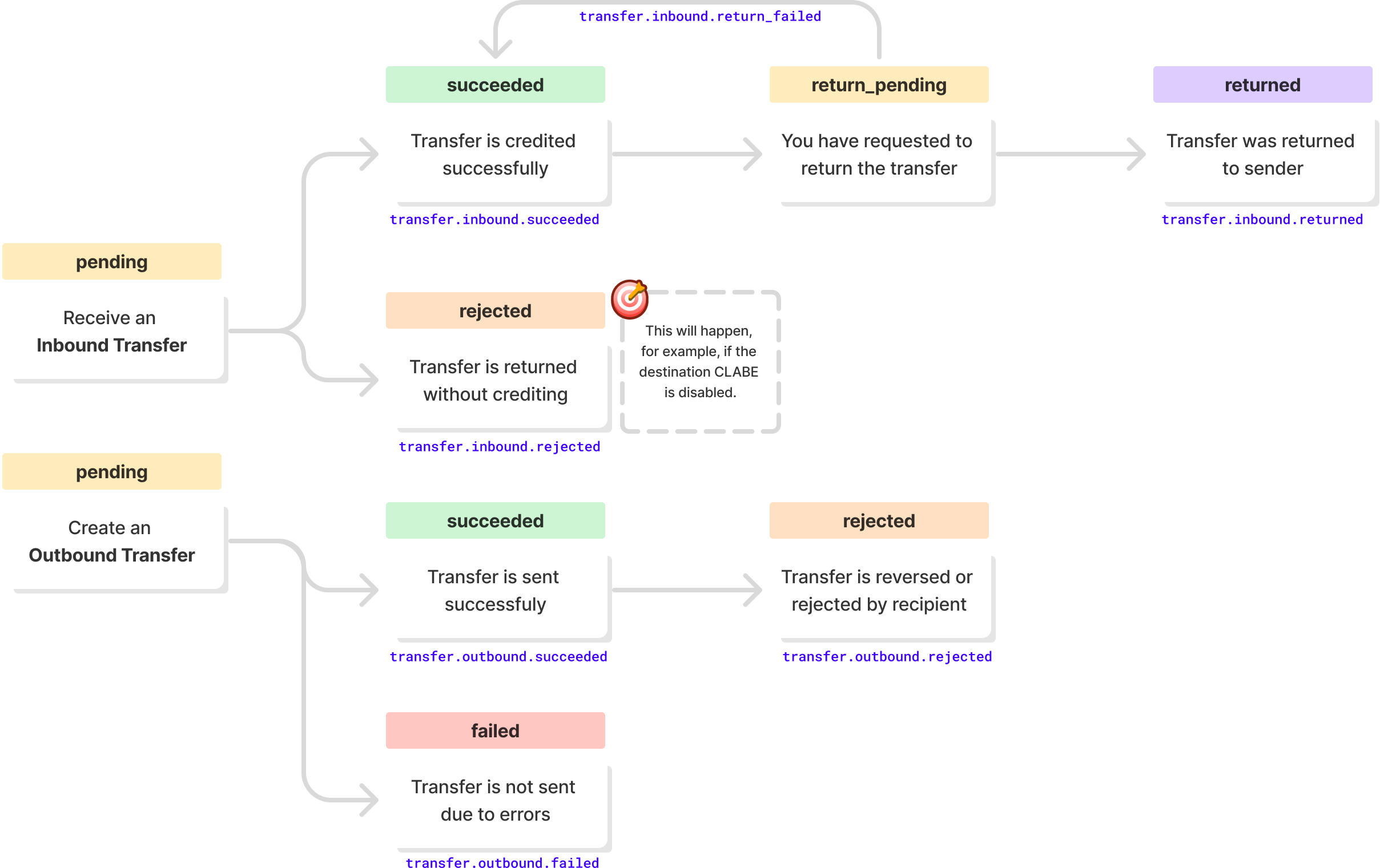
ATransfer moves through these statuses, and Fintoc emits a webhook for each transition:
Transfer limits
The maximum amount perTransfer depends on the country:
| Limit | 🇲🇽 Mexico | 🇨🇱 Chile |
|---|---|---|
| Maximum amount per transfer | No limit | $7,000,000 CLP |
Rate limits
The Transfers API accepts up to 10 requests per second per client by default. Contact Fintoc support to request a higher limit.Transfer returns
🇲🇽 Mexico
In Mexico, you can request the return of an inboundTransfer that you don’t recognize or that doesn’t meet your business’s acceptance criteria. When Fintoc returns the Transfer, the status changes to returned. Fintoc deducts the transfer amount from your account balance.
🇨🇱 Chile
In Chile, the Centro de Compensación Automatizado can reject inbound or outboundTransfer objects. When the Centro de Compensación Automatizado rejects a Transfer, the status changes to returned, and Fintoc restores the funds to your account balance.
Authorizing a transfer
The Transfers API supports a single authorizer. When a person in your organization with permission to authorize transfers confirms aTransfer, Fintoc pays out the Transfer immediately.