

- Save during a payment: create a Checkout Session with
flowset topaymentandsave_payment_methodset toenabled. Your customer gets the option to save the payment method for future payments. - Save without a current payment: create a Checkout Session with
flowset tosetupto enroll a payment method without processing a payment.
Option 1: Save during a payment (recommended)
The customer pays and their payment method is saved in a single step.Create or choose a Customer
Every saved payment method must belong to aCustomer. If you already have one, reuse its id. Otherwise, you can either create it first with the Customers API or send customer_data in the Checkout Session to create the Customer inline.
Server
Node
Customer:
id (e.g. cus_3B2bODrQFje7ZVkT69xyaTSDwXQ).
If a Customer with the same tax_id already exists, the request returns a 409 Conflict error. To reuse an existing Customer, send its id in customer instead of customer_data.
Create a Checkout Session with save_payment_method
Create a Checkout Session with the customer ID, flow set to payment, and save_payment_method set to enabled. Fintoc processes the payment and, if your customer chooses to save the payment method during the flow, stores their credentials for future use.
Server
Node
CheckoutSession, including its redirect_url:
Redirect the customer
Use theredirect_url returned in the response to redirect your customer to the Fintoc-hosted page, where they complete the payment and can choose to save their credentials for future payments.
Client
Handle post-payment events
Always use webhooks to determine the final outcome. Your customer may close the tab, lose connection, or never reach yoursuccess_url.
Checkout Session events
-
checkout_session.finished: Sent when a Checkout Session reaches a final successful state. The event includes the payment outcome and, if your customer opted in, the savedpayment_method. Exampledataobject:
Payment Method events
If your customer chose to save the method, Fintoc also sends apayment_method.activated event. The event’s data field contains a PaymentMethod like this:
Option 2: Save a method without a current payment
Create a Setup session
The Checkout Session object represents your intent to save a payment method without processing a payment. Using your Secret Key, create a Checkout Session from your backend withflow set to setup:
Server
Node
CheckoutSession, including its redirect_url:
Send
payment_method_options to preselect a bank for your customerYou can create the Checkout Session with a specific bank by sending its institution_id inside the sender_account of payment_method_options. Your customer can then only save a bank account of that institution. You can also send the customer’s Chilean tax ID (RUT) as the holder_id, so the flow pre-fills it.We recommend this option when your customer selects their bank in your flow before you create the session, so they do not have to select a bank twice.You can also restrict enrollment by card kind or account type. Send kinds (credit, debit) inside payment_method_options.card to limit card kinds. Send types (checking_account) inside payment_method_options.pac.sender_account to limit account types. To apply no restriction, omit the option instead of sending an empty array: an empty array allows nothing.Redirect the customer
After creating a session, you receive aredirect_url that you use to redirect your customer so they can enroll their bank account as a saved payment method.
Client
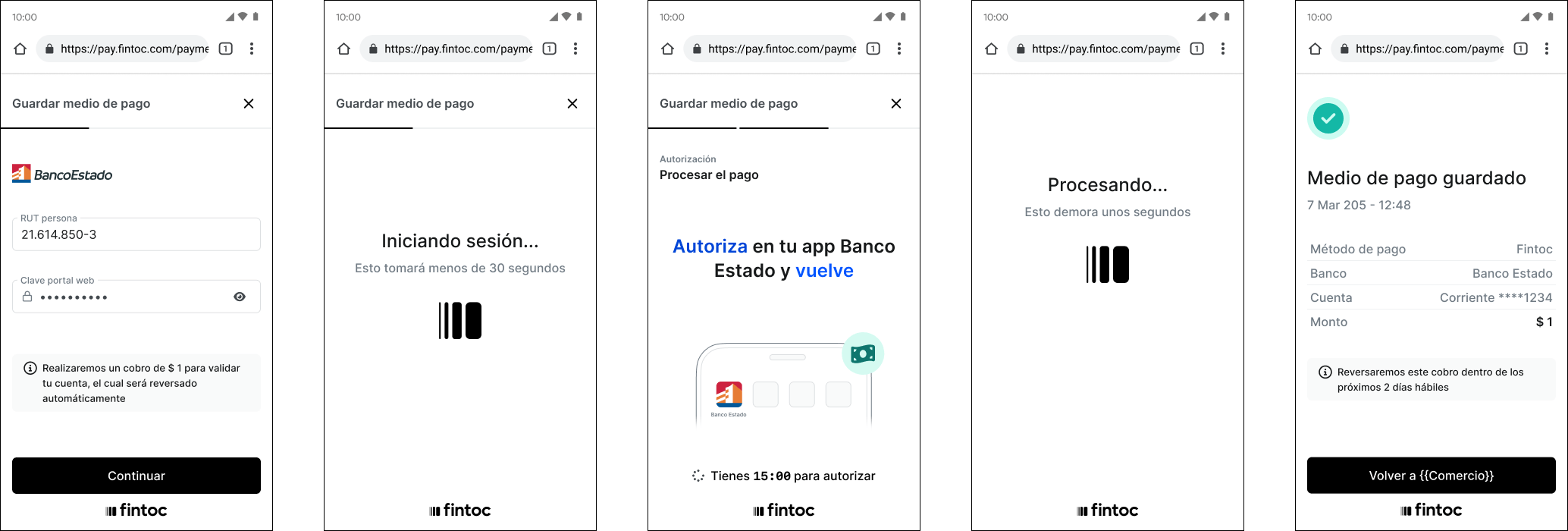
Handle post-session events
Subscribe tocheckout_session.finished, checkout_session.expired, and payment_method.activated for the standalone setup flow.
Create a payment session with a saved payment method
If your customer has a savedbank_transfer payment method, you can create a payment Checkout Session that uses the saved method. Fintoc redirects your customer directly to the bank approval step, without asking them to log in with their bank credentials.
Server
Node
CheckoutSession, including its redirect_url:
Redirect the customer
Use theredirect_url to redirect your customer to the Fintoc-hosted page, where they go directly to the bank approval step without logging in with their bank credentials.
Client
Handle post-payment events
After the payment, Fintoc sendscheckout_session.finished, checkout_session.expired, payment_intent.succeeded, or payment_intent.failed, depending on the outcome:
Test your integration
Using your test mode API Secret Key, you can create Checkout Sessions that simulate successful and failed outcomes without moving any money. This lets you validate your full setup and payment flow end-to-end:- Your backend API requests (creating sessions and handling responses)
- The redirect flow from your frontend to the
redirect_urland back to thesuccess_urlorcancel_urlafter the setup or payment - The webhooks for post-session events that save the
customer, thepayment_method, and the payment result- After a successful setup or payment that saves a
payment_method, test creating a payment session with the customer’s saved method
- After a successful setup or payment that saves a
bank_transfer flow in test mode, open the redirect_url, select the test bank, and log in with the test credentials user_good and pass_good. This combination simulates a successful enrollment and payment.
After a successful run, Fintoc sends a checkout_session.finished event with status set to finished:
payment_method.activated event with status set to active: