

- On your backend, create a Checkout Session with
flow: setup. - Redirect your customer to complete the enrollment at the Fintoc-hosted checkout page.
- Handle post-session events to save the
payment_methodandcustomer. - Create charges against the saved payment method using the Payment Intent API.
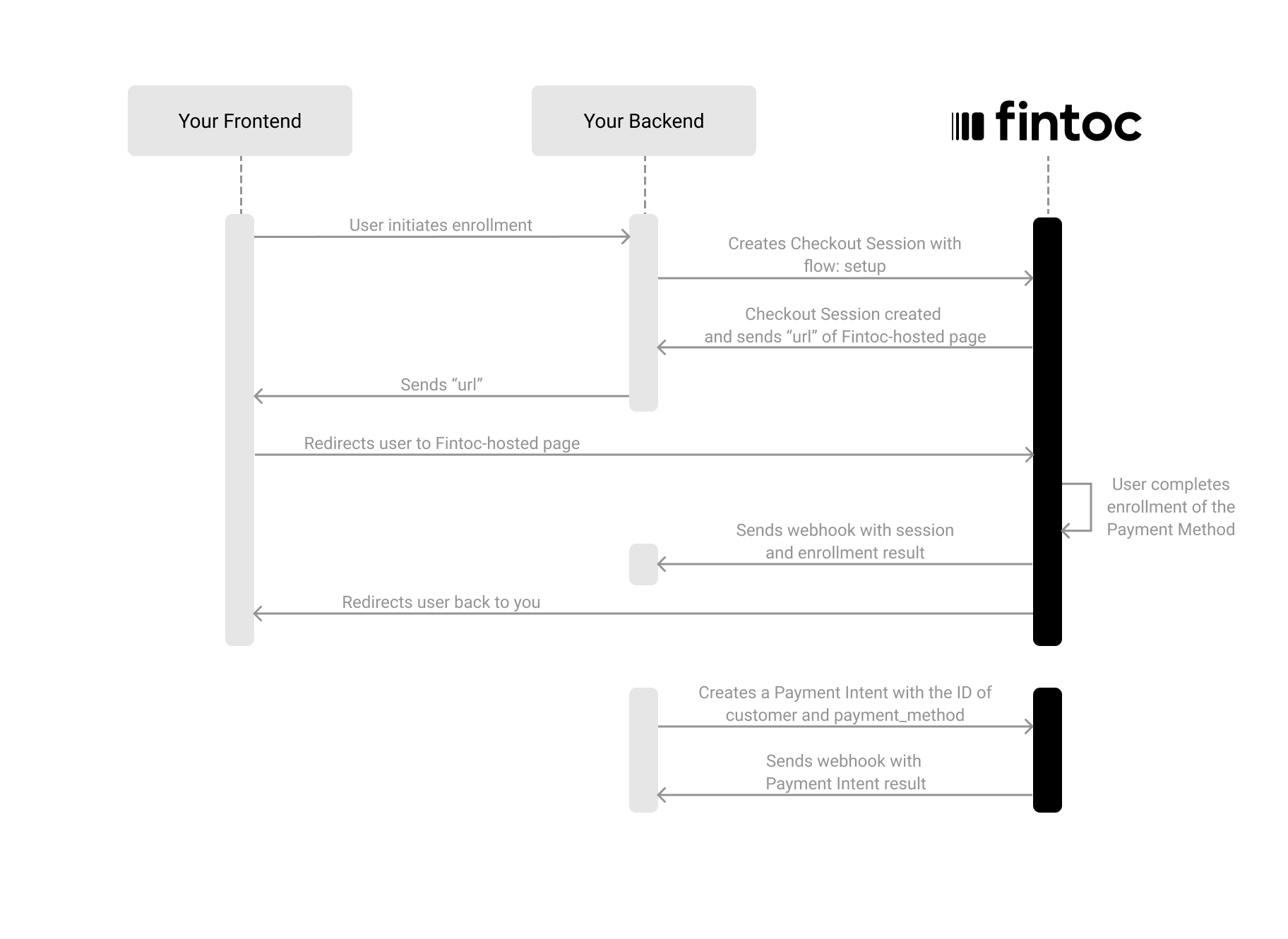
Create a Checkout Session
The Checkout Session with thesetup flow represents your intent to save a payment method for future charges, without creating a recurring subscription.
Using your Secret Key, create a Checkout Session on your backend with flow set to setup:
Server
Node
redirect_url:
Difference from the subscription flowWhen you create a Checkout Session with
flow: setup, Fintoc enrolls the customer’s payment method and creates a PaymentMethod, but does not create a subscription or schedule any recurring charges. You control when and how much to charge by creating future payment intents.Include customer data
When creating a Checkout Session for setup, you must include customer information.Redirect the customer to complete the enrollment
Next, redirect the customer to theredirect_url from the response. The customer sees the Fintoc-hosted checkout page where they complete the enrollment.
After the customer completes the enrollment, Fintoc automatically redirects them to your success_url or cancel_url, depending on the outcome.
Client
Handle post-session events
Always use webhooks to determine the final outcome. Customers may close the tab, lose connection, or never reach yoursuccess_url.
Checkout Session events
When the enrollment completes, Fintoc sends acheckout_session.finished event with the customer and payment_method information:
Payment Method events
Fintoc also sends apayment_method.activated event. The event’s data field contains a PaymentMethod like this:
customer ID and the payment_method ID. You need them to create charges later.
Events summary
You should subscribe to all the following post-session events:Create a charge against the saved payment method
Once you have a savedpayment_method, charge it by creating a Payment Intent with the payment_method and customer IDs:
Server
Node
Fintoc responds with the created Payment Intent:
Handle payment events
Subscribe to the following events to track the payment outcome:Test your integration
Using your test mode API Secret Key, create Checkout Sessions that simulate the full setup and payment flow without moving any money.1) Create a setup Checkout Session using test credentials
Create a Checkout Session withflow: setup using your test mode Secret Key. Complete the enrollment flow on the Fintoc-hosted page using the following credentials:
Test credentials:
PAC:
- Username (RUT):
11.111.111-1 - Password:
jonsnow
Card:
2) Verify the saved payment method
After completing the test enrollment, you should receive thecheckout_session.finished and payment_method.activated webhook events. Verify that:
- The
payment_methodID is present in the event payload. - The
customerID matches the customer you enrolled.
3) Create a test charge against the saved method
Using thecustomer and payment_method IDs from step 2, create a Payment Intent against the saved method. Verify that:
- You receive the
payment_intent.succeededevent. - The amount matches what you sent.
- The payment method used is the saved PAC or card.
Test mode does not yet support saving a Payment Method in Mexico.