

Invoice for the amount your customer owes. Fintoc then collects that invoice, or leaves it open for you to collect. The subscription schedules the charge; the invoice is the charge. Attempts, retries, and payment links all live on the invoice. Handle invoice.* events as part of the integration, not as an add-on. See Manage invoices.
You can create a subscription in two ways:
- With a
Checkout Session. Your customer enrolls a payment method at the Fintoc-hosted checkout page, and Fintoc creates the subscription with that payment method attached. Use it when your customer has to authorize the payment method. - With the Subscriptions API. You create the subscription on your backend, with no checkout and no customer interaction. Use it when your customer already has an enrolled payment method, or when you plan to issue invoices without charging. See Create a subscription with the API.
Checkout Session, you complete four steps:
- On your backend, create a
Checkout Sessionwithflow: subscription. - Redirect the customer to complete the enrollment at the Fintoc-hosted checkout page.
- Handle post-enrollment and recurring payment events (webhooks).
- Handle the invoices the subscription issues on every billing cycle.
The v2
Checkout Session endpoints require API version 2026-02-01 or later. Fintoc pins your account to the version current on your first API request. If your account is pinned to an earlier version, send the Fintoc-Version: 2026-02-01 header on checkout session requests. This lets you test them without affecting the rest of your integration. See Authentication for details.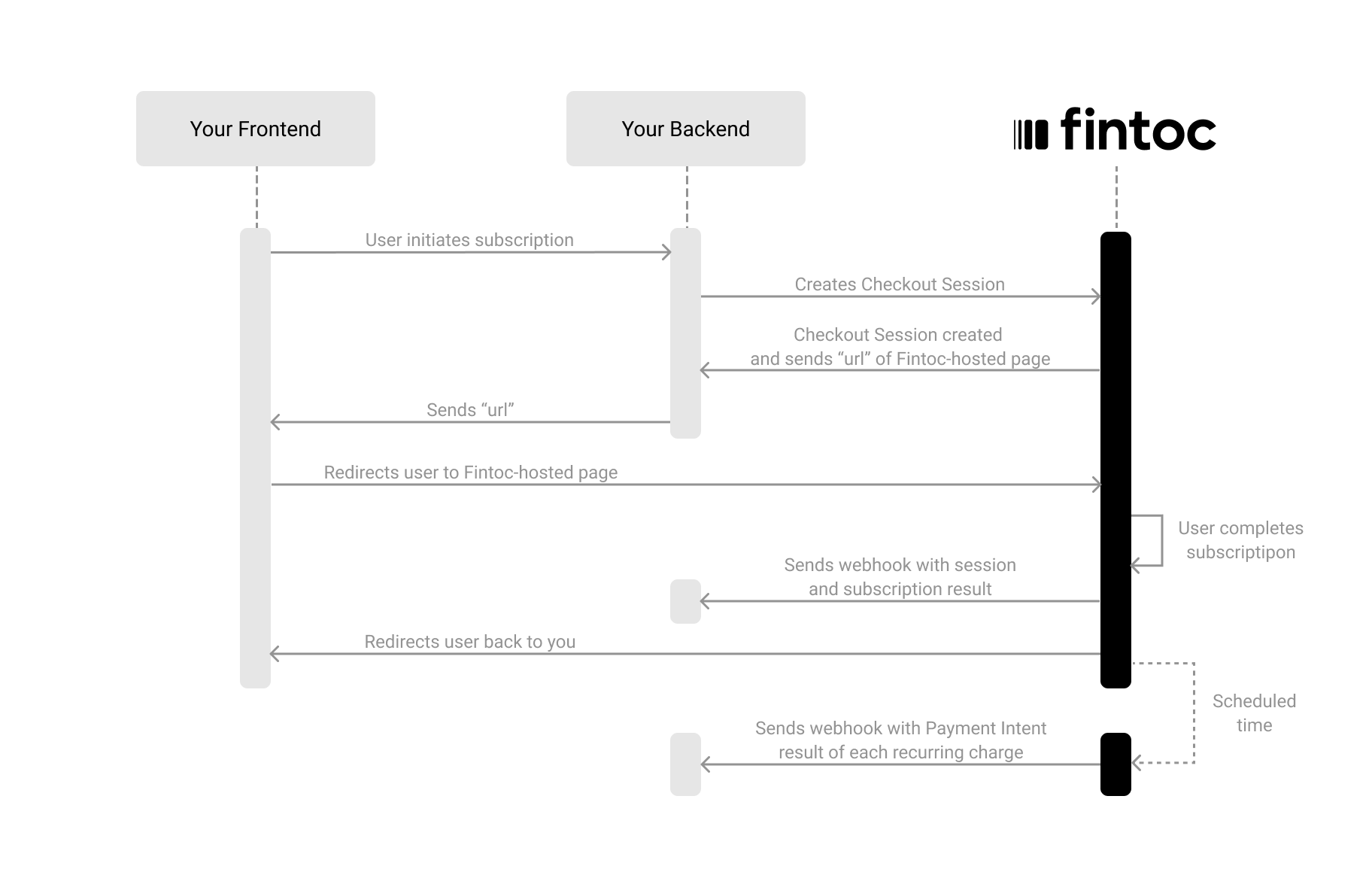
Create a Checkout Session
The Checkout Session object represents your intent to enroll a payment method for recurring charges, and to create a subscription with a fixed amount and periodicity. Using your Secret Key, create aCheckout Session on your backend with flow set to subscription.
Server
Node
id and redirect_url to continue the flow:
redirect_url attribute. In the next step, you redirect the customer to this location to complete the subscription.
The following table describes the parameters you send when creating a Checkout Session:
Include customer data (required for subscriptions)
When creating aCheckout Session with flow: subscription, you must include customer information. You can do this either by referencing an existing customer ID (customer) or by sending customer_data to create one inline:
Include an items list (required for subscriptions)
When creating aCheckout Session with flow: subscription, you must include the items the customer subscribes to. This information lets Fintoc display the items on the checkout page and show only the payment methods available for specific products.
Each item in
line_items must include price_data.
price_data object
product_data object
Price a subscription in UF
To charge a plan indexed to UF, keep the session’scurrency as CLP. Set the item’s price_data.currency to CLF, the ISO 4217 code for UF. Set unit_amount in the smallest UF unit, which has four decimals. The following partial payload shows the UF-specific fields; keep the other required fields from the full request above:
CLP. When Fintoc generates an invoice, Fintoc converts every CLF item using the UF value at the start of the billing period. The amount adjusts on every cycle. Once Fintoc issues the invoice, the invoice amount no longer changes, no matter when your customer pays the invoice.
A single subscription can combine CLP and CLF items, which lets you index only part of a plan to UF. Any other currency mix, such as an MXN item inside a CLP subscription, returns an error, and Fintoc does not create the subscription.
Redirect the customer to complete the enrollment
Next, redirect the customer to the Fintoc-hosted checkout page using theredirect_url. After the customer completes the enrollment, Fintoc redirects the customer back to your site: to the success_url on success, or to the cancel_url if they cancel.
Client
Handle post-session events
Once aCheckout Session finishes, you handle the result in your frontend and complete the subscription in your backend. For your backend, you use the events that Fintoc sends through webhooks.
Complete the subscription on your backend
Fintoc sends acheckout_session.finished event when the session completes.
In a subscription flow, this event includes information about the session and references to the subscription and payment_method created during enrollment.
In
live mode, when the bank has not activated a Chilean automatic debit (PAC) mandate yet, Fintoc schedules the first charge for 2 Chilean business days later. The first invoice stays open and the subscription stays incomplete until Fintoc charges the invoice. Fintoc charges cards right away. See First automatic debit (PAC) charge while the mandate activates.invoices field. See Reconcile payments with invoices and subscriptions.
Create a subscription with the API
When your customer does not need to enroll a payment method in a checkout, create the subscription directly with Create a subscription. You need an existingcustomer and the items the subscription bills on every cycle.
The collection_method decides how Fintoc collects every invoice the subscription generates:
charge_automatically, the default, charges apayment_methodon every billing cycle. The payment method is required.send_invoiceleaves every invoiceopenfor you to collect. The payment method is optional.
Charge automatically against a payment method
Pass thepayment_method Fintoc charges on every billing cycle. It must belong to the customer, be active, and be pac, card, or mx_direct_debit (in test mode with MXN). Subscriptions do not support bank_transfer.
Server
Node
Fintoc responds with the created subscription:
incomplete, not active. Fintoc finalizes the initial invoice during subscription creation and charges the payment method. The subscription becomes active once that first payment succeeds. Track the outcome with the invoice.* events described in Manage invoices.
Issue invoices without charging
Setcollection_method to send_invoice and leave out payment_method. Fintoc issues one invoice per billing cycle and leaves each one open, so the subscription never charges anyone on its own.
Server
active when you create it, and the initial invoice stays open. active does not mean your customer paid. With send_invoice there is no charge to wait for, so Fintoc skips the incomplete status. Track the status of each invoice to know what your customer owes.
You can attach a payment method later with Update a subscription, which lets you charge open invoices on demand. For the ways to settle an open invoice, see Collect the invoices yourself instead of charging automatically.
Test your integration
To confirm that your integration works correctly, you can simulate subscriptions and scheduled recurring payments without moving any money.1) Create a subscription Checkout Session using test user credentials
Using your test mode Secret Key, create aCheckout Session with flow: subscription on your backend. Then complete the enrollment on the Fintoc-hosted checkout page with the following credentials:
Test credentials
- Username (RUT):
41.579.263-8 - Password:
jonsnow
2) Handle simulated scheduled payments of the subscription
In test mode, Fintoc simulates scheduled subscription payments so you can verify success and failure handling without moving money. You handle simulated payments through the sameinvoice.* and payment_intent.* events described in Manage invoices. A successful charge emits invoice.payment_succeeded, invoice.paid, and payment_intent.succeeded. A failed charge emits invoice.payment_failed and payment_intent.failed.
Mexican direct debit (
mx_direct_debit) supports recurring payments in test mode with MXN. Follow Accept direct debit payments in Mexico for the sandbox enrollment and charge scenarios.Go live
Before you create subscriptions inlive mode, confirm that your organization has the required products enabled for each payment method you plan to offer:
pacrequires the Subscriptions product.cardrequires card payments with setup for future charges.
payment_method_types separately. If any listed type is not enabled for your organization in live mode, POST /v2/checkout_sessions returns a 403 Forbidden error. The error has type set to authorization_error and code set to product_access_required. If you omit payment_method_types, Fintoc offers only the enabled types. The endpoint returns this error only when no payment method types are enabled.
live mode, email sales@fintoc.com or contact your Account Executive. Specify which payment methods you need for subscriptions. For the rest of the steps to go live, see the Go-live checklist.