

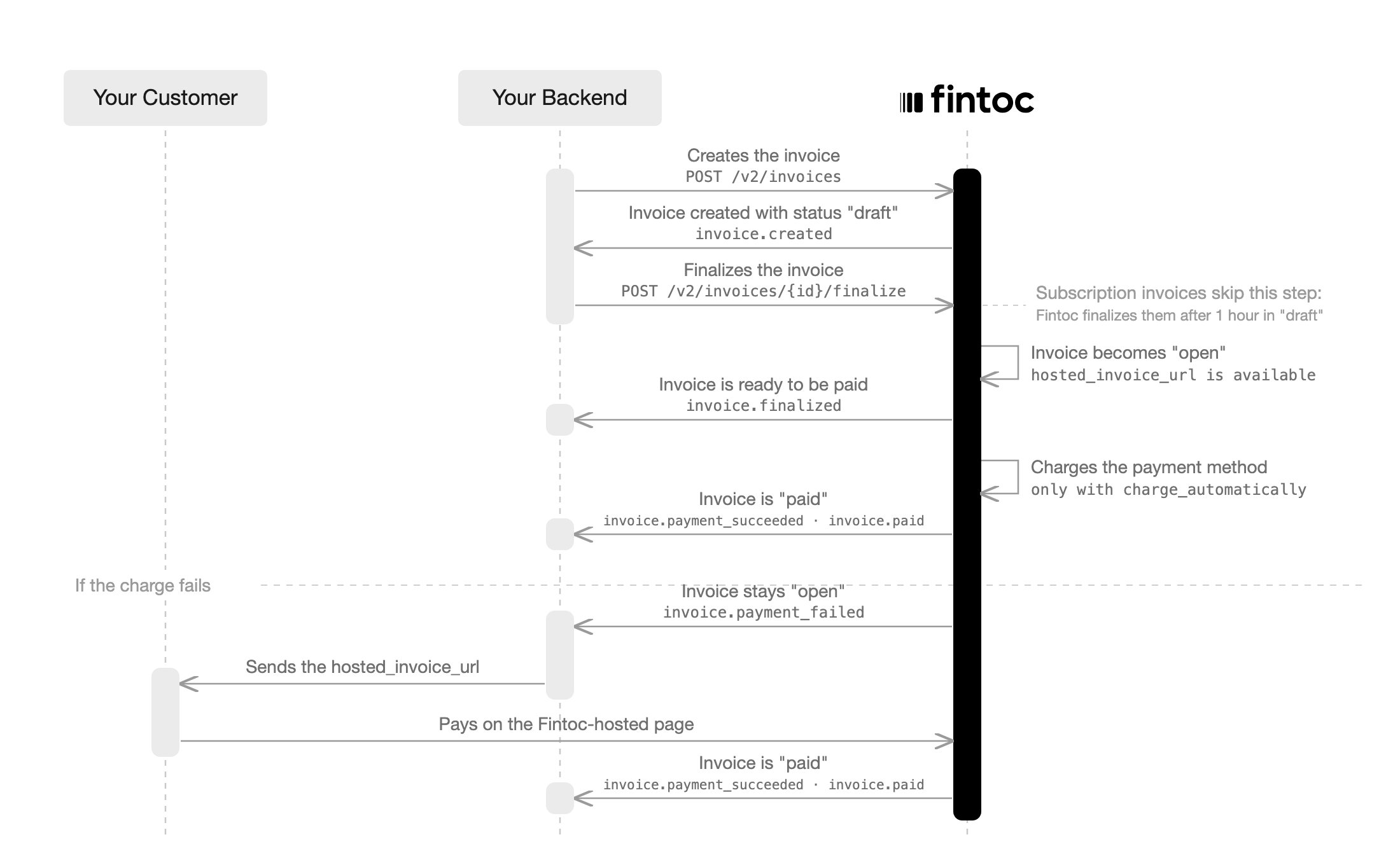
Invoice for each billing cycle. An invoice represents the amount your customer owes for a given period. With charge_automatically, Fintoc attempts to collect the invoice using the enrolled payment method. With send_invoice, the invoice stays open for you to collect.
Fintoc creates the invoices of the subscription for you. You can also create your own invoices for amounts the subscription does not cover, and collect any open invoice on demand.
For full details on invoices, see the Invoice object.
Invoices in the subscription flow
After thecheckout_session.finished event, Fintoc creates the first invoice and charges the enrolled payment method. With charge_automatically, the subscription stays incomplete until that first payment succeeds, and then becomes active. Handle the following invoice-related events alongside the post-session events in Create subscriptions for your customer:
Month 1: When the subscription is created, Fintoc generates the first invoice and finalizes it without the one-hour draft window. Fintoc then charges the enrolled payment method. On success, you receive
invoice.created, followed by invoice.finalized, invoice.payment_succeeded, invoice.paid, and payment_intent.succeeded.
Month 2 onwards: At each billing cycle renewal, based on the subscription’s billing_cycle_anchor, Fintoc creates a new invoice in draft status. After 1 hour, Fintoc finalizes the invoice, moves it to open, and charges the enrolled payment method. Use that hour to adjust the invoice before Fintoc charges it. On success, you receive invoice.finalized, invoice.payment_succeeded, and invoice.paid. On failure, you receive invoice.payment_failed.
First automatic debit (PAC) charge while the mandate activates
Inlive mode, a new Chilean automatic debit (PAC) mandate may still be pending when Fintoc finalizes the invoice. Fintoc defers the first charge when both conditions apply:
- The PAC payment method is not
activeyet. - Fintoc has never charged that payment method.
next_payment_attempt_at field shows when Fintoc will charge it.
While the charge is scheduled, the first invoice stays open and the subscription stays incomplete. This state is expected and does not mean the payment failed. Do not send the hosted_invoice_url to your customer during this window.
When Fintoc runs the charge, you receive invoice.payment_created. If the charge succeeds, you then receive invoice.payment_succeeded and invoice.paid, and the subscription becomes active. If it fails, you receive invoice.payment_failed.
Fintoc does not defer charges on cards or on PAC payment methods that are already active. Fintoc charges them right after it finalizes the invoice. In test mode, Fintoc never defers the first charge.
Fintoc finalizes the invoices of a subscription for you. An invoice you create yourself stays draft until you finalize it, as described in Charge an amount outside the billing cycle.
Recovering a failed payment
When an automatic charge fails, Fintoc emitsinvoice.payment_failed. To recover the payment, send the invoice’s hosted_invoice_url to your customer through your own channel, such as email or WhatsApp. The hosted page lets your customer pay using the payment methods enabled on your organization’s account. A successful payment creates a payment_intent on the invoice and settles the debt. The subscription’s enrolled payment method stays valid, and Fintoc charges the next cycle automatically.
The hosted_invoice_url becomes available on the Invoice object once the invoice reaches open status. For details, see the Invoice object.
An invoice accepts only one payment at a time. If you open the
hosted_invoice_url while an automatic charge is in progress, the page shows that an invoice payment is in progress and the payment link is disabled. Fintoc re-enables the payment link if the automatic charge fails.Reconcile payments with invoices and subscriptions
Use theinvoices field of the payment_intent to link each payment to the invoice it pays. The field lists the IDs of the invoices the payment intent covers. Fintoc includes the invoices field in the API and in payment_intent.* webhooks for every payment on an invoice. Covered payments include automatic charges, their retries, and payments from the hosted_invoice_url.
To find the subscription of any payment, read the invoice ID from invoices, then get the invoice and read its subscription field. The invoice’s payments array also lists the payment_intent of every attempt.
The payment intent’s metadata comes from the invoice. If the invoice has no metadata, the payment intent’s metadata is empty. To add your own references, update the invoice metadata.
Charge an amount outside the billing cycle
Fintoc issues the subscription invoices for you. You can also create an invoice yourself for an amount the subscription does not cover. Use this for a one-off adjustment, an extra service, or a charge outside the billing calendar. Create it for the samecustomer, with the payment method enrolled during checkout as default_payment_method.
curl example.
Server
curl
draft status, with subscription set to null. The invoice bills the customer, not the subscription, so it does not change the subscription’s billing cycle or amount. Finalize the invoice to move it to open and charge default_payment_method. Unlike the invoices of a subscription, which Fintoc finalizes on its own after an hour in draft, an invoice you create stays draft until you finalize it.
Server
invoice.* events, keeps the same payments history, and exposes the same hosted_invoice_url to fall back on when a charge fails. You can also retry a failed charge with Pay an invoice, against the enrolled payment method or another active payment method of the same customer.
For the full on-demand flow, including how to collect an invoice from a customer with no enrolled payment method, see Save a payment method for future charges.
Collect the invoices yourself instead of charging automatically
Withcollection_method set to send_invoice, Fintoc stops making automatic charges. Fintoc still issues one invoice per billing period, but each invoice stays open and you decide how to collect it. You have three ways to settle an open invoice:
- Send your customer the payment link in
hosted_invoice_urland let them pay through the Fintoc-hosted page. - Charge the invoice on demand with Pay an invoice, using the payment method attached to the subscription.
- Collect the money outside Fintoc, by bank transfer or cash, and mark the invoice as paid. Fintoc records this with
external_paymentset totrue.
send_invoice never charges automatically, it does not require a payment method. To create this subscription with the API, without sending your customer through a checkout enrollment, see Issue invoices without charging. You can still attach a payment method later, which lets you charge invoices on demand.
Fintoc does not contact your customer through any channel. Reaching out is your responsibility, whichever option you use.
Collecting the invoices yourself has three consequences:
- Unpaid invoices accumulate. Each billing period adds one invoice, and each one settles separately.
- The subscription starts
active, and that does not mean your customer paid. Withsend_invoice, no automatic charge waits to complete, so Fintoc skips theincompletestatus used withcharge_automatically. Track thestatusof each invoice to know what your customer owes. - Only Update a subscription changes the collection method. Attaching a payment method does not switch the subscription to
charge_automatically.
Close an invoice you will not collect
Anopen invoice stays open until it is paid or you close it. This matters most with send_invoice, where unpaid invoices accumulate one per billing period. Choose how to close an invoice based on what happened to the debt:
Mark an invoice as uncollectible to write off a debt while keeping a record that your customer owed it. Unlike a voided invoice, an
uncollectible invoice reflects a real debt that went unpaid.
Server
Invoice object with status set to uncollectible and emits the invoice.marked_uncollectible event:
- The invoice must be
open. Fintoc returns409 Conflictwith codeinvoice_not_markable_uncollectiblefor an invoice in any other status, including one that is alreadyuncollectible. - The invoice must have no payment in progress. Fintoc returns
422 Unprocessable Entitywith codeinvoice_has_pending_paymentwhile a payment is pending. Wait for the payment to succeed or fail before you retry. - The change is final. You cannot void, pay, or reopen an
uncollectibleinvoice.
Test invoice creation with status draft
To test an invoice that Fintoc creates in draft status, create a subscription with a line item using the product name sandbox_draft:
Server
Node
Checkout Session:
draft status, so you can edit its items with the Add lines endpoint before the invoice leaves draft.