

Create a payment
Using your Secret Key, create aPayment Intent on your server with an amount, currency(only MXN for Cash Payments) and payment_type: "cash".
Response when creating a Payment Intent for a Cash Payment
After making the request, Fintoc will respond with the Payment Intent with the statuscreated including the payment_type_options.cashcontaining the information of the Cash Payment reference:
Share the reference and instructions to pay with your customer
After creating the payment, share the voucher with your customer for clear instructions on how to complete the payment at one of the available locations. Example of voucher based on the amount of the payment: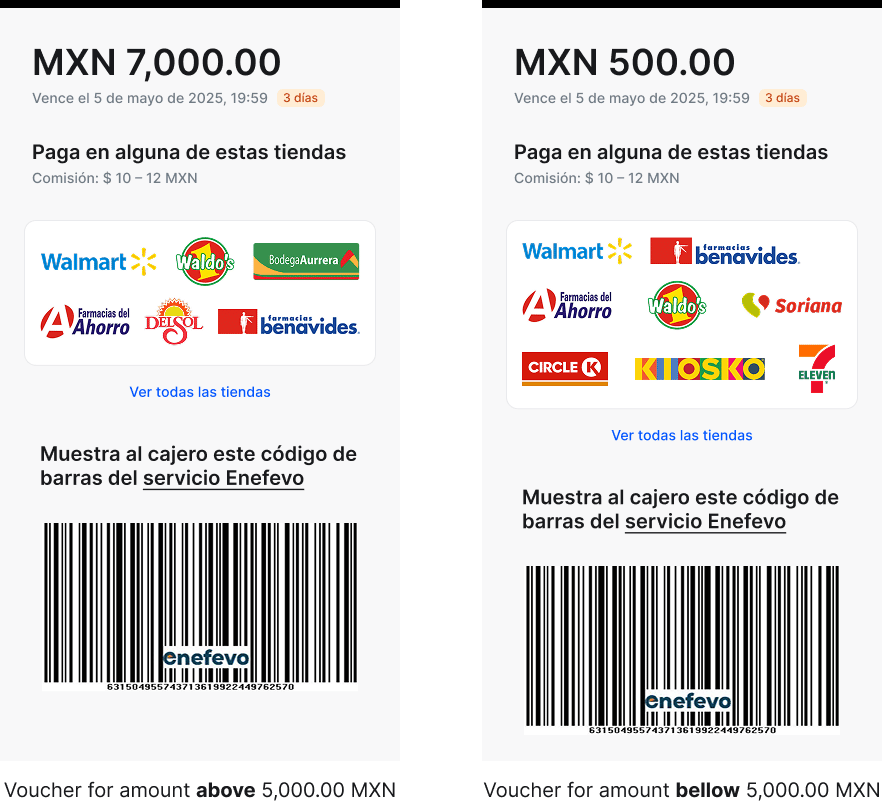
barcode_url, reference_number and images of the lists of locations:
We recommend prioritizing the barcode as the preferred method of presentation at the location, as it enables a faster payment process compared to dictating the reference number.
Maximum Amount Limit by LocationSome locations only accept payments up to 5,000.00 MXN, while others have no maximum limit. You should display specific logos and a list of all locations based on the payment amount, as shown in the example voucher above.
Handle post-payments events
Once a Payment Intent is completed, handle the payment result using the events sent by the webhooks to complete the payment in your backend. Fintoc sends apayment_intent.succeeded event when the payment is successfully completed. Use the webhook guide to receive these events and run actions, such as sending an order confirmation email to your customer, logging the sale in a database, or starting a shipping workflow.
Expire a payment in progress
If needed, you can expire a payment that is in thecreated status using the Payment Intent expire endpoint like in the example bellow:
curl
Test your integration
To simulate a successful or expired Cash Payment, you can use one of the following amounts when creating the Payment Intent ofpayment_type: cash
In test mode, the
succeeded scenario have immediate webhook notification of the payment_intent.succeeded event.
For the expired scenario, the Payment Intent goes to the created status, so you can test the endpoint to expire a Payment Intent or wait for the end of the expiration time to receive the payment_intent.expired event.