

- On your backend, create a
Checkout Sessionwithflow: subscription - Redirect your user to complete the enrollment at the Fintoc-hosted checkout page
- Handle post-enrollment and recurring payment events (webhooks)
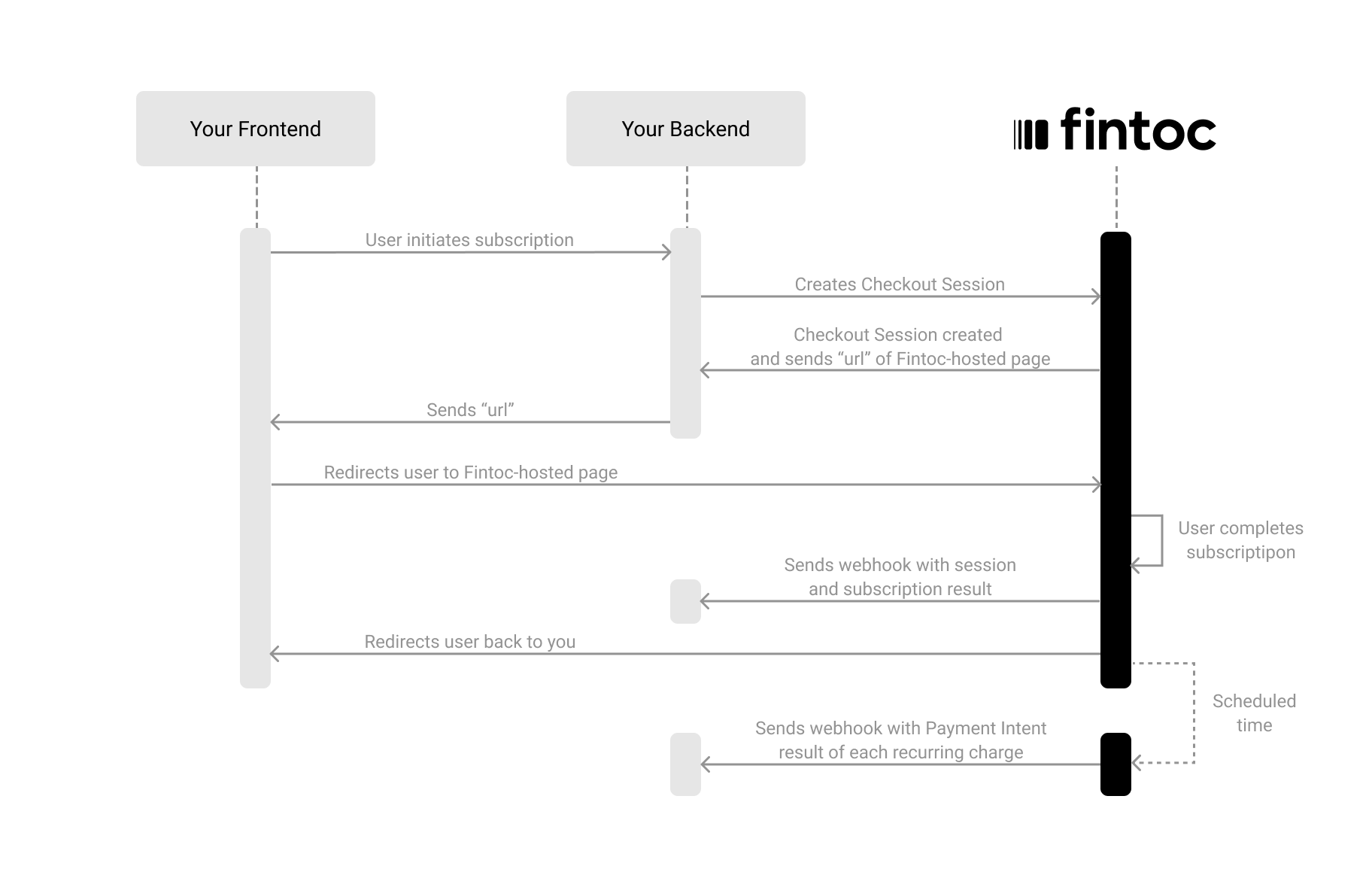
Create a Session
The Checkout Session object represents your intent to enroll a payment method for recurring charges (PAC), and to create a subscription with a fixed amount and periodicity. Using your Secret Key, create aCheckout Session on your backend with flow set to subscription.
Node
Include Customer Data (Required for subscriptions)
When creating aCheckout Session with flow: subscription, you must include customer information. You can do this either by referencing an existing customer ID (customer) or by sending customer_data to create one inline:
Include a Items list (Required for subscriptions)
When creating aCheckout Session, you can also include information about session items. This enables Fintoc to display this information on the checkout page and show only the payment methods available for specific products.
Each line_item needs one of price_data or price.
price_data Object
product_data Object
Response when creating a Checkout Session
After making the request to create the Checkout Session, Fintoc should respond with something like this:url attribute. In the following step, you’ll use this attribute to redirect the user to complete the subscription.
Redirect the user to complete the payment
Next, you will redirect users to the Fintoc Checkout page. After completing the payment, they’ll be automatically redirected back to your site. Based on the result, the user will be redirected to either the success or cancel URL.Handle post-session events
Once a Checkout Session finishes, you handle the result in your frontend and complete the subscription in your backend. For your backend, you will use the events sent by webhooks.Complete the subscription on your backend
Fintoc sends acheckout_session.finished event when the session completes.
In a subscription flow, this event includes information about the session and references to the subscription and payment_method created during enrollment.
Test your integration (Coming soon)
To confirm that your integration works correctly, you can simulate subscriptions and scheduled recurring payments without moving any money1) Create a subscription Checkout Session using test users credencials
Using your test mode API Secret Key, create a Checkout Session offlow: subscription on your backend and complete the subscription enrollment flow on the fintoc-hosted page using the following credentials:
Test credentials
- Username (RUT):
41614850-3 - Password:
jonsnow