

Available in Mexico and Chile
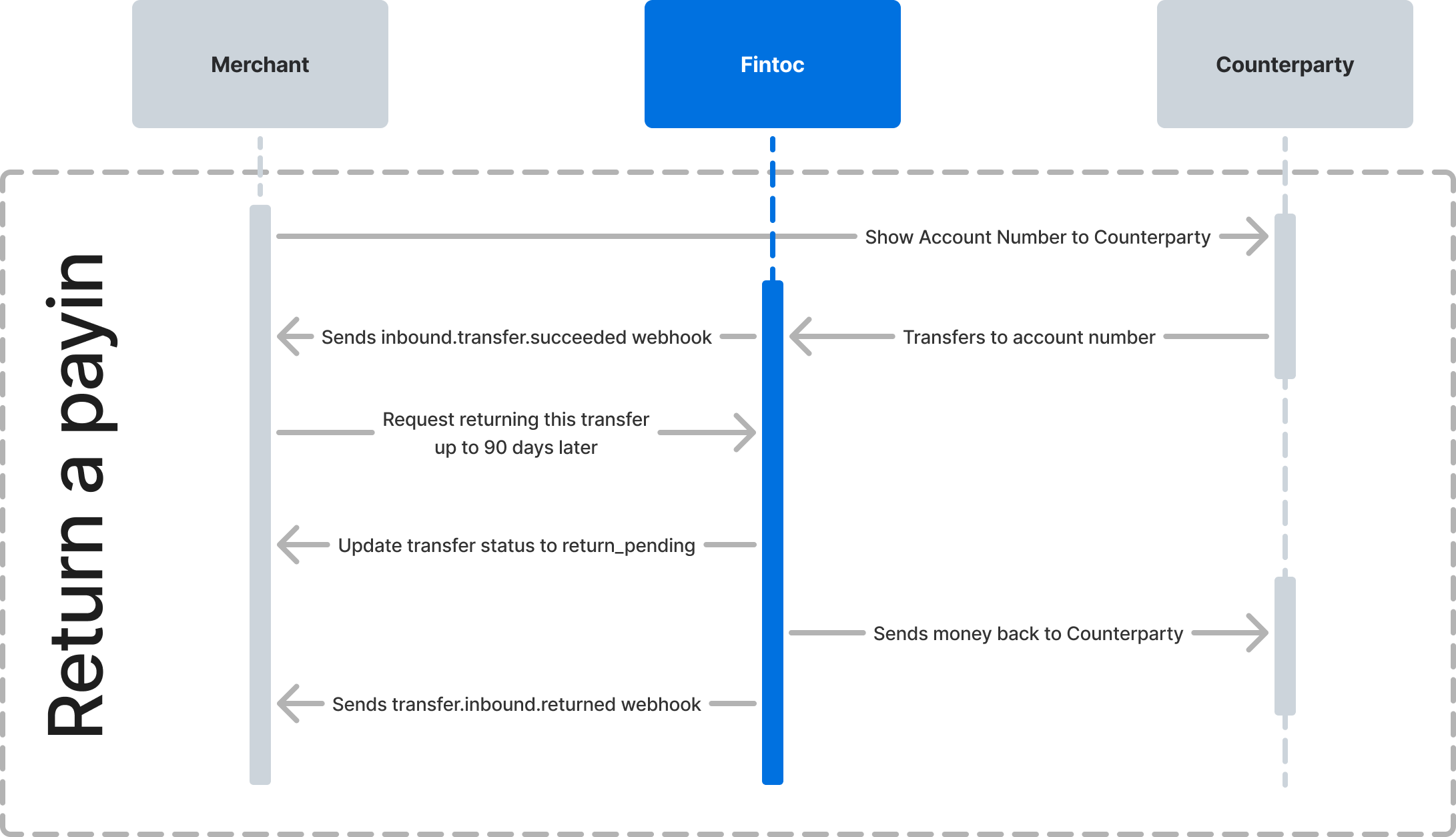
Trigger the return
Call the return transfer endpoint with thetransfer_id and Fintoc-JWS-Signature header. The header contains a JSON Web Signature (JWS) for the request:
succeeded status. If the transfer has another status, Fintoc responds with a 409 Conflict status and the invalid_transfer_status error code.
Returns in Chile
In Chile, you can return an inbound transfer as soon as it reaches thesucceeded status if the sender’s account is also at Fintoc.
If the transfer comes from another bank, wait 90 seconds after the transfer reaches succeeded before you return it. If you call the endpoint earlier, Fintoc responds with the same 409 Conflict status and invalid_transfer_status error code, and the error message says that Fintoc received the transfer too recently. Retry the request after the 90-second window.
Return a transfer from the Dashboard
You can also return an inbound transfer from the Fintoc Dashboard:- Go to the transfers list and find the inbound transfer with the
succeededstatus. - Open the transfer’s options menu and select Return.
- Review the amount and the recipient account. The Dashboard shows the standardized Mexican bank account number (CLABE) for Mexican transfers and the account number for Chilean transfers.
- Select Confirm return and enter the 6-digit code from your authenticator app.
Handle the return result
Handle the following webhook events to track the outcome of a return:Test the integration
Confirm your integration intest mode before going live. Trigger a return for a simulated inbound transfer and check that your webhook handler receives the expected event:
- For a successful return, expect the
transfer.inbound.returnedevent and a transfer withstatusset toreturned. - For a failed return, expect the
transfer.inbound.return_failedevent and a transfer withstatusset tosucceeded.