

Transfer represents one inbound or outbound money movement. Inbound transfers land on an Account Number; outbound transfers debit an Account. This page explains the Transfer data model: the Counterparty, statuses, limits, returns, and authorization. For the field-by-field reference, see the Transfer object.
Transfer counterparty
EachTransfer includes a nested Counterparty object that represents the other party in the transfer: either the sender or the recipient, depending on the direction.
The Counterparty object includes these details:
- Counterparty name, such as a customer, supplier, or partner.
- Bank account details, such as the account number and bank code.
- For inbound transfers, the
Counterpartyis the entity that sent funds to your Account Number. - For outbound transfers, the
Counterpartyis the entity that receives funds from yourAccount.
Transfer statuses and webhook notifications
ATransfer moves through these statuses, and Fintoc emits a webhook for each transition:
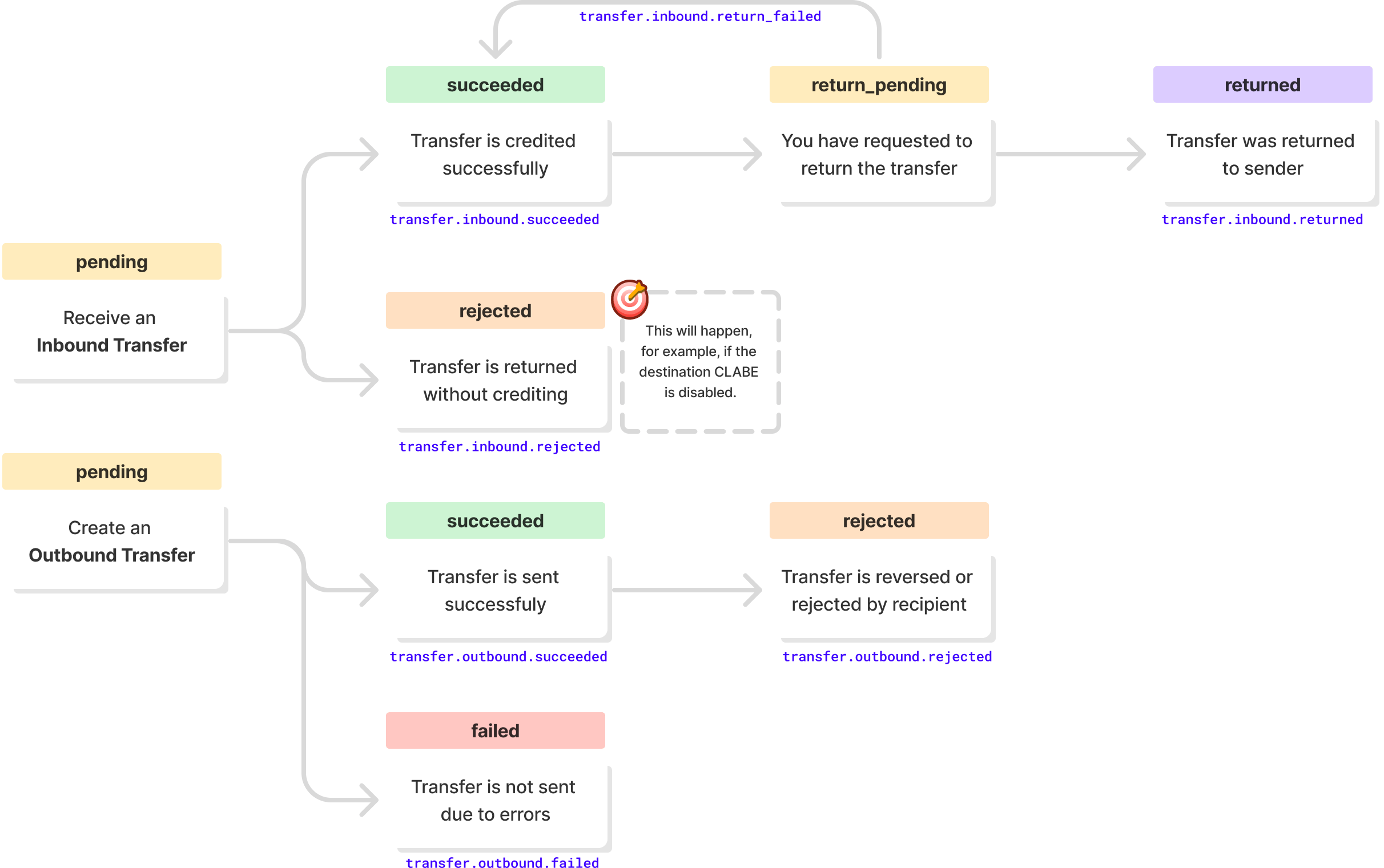
partially_succeeded when only some parts of a transfer over $7,000,000 CLP settle, or reversed after a settled transfer is reversed. Fintoc emits transfer.outbound.partially_succeeded and transfer.outbound.reversed for these transitions.
A Transfer reports one of these statuses:
Chilean outbound transfers can report
partially_succeeded. All Chilean transfers can report reverse_pending and reversed. Mexican transfers do not report any of these statuses.
Final statuses
failed, rejected, partially_succeeded, returned, and reversed are final. A succeeded transfer can still move to return_pending and returned, or in Chile to reverse_pending and reversed. A transfer reaches rejected or reject_failed only from pending, so a succeeded transfer never becomes rejected.
When a Chilean outbound transfer fails, Fintoc credits the full amount back to your available balance, and the recipient does not receive the funds. See Chilean transfer failure reasons.
Outbound transfers never report rejected, in Chile or in Mexico. A recipient institution or Banco de México rejection moves an outbound transfer to failed, and Fintoc sends transfer.outbound.failed. For Mexican rejections, see the SPEI rejection causes.
If a transfer reports reject_failed, contact Fintoc support with the transfer id before you take any other action on it.
Transfer limits
TheTransfer API does not set a maximum amount in Mexico or Chile.
In Chile, some banks cap incoming transfers at $7,000,000 CLP. Fintoc splits an outbound transfer over $7,000,000 CLP into parts of up to $7,000,000 CLP and reports the result on the single Transfer you created. Fintoc sends the parts one after another, so a split transfer stays pending longer than a single transfer. Transfers between Fintoc accounts are not split. See Large transfers in Chile.
Rate limits
The Business Accounts API accepts up to 10Transfer requests per second per organization by default. Contact Fintoc support to request a higher limit.
Transfer returns
🇲🇽 Mexico
In Mexico, you can request the return of an inboundTransfer that you don’t recognize or that doesn’t meet your business’s acceptance criteria. When Fintoc returns the Transfer, the status changes to returned. Fintoc deducts the transfer amount from your account balance.
🇨🇱 Chile
In Chile, you can request the return of an inboundTransfer in the succeeded status. If the Transfer comes from another bank, wait 90 seconds after it reaches succeeded before you request the return. When Fintoc returns the Transfer, the status changes to returned. Fintoc deducts the transfer amount from your account balance. See Return a transfer.
Authorizing a transfer
Manual transfers in the dashboard use transfer permissions and approval percentages. This approval flow does not apply to transfers created through the API. For API transfers, follow Send transfers.Authorize manual transfers in the dashboard
When you create a manual transfer, your permission and approval percentage determine what happens:- Authorize with 100%: Your authorization is enough to create the transfer immediately. You do not need another person’s approval.
- Authorize with less than 100%: Your approval contributes your assigned percentage. The request stays pending authorization until another person approves and the combined approvals reach 100%.
- Manage only: You create a request without contributing an approval percentage. One or more people with Authorize permission must approve until the combined approvals reach 100%.
Transfer; it does not mean the funds have settled. Track the result through the transfer statuses.