
Quickstart: Web Checkout
Try out collecting a payment with Fintoc Checkout in a web app in less than 10 minutes.
Before you start
You need:
-
A Fintoc account: Sign up in the Fintoc Dashboard
-
A Fintoc Secret Key
Every Fintoc account has two key pairs: one corresponds to the test mode, while the other corresponds to the productive API environment. In this case, you must use the Public Key and Secret Key from test mode. To easily identify them, we added the prefix pk_test_ and sk_test_, respectively. Find them on your dashboard, in the For Developers -> API Keys section.
-
A backend environment (Node/Next.js/Express/etc.)
-
An HTTPS URL for callbacks (success_url, cancel_url)
If you don't have one, you can set one up for testing with NGrok.
ngrok http 3000Step 1: Set environment variables
Use these in your backend environment:
FINTOC_SECRET_KEY=sk_test_xxx
APP_PUBLIC_BASE_URL=[https://your-public-https-domain.com](https://your-public-https-domain.com)FINTOC_SECRET_KEY: sent only from your backend to FintocAPP_PUBLIC_BASE_URL: used to build callback URLs. If you are using NGrok, if ngrok prints:https://abc123.ngrok-free.dev -> http://localhost:3000 Then set:
APP_PUBLIC_BASE_URL=[https://abc123.ngrok-free.dev](https://abc123.ngrok-free.dev)Use only the HTTPS domain (no arrows, no localhost suffix).
Step 2: Create a Checkout Session
Using your test Secret Key, create a Checkout Session from your backend assigning the correct amount and currency for the payment. Always create the Checkout Session from your backend, or a malicious user could alter these fields.
If you plan on enabling Refunds for payments, include a customer_email in the Checkout Session request.
🇨🇱 Here's an example of creating a Checkout Session for Chile:
curl --request POST "https://api.fintoc.com/v2/checkout_sessions" \
  --header "Authorization: FINTOC_SECRET_KEY" \
  --header "Content-Type: application/json" \
  --data-raw '{
    "amount": 2476,
    "currency": "CLP",
    "customer_email": "[email protected]",
    "success_url": "https://merchant.com/success",
    "cancel_url": "https://merchant.com/987654321"
  }'
const { Fintoc } = require('fintoc');
const fintoc = new Fintoc('FINTOC_SECRET_KEY');
const checkoutSession = await fintoc.checkoutSessions.create({
amount: 1000,
currency: 'mxn',
customer_email: '[email protected]'
});from fintoc import Fintoc
client = Fintoc('FINTOC_SECRET_KEY')
checkout_session = client.checkout_sessions.create(
amount=1000,
currency='clp',
customer_email='[email protected]'
)require 'net/http'
require 'uri'
require 'json'
checkout_session = {
amount: 1000,
currency: 'clp',
customer_email: '[email protected]'
}
uri = URI("https://api.fintoc.com/v2/checkout_sessions")
header = {
Accept: 'application/json', Authorization: 'FINTOC_SECRET_KEY'
}
http = Net::HTTP.new(uri.host, uri.port)
request = Net::HTTP::Post.new(uri.request_uri, header)
request.body = checkout_session.to_json
response = http.request(request)🇲🇽 If you want to create a Checkout Session for Mexico
- Change the
currencytoMXN - Make sure to write amounts in cents. For ejample: an
amountof MXN10.29should be written like1029. Read more about currencies here.
The response should look like this:
{
  "id": "cs_li5531onlFDi235",
  "object": "checkout_session",
  "mode": "test",
  "status": "created",
  "amount": 350000,
  "currency": "CLP",
  "created_at": "2024-06-04T15:32:46.721Z",
  "updated_at": "2024-06-04T15:32:46.721Z",
  "success_url": "https://merchant.com/success",
  "cancel_url": "https://merchant.com/987654321",
  "redirect_url": "https://checkout.fintoc.com/checkout_session_01HXY3Z7X5YQ54V8G2E1KJQAVF",
  "metadata": {},
  "customer": {}
}
Step 3: Redirect your user to the Fintoc-hosted checkout page
Your new created checkout_session should contain the redirect_url attribute. You must redirect your user to this url to complete the payment flow.
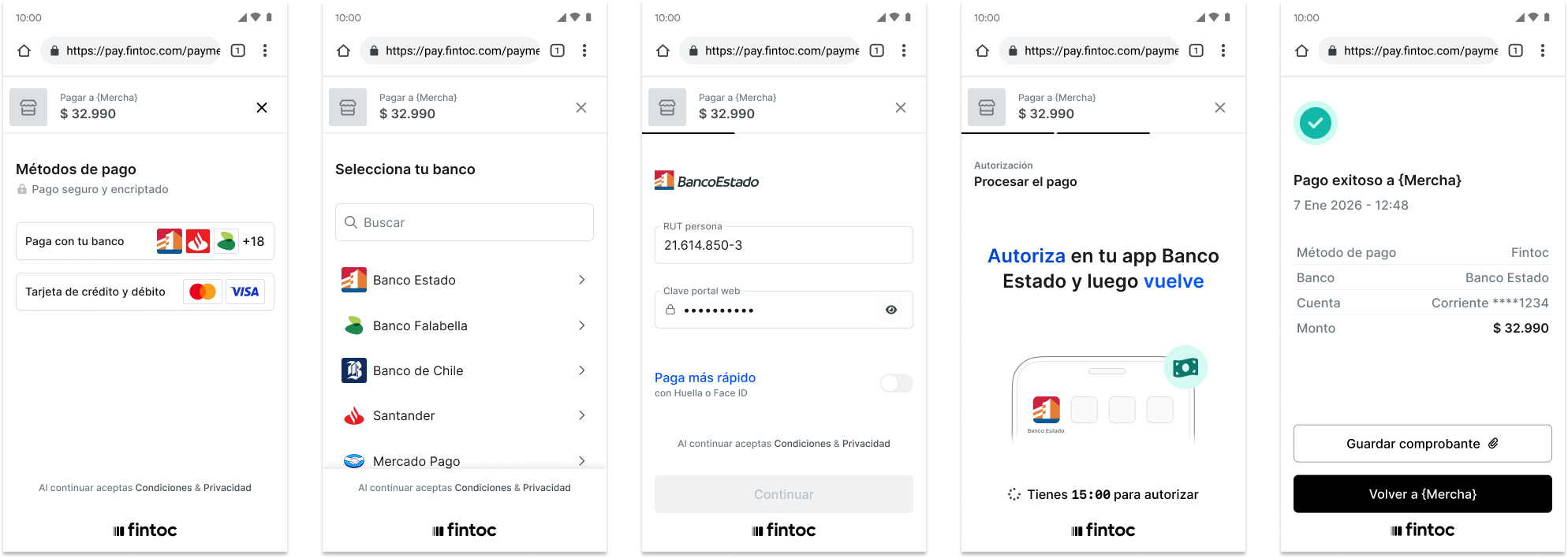
Payment flow when the user selects "Paga con tu banco"
Step 4: Handle post-payment events
Fintoc sends a checkout_session.finished event when the payment related to a session is completed. Use the webhook guide to receive these events and run actions, such as sending an order confirmation email to your customer, logging the sale in a database, or starting a shipping workflow.
Listen for these events rather than waiting on a callback from the client. From the client side, On the client, the customer could close the browser window or quit the app before the callback executes, and malicious clients could manipulate the response.
We recommend handling the following events:
| Event | Description | Action |
|---|---|---|
checkout_session.finished | Sent when a customer has completed a payment. The webhook contains information about the Payment including its final status. | Depending on the final status of the related payment, confirm the order to the customer or offer to retry the payment. |
checkout_session.expired | Triggers when a customer leaves the payment flow before finishing | Offer the customer another attempt to pay. |
payment_intent.succeeded | Sent when the payment related to a checkout session succeeds. It's useful for confirming payments that were previously in pending status | Confirm the customer's order |
payment_intent.failed | Sent when the payment related to a checkout session fails. It's used to determinate the final status of payments that were previously in pending status | Offer the customer another attempt to pay. |
Learn more about webhooksTo learn more about how to create your own webhook endpoint, test your webhook endpoint and security best practices read our Webhooks guide.
Step 5: Make your first payment
Once the you access the Fintoc-hosted checkout page, follow the payment flow using Fintoc's test special values. For a successful payment, you can use one of these values:
- In Chile, select any bank and login using the
41614850-3rut andjonsnowpassword. Once you are logged in to the bank, select the account with the number422159212. After you select that account, wait 5 seconds and the payment should be successful. - For Mexico, select any bank and write the number
5555555555. Wait 5 seconds and the payment should be successful.
You should have received a checkout_session.finished event containing a successful payment in your webhook endpoint.
Congratulations! You just made your first Fintoc payment! To test different payment flows, see Fintoc's test special values.
Updated about 1 month ago