
Save a payment method for future charges
Save a customer's payment method with a setup Checkout Session, then charge it on demand with the Payment Intent API.
Save a customer's payment method once and charge it later for on-demand or variable-amount payments, without creating a recurring subscription.
Unlike the subscription flow, the setup flow does not couple enrollment with recurring billing, so you decide when and how much to charge.
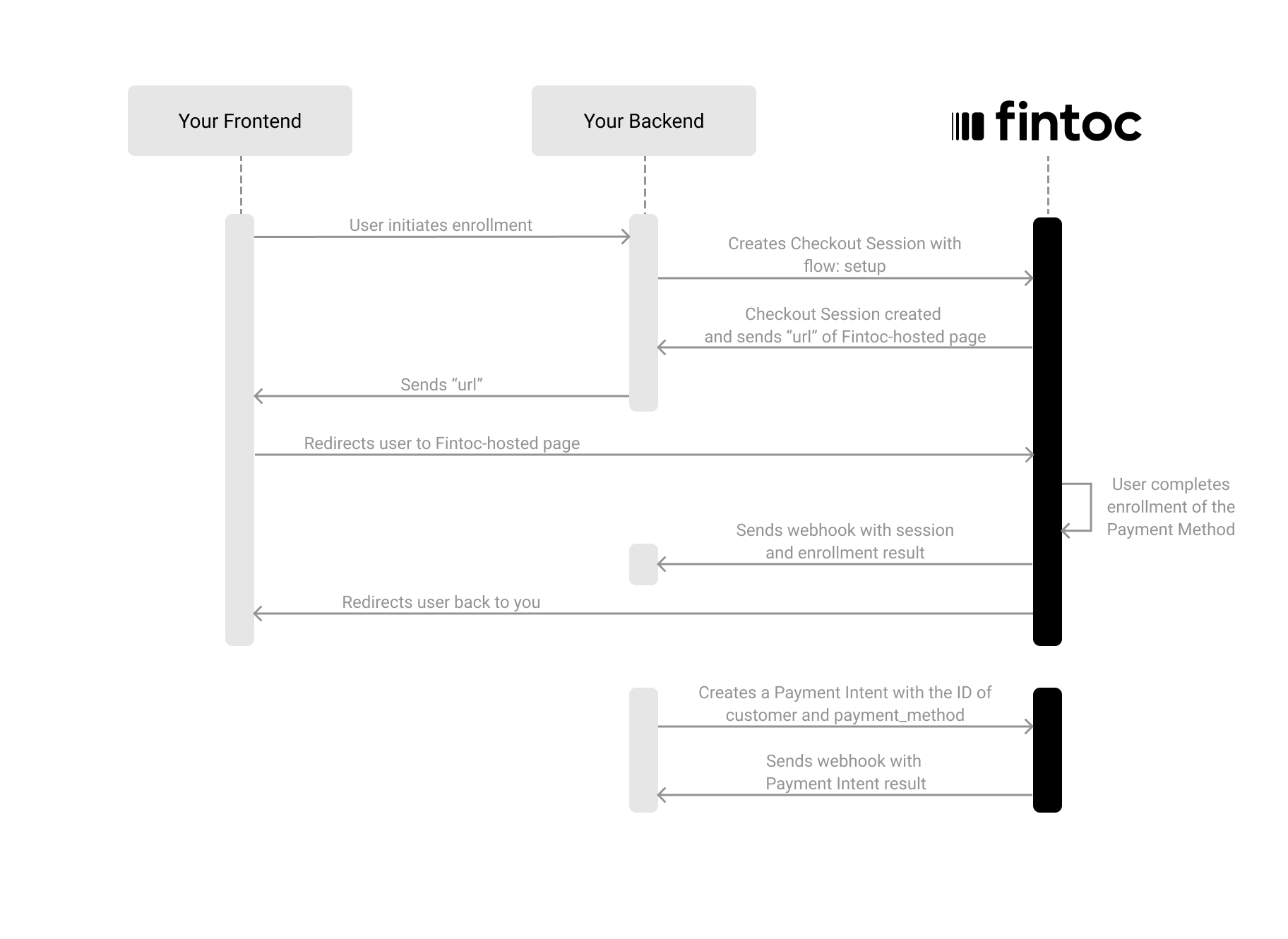
Set up a payment method and charge it later in four steps:
- On your backend, create a Checkout Session with
flow: setup. - Redirect your customer to complete the enrollment at the Fintoc-hosted checkout page.
- Handle post-session events to save the
payment_methodandcustomer. - Create charges against the saved payment method using the Payment Intent API.
The following diagram shows how the setup flow works:
Create a Checkout Session
The Checkout Session with the setup flow represents your intent to save a payment method for future charges, without creating a recurring subscription.
Using your Secret Key, create a Checkout Session on your backend with flow set to setup:
Server
curl --request POST "https://api.fintoc.com/v2/checkout_sessions" \
  --header "Authorization: YOUR_SECRET_API_KEY" \
  --header "Content-Type: application/json" \
  --data-raw '{
    "flow": "setup",
    "currency": "CLP",
    "success_url": "https://merchant.com/success",
    "cancel_url": "https://merchant.com/cancel",
    "customer_data": {
      "tax_id": {
        "type": "cl_rut",
        "value": "11.111.111-1"
      },
      "name": "Felipe Castro",
      "email": "[email protected]"
    },
    "metadata": {}
  }'
const { Fintoc } = require('fintoc');
const fintoc = new Fintoc('YOUR_SECRET_API_KEY');
const checkoutSession = await fintoc.checkoutSessions.create({
flow: 'setup',
currency: 'CLP',
success_url: 'https://merchant.com/success',
cancel_url: 'https://merchant.com/cancel',
customer_data: {
tax_id: {
type: 'cl_rut',
value: '11.111.111-1'
},
name: 'Felipe Castro',
email: '[email protected]'
},
metadata: {}
});from fintoc import Fintoc
client = Fintoc('YOUR_SECRET_API_KEY')
checkout_session = client.checkout_sessions.create(
flow='setup',
currency='CLP',
success_url='https://merchant.com/success',
cancel_url='https://merchant.com/cancel',
customer_data={
'tax_id': {
'type': 'cl_rut',
'value': '11.111.111-1'
},
'name': 'Felipe Castro',
'email': '[email protected]'
},
metadata={}
)After creating the Checkout Session, Fintoc responds with the session details and a redirect_url:
{
  "id": "cs_li5531onlFDi235",
  "object": "checkout_session",
  "flow": "setup",
  "status": "created",
  "currency": "CLP",
  "customer": {
    "id": "cus_NffrFeUfNV2Hib",
    "object": "customer",
    "email": "[email protected]",
    "metadata": {},
    "name": "Felipe Castro",
    "tax_id": {
      "type": "cl_rut",
      "value": "11.111.111-1"
    }
  },
  "success_url": "https://merchant.com/success",
  "cancel_url": "https://merchant.com/cancel",
  "redirect_url": "https://pay.fintoc.com/checkout/cs_li5531onlFDi235",
  "metadata": {}
}| Parameter | Example | Description |
|---|---|---|
flow | setup | Required. Flow type for the session. One of payment, setup, or subscription. Use setup to save a payment method without charging. |
currency | CLP | Required. Three-letter ISO 4217 currency code. One of CLP or MXN. |
success_url | https://merchant.com/success | Required. URL to redirect the customer after a successful enrollment. |
cancel_url | https://merchant.com/cancel | Required. URL to redirect the customer if they cancel the enrollment. |
payment_method_types | ["pac"] | Payment methods available for the enrollment. One or more of pac (Chilean direct debit), direct_debit (Mexico), or card. |
customer | cus_3B2bODrQFje7ZVkT69xyaTSDwXQ | Required if no customer_data. ID of an existing Customer. |
customer_data | { tax_id: {...}, ... } | Required if no customer. Data for inline customer creation. Send at least one of email or tax_id. If a Customer with the same tax_id already exists, the request returns a 409 Conflict error. To reuse an existing Customer, send its id in customer instead of customer_data. |
payment_method_options | { pac: { ... } } | Options specific to each payment method, keyed by values in payment_method_types (for example, pac). For pac, restrict the sender_account with types (checking_account), institution_id, or holder_id; for card, restrict kinds (credit, debit). To apply no restriction, omit the option instead of sending an empty array because an empty array allows nothing. |
metadata | { "order": "987654321" } | Set of key-value pairs for storing additional information. |
Difference from the subscription flowWhen you create a Checkout Session with
flow: setup, Fintoc enrolls the customer's payment method and creates aPaymentMethod, but does not create asubscriptionor schedule any recurring charges. You control when and how much to charge by creating future payment intents.
Include customer data
When creating a Checkout Session for setup, you must include customer information.
| Attribute | Type | Description |
|---|---|---|
tax_id | object | Required if no email. Object that identifies the customer at a fiscal or regulatory level. The type is one of cl_rut (Chilean tax ID, RUT) or mx_rfc (Mexican tax ID, RFC), and value is the tax identifier as a string. See the Customer object. If a Customer with the same tax_id already exists, the request returns a 409 Conflict error. To reuse an existing Customer, send its id in customer instead of customer_data. |
name | string | Full name of the customer. |
email | string | Required if no tax_id. Email used to notify the customer about the enrollment and charges. |
metadata | object | Set of key-value pairs for storing additional information. |
Redirect the customer to complete the enrollment
Next, redirect the customer to the redirect_url from the response. The customer sees the Fintoc-hosted checkout page where they complete the enrollment.
After the customer completes the enrollment, Fintoc automatically redirects them to your success_url or cancel_url, depending on the outcome.
Client
window.location.assign(REDIRECT_URL_FROM_YOUR_BACKEND);Handle post-session events
Always use webhooks to determine the final outcome. Customers may close the tab, lose connection, or never reach your success_url.
Checkout Session events
When the enrollment completes, Fintoc sends a checkout_session.finished event with the customer and payment_method information:
{
  "id": "evt_a4xK32BanKWYn",
  "object": "event",
  "type": "checkout_session.finished",
  "data": {
    "id": "cs_li5531onlFDi235",
    "object": "checkout_session",
    "mode": "live",
    "flow": "setup",
    "status": "finished",
    "currency": "CLP",
    "customer": {
      "id": "cus_NffrFeUfNV2Hib",
      "name": "Felipe Castro",
      "email": "[email protected]",
      "tax_id": {
        "type": "cl_rut",
        "value": "11.111.111-1"
      }
    },
    "payment_method": "pm_NffrFeUfNV2Hib",
    "metadata": {},
    "success_url": "https://merchant.com/success",
    "cancel_url": "https://merchant.com/cancel"
  }
}
Payment Method events
Fintoc also sends a payment_method.activated event. The event's data field contains a PaymentMethod like this:
{
  "id": "pm_NffrFeUfNV2Hib",
  "object": "payment_method",
  "card": null,
  "created_at": "2021-10-15T15:22:11.474Z",
  "customer": "cus_NffrFeUfNV2Hib",
  "mode": "live",
  "metadata": {},
  "pac": {
    "account_holder_id": "11.111.111-1",
    "account_number": "19831940978",
    "account_type": "checking_account",
    "institution": {
      "id": "cl_banco_falabella",
      "country": "cl",
      "name": "Banco Falabella"
    },
    "status": "active"
  },
  "type": "pac"
}
Store both the customer ID and the payment_method ID. You need them to create charges later.
Events summary
You should subscribe to all the following post-session events:
| Event | Description | Recommended action |
|---|---|---|
checkout_session.finished | Session successfully completed. Method enrolled. | Store customer + payment_method. |
checkout_session.expired | Session expired before the customer completed enrollment. | Allow the customer to retry. |
payment_method.activated | Payment method is active and ready for charges. | Create charges against this method when needed. |
payment_method.canceled | Payment method is canceled and not available for charges. | Stop creating charges against the method. |
Create a charge against the saved payment method
Once you have a saved payment_method, charge it by creating a Payment Intent with the payment_method and customer IDs:
Server
curl --request POST "https://api.fintoc.com/v2/payment_intents" \
  --header "Authorization: YOUR_SECRET_API_KEY" \
  --header "Content-Type: application/json" \
  --data-raw '{
    "amount": 150000,
    "currency": "CLP",
    "customer": "cus_NffrFeUfNV2Hib",
    "payment_method": "pm_NffrFeUfNV2Hib",
    "metadata": {
      "order_id": "order_98765"
    }
  }'
const { Fintoc } = require('fintoc');
const fintoc = new Fintoc('YOUR_SECRET_API_KEY');
const paymentIntent = await fintoc.paymentIntents.create({
amount: 150000,
currency: 'CLP',
customer: 'cus_NffrFeUfNV2Hib',
payment_method: 'pm_NffrFeUfNV2Hib',
metadata: {
order_id: 'order_98765'
}
});from fintoc import Fintoc
client = Fintoc('YOUR_SECRET_API_KEY')
payment_intent = client.payment_intents.create(
amount=150000,
currency='CLP',
customer='cus_NffrFeUfNV2Hib',
payment_method='pm_NffrFeUfNV2Hib',
metadata={
'order_id': 'order_98765'
}
)| Parameter | Example | Description |
|---|---|---|
amount | 150000 | Required. A positive integer representing the amount to charge in the smallest currency unit (for example, 150000 for CLP 150000, since CLP has no minor unit, or 10000 for MXN 100.00). |
currency | CLP | Required. Three-letter ISO 4217 currency code. One of CLP or MXN. |
customer | cus_NffrFeUfNV2Hib | Required. ID of the Customer to charge. |
payment_method | pm_NffrFeUfNV2Hib | Required. The saved payment method ID. |
metadata | { "order_id": "order_98765" } | Set of key-value pairs for storing additional information. |
Fintoc responds with the created Payment Intent:
{
  "id": "pi_34i0T5AWRfIDMOJnhq9BgxXUiyt",
  "object": "payment_intent",
  "status": "created",
  "amount": 150000,
  "currency": "CLP",
  "customer": "cus_NffrFeUfNV2Hib",
  "payment_method": "pm_NffrFeUfNV2Hib",
  "metadata": {
    "order_id": "order_98765"
  }
}
Handle payment events
Subscribe to the following events to track the payment outcome:
| Event | Description | Recommended action |
|---|---|---|
payment_intent.succeeded | The charge was successful. | Fulfill the order and confirm to the customer. |
payment_intent.failed | The charge failed. | Retry the charge or ask for another payment method. |
Test your integration
Using your test mode API Secret Key, create Checkout Sessions that simulate the full setup and payment flow without moving any money.
1) Create a setup Checkout Session using test credentials
Create a Checkout Session with flow: setup using your test mode Secret Key. Complete the enrollment flow on the Fintoc-hosted page using the following credentials:
Test credentials:
PAC:
- Username (RUT):
11.111.111-1 - Password:
jonsnow
Select the account based on the final outcome you want to test:
| Account number | Type of MFA | Correct code |
|---|---|---|
| 813990168 | Security device | 000000 |
| 422159212 | Mobile Application - Success | N/A |
| 5233137377 | Mobile Application - Failure | N/A |
| 170086177 | SMS | 0000 |
| 746326042 | Coordinate Card | ['00', '00', '00'] |
Card:
| Card Number | Expiration Date | CVV | Holder Name | 3DS Challenge Code | Final Result |
|---|---|---|---|---|---|
| 4111111111111111 | Any future date | Any | Any | - | ✅ Succeeded |
| 4456524869770255 | Any future date | Any | Any | 1234 | ✅ Succeeded if code is correct |
| 4574441215190335 | Any future date | Any | Any | - | ❌ Failed due to invalid credentials |
| 4349003000047015 | Any future date | Any | Any | - | ❌ Failed due to rejected transaction |
2) Verify the saved payment method
After completing the test enrollment, you should receive the checkout_session.finished and payment_method.activated webhook events. Verify that:
- The
payment_methodID is present in the event payload. - The
customerID matches the customer you enrolled.
3) Create a test charge against the saved method
Using the customer and payment_method IDs from step 2, create a Payment Intent against the saved method. Verify that:
- You receive the
payment_intent.succeededevent. - The amount matches what you sent.
- The payment method used is the saved PAC or card.
Test mode does not yet support saving a Payment Method in Mexico.